
ecdpecnghdabcaloifcmpjaimlnnjigi

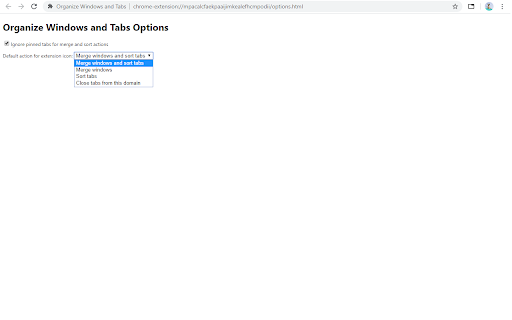
Organize Windows and Tabs This extension adds these actions: * Merge windows and sort tabs: Merge all windows on target window, and sorts all tabs according to tab url alphabetically. * Merge windows: Merge all windows on target window. * Sort tabs: Sort tabs on target windows according to tab url alphabetically. * Close tabs from this domain: Closes all tabs with same domain. * Move tabs from this domain to this window Moves tabs from same domain with the selected tab's domain to current window. * Group tabs from this domain Groups tabs from same domain with the selected tab's domain. Default extension icon action is "Merge windows and sort tabs". This can be changed from options page. You can select "do nothing" option to disable default action. By default the extension ignores pinned tabs, popup and app windows for merge and sort actions. These can be changed from options page. This extension does not cause tab groups to be ungrouped.

Tab Sorter 2
Enhance your browsing experience, one click at a time Introducing TabSorter2 - the browser extension designed to revolutionize the way you manage your tabs! Say goodbye to tab clutter and hello to seamless organization with just one click. 🅴🅵🅵🅾🆁🆃🅻🅴🆂🆂 🆃🅰🅱 🅼🅰🅽🅰🅶🅴🅼🅴🅽🆃 [FREE]: • 💫 Quickly sort your tabs by domain and title for easy navigation. • 🔄 Merge all your windows into one streamlined interface. • 🎲 Spice things up by shuffling your tabs for a bit of fun! • 💥 Collapse: Create groups of domains with more than 2 tabs opened [NEW] 🅰🅳🆅🅰🅽🅲🅴🅳 🅵🅴🅰🆃🆄🆁🅴🆂 🅵🅾🆁 🅿🅾🆆🅴🆁 🆄🆂🅴🆁🆂: • ↔️ Split your window vertically or horizontally to tailor your browsing experience. • 🏷️ Take control with Domain Uniting, perfect for grouping or isolating tabs from the same domain. • 🧠 Optimize your memory usage with Memory Optimization, freezing and unloading tabs to save valuable resources. • 🧹 Say goodbye to clutter with Domain Cleanup, closing all tabs from a specific domain across all windows. • 🚫 Eliminate duplicates with Tab Deduplication for a cleaner browsing experience. 🅲🅾🅼🅱🅰🆃 🆃🅰🅱 🅰🅳🅳🅸🅲🆃🅸🅾🅽: • 🎯 Dive into Focus Mode to eliminate distractions and boost productivity with a clear canvas. • 📚 Easily return to your tabs with Unfocus when you're ready to dive back in. 🅾🆁🅶🅰🅽🅸🆉🅰🆃🅸🅾🅽🅰🅻 🅱🅻🅸🆂🆂 🆆🅸🆃🅷 🆂🆃🅰🅲🅺🅸🅽🅶 🅼🅾🅳🅴: • 🗂️ Keep your windows neat and clutter-free after a domain split with Stacking Mode. • ✨ Tidy up: Feeling overwhelmed? In one clean sweep, tidy up your messy tab life 🧹 [FREE - Experimental for 50+ tabs opened] Why wait any longer? Embrace the essentials for free indefinitely or subscribe to support continuous development and unlock all current and forthcoming features 🙌. Seize control of your browsing journey today with TabSorter2. Your tabs will thank you for it 😉!

Tab Manager - sort, group and more
Tab Manager - sort, group and more Introducing Tab Manager – Your Ultimate Chrome Tab Organizer! Are you overwhelmed by the chaos in your browser tabs? Say goodbye to clutter and welcome seamless organization with Tab Manager, the essential Chrome extension for a streamlined browsing experience. • Pin tab group • Create custom group • Auto collapse groups • Sort tab groups by the number of tabs, both increasing and decreasing. • Automatically group tabs by domain, supporting up to 5 levels of subdomains. 🔍 Smart Tab Sorting: Transform your workspace with ease by sorting your tab groups by title or tab count. With just a click, Tab Manager intelligently organizes your tabs, making it effortless to find exactly what you need. 🚀 Boosted Productivity: Enhance your productivity with a perfectly arranged workspace. Effortlessly switch between projects, tasks, or leisure browsing without sifting through a cluttered tab bar. 🌐 Automatic Grouping: Let Tab Manager do the heavy lifting by automatically grouping your tabs by domain, keeping related tabs together and your browsing neat. 💎 Streamlined Interface: Enjoy a smooth, user-friendly experience with a sleek interface designed for efficient tab management. No complex settings, just seamless integration into your Chrome browser. 🔒 Privacy and Security: Your privacy is our priority. Tab Manager operates locally on your browser, ensuring your sensitive data remains secure. Feedback: We value your input! Help us improve Tab Manager by sharing your thoughts and suggestions. Discover the difference with Tab Manager and transform the way you browse!

Group Tabs
This is a Chrome extension that sorts and groups tabs. * Feature: Not group for domain or sub-domain that has only 1 tab. # Access to data This extension access all tabs, but uses only the URL of the site open in the tab. Use this information when sorting or grouping tabs.

Close Duplicate Tabs
Find and close duplicate tabs fast, with optional auto-close and smart tab grouping. MAJOR UPDATE: Now with automatic tab grouping & automatic duplicate tab closing! Check options to enable settings! Too many duplicate tabs can quietly slow down your browsing and make it harder to stay organized. Close Duplicate Tabs helps you spot duplicate tabs quickly and clean them up in one click. Use the popup to review duplicates before closing them, or turn on automatic duplicate cleanup for a more hands-off workflow. The extension also supports a keyboard shortcut, tab-count hover summaries, optional automatic tab grouping, URL matching controls for # fragments and ? query strings, and an exclusion list for domains you do not want to deduplicate. - One-click duplicate cleanup - Optional auto-close for new duplicates - Popup review with per-URL manual close - Keyboard shortcut for closing all duplicates - Hover summary with tab count and duplicate count - Optional smart tab grouping by domain - Matching controls for # fragments and ? query strings - Exclusion list for domains to ignore - No data collection v3.2 * Using latest Chrome APIs * Auto Group Tabs based on their domain. * Auto close duplicate tabs so you save on memory. v2.5 * Top domains listed on hovering over the extension icon. v2.3 * Now see titles for duplicate tabs, not long URLs * Special case handling for websites that "replace" tabs behind the scenes. Short version: more accurate duplicate tracking. v2.0 * Options page, with list of upcoming capabilties * NEW: Reorder (sort) pages by URL v1.8: * Lists open tab count, and duplicate tab count * List duplicate URLs, and their counts * Groundwork for options v1.6: * Now identifies & closes duplicates across windows * More accessible colors for duplicate count badge
