
jjccmgilgdiidikhhefilepbphjdcffo


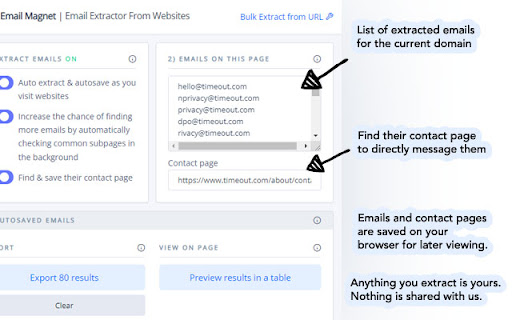

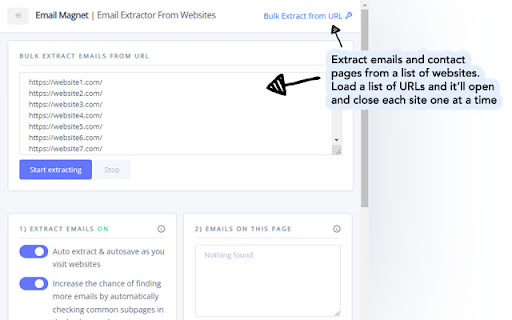
Extract emails and contact pages while visiting websites automatically. Includes bulk email extractor tool for multiple websites. Extract emails and contact pages from websites with Email Magnet. What Email Extractor From Websites chrome extension do? ✓ Extract email addresses from websites and save them to export or view later. ✓ Increase the chance of finding emails by visiting a few common pages in the background. ✓ Find and save the websites contact form page. If there's no email, you can contact them directly from the website. ✓ Bulk email extractor tool. Enter a list of websites and it'll visit its page and extract multiple emails it can find. ✓ Set a minimum and maximum delay in seconds when bulk extracting. ✓ View your extracted email addresses on a separate page. You can filter emails, sort emails, and show/hide columns. ✓ Export your scraped emails and contact pages to Excel CSV. ✓ Provide the URL source to all the emails you find. ✓ Auto save your found email addresses on your local computer. ✓ Remove duplicate emails. ✓ Privacy first. Everything is done locally. No information is being sent or shared. Email extractor chrome tool searches the source codes provided by websites. The emails are visible and available to the public. How to automatically extract emails from websites? - Turn on the toggle "Auto extract & auto-save as you visit websites" - Visit websites - Emails will save on your local computer and displayed on the Email Extractor tool. Features - Search and saves any emails found on the current webpage. - Search and saves their contact page for later use. - Crawl the websites common sub-pages to find their emails. Automated and done in the background. - Display a list of emails found and the url of their contact page. - Bulk email extractor from a list of website URLs with random delay in seconds set by the user. - View all your scraped emails on a separate page. - Export your extracted emails in Excel CSV. What data does it provide? - Email - Domain source - URL where the email was found - URL to their contact page Free & Paid This is a free email extractor chrome extension. Extract emails from the current webpage and export the latest 5 extracted emails. A paid plan will give you unlimited auto-saved emails and export. Save all your extracted emails. - Method is an alternative to email finders like Snovio and email lookup services like Hunter. - No confusing payment. No cost for heavy usage. No billing systems with limits and restrictions. - 1.2.0: - For bulk extracting emails from URLS, you can set a random delay in seconds when to visit the next URL. Set a range with minimum and maximum number of seconds and it'll randomly delay between the two numbers. - 1.1.0: - Added an option to find and save contact pages. Good when there's no email but you can still reach them through their contact form. - Display the link to the contact page directly on the popup. - Updated the name to Email Magnet because the original name was too generic.

AI Email Extractor: Find the Email ID by AI
Extract the email addresses behind any webpage.It uses AI and powerful algorithms to extract email addresses from web pages. Automated Email Extraction Tool which extracts email addresses from web pages and AutoSaves them to use anytime. Collecting email ids, it’s not complicated & time-consuming anymore. Collect more email ids and get more leads with AI Email Extractor! AI Email Extractor is a Powerful Automated Emails Extraction Tool for Chrome and Firefox. It uses AI and powerful algorithms to extract email addresses from web pages. All email ids are filtered through those algorithms. AI Email Extractor goes through every web source it visits and extracts email addresses from those web pages. It also saves email addresses to the user’s account. 🔥 FEATURES ✓ Uses AI And Powerful Algorithms ✓ Extract Email Address from Web Pages Automatically ✓ Support automatic search for "auto search" features, automatically open the next page of search results. ✓ "Automation" feature, support paste website URLs and extract emails in bulk. ✓ Auto-save all Email Address while you browse any website(Professional) ✓ Filters for Duplicate Email ID, so you get only Unique ones ✓ Export Option to export list of your extracted emails to a text or cvs file(Professional) ✓ One click copy your extracted emails (Professional) ✓ Extract Emails from Local HTML Documents ✓ Extract Emails from Text Files ✓ Fast, Light ✓ Automatic adaptation of CSV files with various separators ✓ removes duplicate email addresses 👋 FAQ If you have any questions, please keep in touch via help@extensionsgod.com. 🔒 DATA PRIVACY All data is processed in your local computer, never passing through our web server, and no one knows what you save. 🗓️ CHANGELOG v3.0.1 Add "Automation" feature, support paste website URLs and extract emails in bulk. v3.0.0 Add "auto search" feature, automatically open the next page of search results. v2.0.0 Optimize filtering rules to exclude invalid email addresses.

Email Extract - Email Extractor Tool
Extract Emails from Search Engines and the Web with a Semi-Automatic Email Extractor Tool. Generate Lead and Find New Clients Email Extract extension (Email Extractor tool) searches email addresses on pages you visit. Auto Search Mode automates search for emails on search engines. Email Extractor is a free tool that can help sales and marketing professionals, recruitment agencies and HR professionals, small business owners, researchers, and digital marketers quickly and easily extract email addresses from various sources, automate email search, and build comprehensive email lists to reach out to their target audience more effectively. 🆕 Here's what's new in our 2025 Q1-Q2 product update: * Enhanced search functionality for emails, including support for manually obfuscated email formats (e.g., "user[at]domain.com"). * Improved accuracy and speed of email extraction across different web pages. Features: * Extract emails from visited pages * Extract emails from the current page * Bypass certain obfuscation techniques * "Auto Search" for major search engine like Google and Bing. * Export to Excel in XLSX format with proper data types How to use the extension: - Once installed, the extension automatically activates the "Email extraction" mode. - The number of collected emails is displayed over the icon in the browser toolbar. - Click the "Collected emails" button to access a full-screen page displaying the collected email table. - Press the "Export" button to retrieve an Excel file. Please take note: The Email Extractor operates on a freemium model. Premium plan is required to download more than 50 of the latest emails. Permissions: "Read and change all your data on all websites" This extension requires this permission to search for emails within website content as you browse without requiring additional consent. You have the option to manually adjust this access. Please note that any emails collected stay on your device and are not sent elsewhere. For more information, please consult your browser's documentation: https://support.google.com/chrome_webstore/answer/2664769

Email Extractor: Scrape Emails From Websites
Powerful web email scraping tool automatically visits websites to extract mails and social media profiles in bulk efficiently Email Extractor can help you easily grab emails and contact pages from websites and find huge amounts of email data. This tool automates the process of finding emails, saves time, and lets you focus on your work. Just a few clicks and you can get email addresses from any web page for maximum efficiency. Start using these resources to boost your email outreach and see results today. What data does it provide? 🔹 Email address: The email scraped from the internet. 🔹 Domain source: The website for this place, such as a business' homepage 🔹 Social Medias: The social media profile URLs found from the internet (Facebook, Instagram, LinkedIn, Youtube, Twitter, and so on). Features: ✓ Search and save emails from websites and save their contact pages ✓ Extract emails from common sub-pages ✓ Export emails in Excel CSV format ✓ Auto-search for relevant email leads ✓ Find email leads from up to 1000+ URLs How To Find Emails From URLs? The following is a step-by-step guide to help you extract email addresses from a website using the My Email Extractor tool. ➤ Open your preferred web browser and install the Chrome extension “My Email Extractor”. ➤ Navigate to the website you want to crawl and enter its URL in the extension. ➤ Click the “Scraper” button to extract the email addresses. ➤ Download the email list as an Excel spreadsheet or another preferred format. Note: Make sure your Chrome browser extension settings are set correctly to effectively extract email addresses. Email Extractor, free or unlimited versions, and email discovery tools like Email Finder Extensions, Email Finder Plus, and the Email Collector suite simplify extracting email addresses from web pages. Email Scrapers offers a robust solution for scraping emails from websites. Email Extractor simplifies email extraction from multiple URLs. Extracting emails from PDFs is essential for PDFs, providing an easy way to mine emails. Email extraction tools cater to a variety of needs, from online to comprehensive web-based searches. Whether scraping or extracting emails efficiently, email extraction tools cater to every need.

EmailMagnet — Email Extractor for Chrome
Find and export publicly visible business email addresses from websites you browse. EmailMagnet is a Chrome email extractor designed to help you find email addresses while browsing websites. It works directly in Chrome so you can extract emails from web pages, capture contact information faster, and export results in CSV or TXT without leaving your browser. Built for research, prospecting, lead generation, recruiting, and productivity workflows, EmailMagnet helps reduce manual copy-paste work and makes email extraction simpler inside Chrome. What EmailMagnet does - Extract email addresses from websites while you browse - Capture visible and accessible emails from web pages - Export extracted emails in CSV or TXT - Keep the workflow inside Chrome - Start with a free plan and upgrade to PRO if needed How it works 1. Install EmailMagnet in Chrome 2. Open any website you want to review 3. Click to extract and export email addresses Key features - Chrome email extraction - Browser-based email extractor - Email address detection from websites - CSV export - TXT export - Free plan available - PRO lifetime access - One-click extraction workflow - Designed for browsing-based research Who EmailMagnet is for EmailMagnet is useful for: - founders and solo founders - sales teams and SDRs - marketers and agencies - recruiters - researchers - anyone who needs a faster way to collect email addresses from websites Pricing EmailMagnet includes a free plan to get started. Upgrade to PRO for $19 lifetime — no subscription. Responsible use EmailMagnet should be used responsibly and in compliance with applicable privacy and anti-spam laws, including GDPR and CAN-SPAM where relevant. If you need a simple, browser-based way to extract emails from websites, EmailMagnet helps make the process faster, clearer, and easier to use. EmailMagnet is a Chrome extension for email extraction, email capture, browser-based research, and exporting email addresses to CSV or TXT. What is EmailMagnet? EmailMagnet is a Chrome email extractor that helps you find and export email addresses while browsing websites. How much does PRO cost? PRO is a one-time $19 lifetime purchase with no subscription. Who is EmailMagnet for? It is built for research, prospecting, lead generation, and productivity workflows. Use responsibly: EmailMagnet is designed for legitimate business outreach only. Always obtain proper consent before contacting extracted email addresses and comply with all applicable privacy regulations, including GDPR and CAN-SPAM Act.
