
ejecpjcajdpbjbmlcojcohgenjngflac
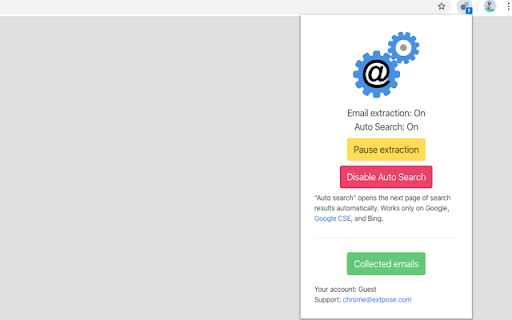
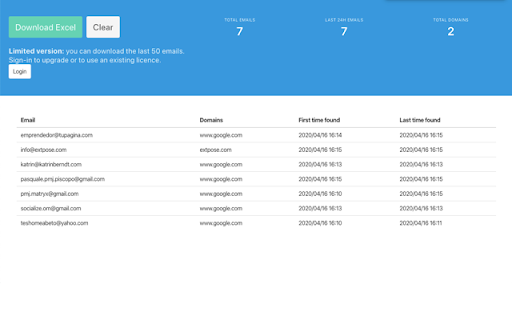

Extract Emails from Search Engines and the Web with a Semi-Automatic Email Extractor Tool. Generate Lead and Find New Clients Email Extract extension (Email Extractor tool) searches email addresses on pages you visit. Auto Search Mode automates search for emails on search engines. Email Extractor is a free tool that can help sales and marketing professionals, recruitment agencies and HR professionals, small business owners, researchers, and digital marketers quickly and easily extract email addresses from various sources, automate email search, and build comprehensive email lists to reach out to their target audience more effectively. 🆕 Here's what's new in our 2025 Q1-Q2 product update: * Enhanced search functionality for emails, including support for manually obfuscated email formats (e.g., "user[at]domain.com"). * Improved accuracy and speed of email extraction across different web pages. Features: * Extract emails from visited pages * Extract emails from the current page * Bypass certain obfuscation techniques * "Auto Search" for major search engine like Google and Bing. * Export to Excel in XLSX format with proper data types How to use the extension: - Once installed, the extension automatically activates the "Email extraction" mode. - The number of collected emails is displayed over the icon in the browser toolbar. - Click the "Collected emails" button to access a full-screen page displaying the collected email table. - Press the "Export" button to retrieve an Excel file. Please take note: The Email Extractor operates on a freemium model. Premium plan is required to download more than 50 of the latest emails. Permissions: "Read and change all your data on all websites" This extension requires this permission to search for emails within website content as you browse without requiring additional consent. You have the option to manually adjust this access. Please note that any emails collected stay on your device and are not sent elsewhere. For more information, please consult your browser's documentation: https://support.google.com/chrome_webstore/answer/2664769

Email Extractor
Extract email addresses from web pages you visit Email Extractor finds and copies to clipboard valid email addresses from web pages a user visits. Right-click on the extension icon to open an options window. You can select an execution mode and the resulting list options. * In the "once" mode (default), when a user clicks the extension icon, the Extractor collects all emails from the active tab and copies them to the clipboard. * In the 'background' mode, when a user clicks the extension icon, the Extractor starts collecting emails from web sites a user visits. When a user clicks the extension icon again, all collected emails are copied to the clipboard, and the collection process stops. Hovering over the extension icon shows a tooltip with a current mode. An indicator shows a number of emails collected: in black while the Extractor is collecting data, red when the collection is done.

Email Exporter
Extract all email addresses and phone numbers in a web page. Extract all email addresses and phone numbers in a web page. Simple and easy web page extractor. * Extract all email addresses in a page. * Extract all phone numbers in a page. * Export results to a text file. * Copy results to clipboard. * Append captured data across pages and tabs. * Search through HTML or text of the page for contacts. * Add custom regular expressions to capture data. * Save results to a file or post them to a URL with authentication. * Quick and easy extractor! Simply click the extension icon to automatically extract all email addresses and phone numbers displayed on the current web page. Email Exporter can be configured to look in the html or the text for matching data. It can also append captured data across web pages and tabs. Check-mark the option to append, then visit multiple pages or tabs, open the extension to extract, and automatically grow your list even bigger. Then save all of the results at once! To save your results, simply export them to a text file (with the option to append to any existing results), copy them to the clipboard and paste them anywhere you want, or post them to a secure URL to process the collected data with your own API.

Hunter - Email Finder Extension
Find email addresses from anywhere on the web, with just one click. Hunter for Chrome lets you find immediately who to contact when you visit a website. The Domain Search is the most powerful email-finding tool of its kind. Click the icon in Chrome to find all the email addresses related to the website you’re visiting. It includes the most common email pattern used, department filters and the public sources. The email addresses are marked verified or returned with confidence scores. If an email address is not verified yet, you can do it by clicking the checkmark icon next to it. If you already know the name the person you would like to contact, type it in the search field. The Email Finder will return the found email address along with a confidence score and sources. If you're reading an article, Hunter's extension will look for the author's name and email address. Click the "+" next to a person to save this lead to a list. You can send email campaigns to your leads or save them to Salesforce, HubSpot, Pipedrive, Zoho and more than a hundred other CRMs and applications. Hunter (formerly Email Hunter) is used by salespeople, marketers, recruiters, bloggers, reporters and plenty of professionals who need to reach out. Hunter's email finder extension requires an account you can create immediately after the installation. You'll get 25 free searches/month and can upgrade your account for more. By installing the extension, you agree to Hunter's Privacy Policy (https://hunter.io/privacy-policy).

Email Extractor Lite
Powerful solution to automatically extract bulk emails from websites. Unlimited and free extraction service. Free extension to extract bulk email IDs automatically from web pages. Powerful email extractor tool for marketers around the world 🚀 ✔ How to use the extension? 💻 ------------------------------------------- - After installation, the "Email extraction" mode is activated by default. - Press the "Collected emails" button to access the list of all saved emails. - Choose the format of your choice and press the "Export" button. ✔ Who is this extension for? 🔥 ----------------------------------------- 👉 Automatic extraction of emails from visited web pages 👉 Extraction from search engines like Google and Bing 👉 Removal of duplicate email addresses (unique ID) 👉 Save emails, search date and domain in the browser 👉 Export email list in TXT, CSV or JSON format 👉 View extracted emails on a modern user interface 1) Is the Email Extractor Lite free? The extraction service is completely FREE. No subscription is required, no account is needed. Take full advantage of this extension. 2) Where are the collected email addresses stored? This extension uses the data storage functions of your web browser to store emails. No data is stored outside your browser. 3) What about Data Privacy and GDPR? This extension protects and respects your privacy. It does not collect or store your personal data. Let's respect your privacy! You can report bugs and feature requests with this link: Note: Do not post bug reports or support requests in reviews! This is NOT a forum and Google will eventually remove some reviews. ✔ How can I support you? ☕️ --------------------------------------- Email Extractor is, and will always be, free, but you can support this 100% free service by making a donation. Any help would be greatly appreciated! You can participate by donating the amount you want ❤️ ✔ Do you have any questions? 📧 ---------------------------------------------- If you have any suggestions, feature requests, or even a partnership request, please feel free to send me a message at my email address.
