
joflojehbdajphljkcggpmajnoibdaio
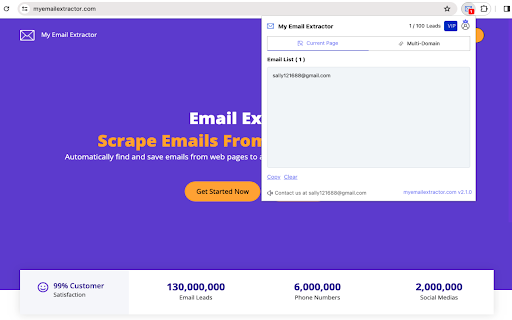
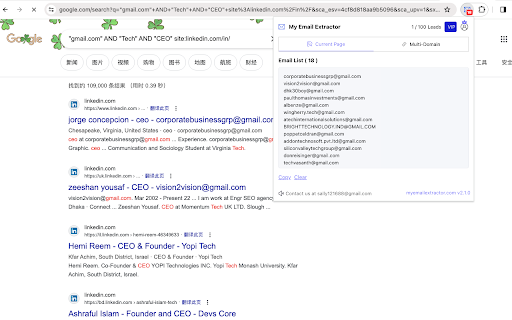
Powerful web email scraping tool automatically visits websites to extract mails and social media profiles in bulk efficiently Email Extractor can help you easily grab emails and contact pages from websites and find huge amounts of email data. This tool automates the process of finding emails, saves time, and lets you focus on your work. Just a few clicks and you can get email addresses from any web page for maximum efficiency. Start using these resources to boost your email outreach and see results today. What data does it provide? 🔹 Email address: The email scraped from the internet. 🔹 Domain source: The website for this place, such as a business' homepage 🔹 Social Medias: The social media profile URLs found from the internet (Facebook, Instagram, LinkedIn, Youtube, Twitter, and so on). Features: ✓ Search and save emails from websites and save their contact pages ✓ Extract emails from common sub-pages ✓ Export emails in Excel CSV format ✓ Auto-search for relevant email leads ✓ Find email leads from up to 1000+ URLs How To Find Emails From URLs? The following is a step-by-step guide to help you extract email addresses from a website using the My Email Extractor tool. ➤ Open your preferred web browser and install the Chrome extension “My Email Extractor”. ➤ Navigate to the website you want to crawl and enter its URL in the extension. ➤ Click the “Scraper” button to extract the email addresses. ➤ Download the email list as an Excel spreadsheet or another preferred format. Note: Make sure your Chrome browser extension settings are set correctly to effectively extract email addresses. Email Extractor, free or unlimited versions, and email discovery tools like Email Finder Extensions, Email Finder Plus, and the Email Collector suite simplify extracting email addresses from web pages. Email Scrapers offers a robust solution for scraping emails from websites. Email Extractor simplifies email extraction from multiple URLs. Extracting emails from PDFs is essential for PDFs, providing an easy way to mine emails. Email extraction tools cater to a variety of needs, from online to comprehensive web-based searches. Whether scraping or extracting emails efficiently, email extraction tools cater to every need.

Email Extractor
Automatically extract email addresses from web pages or bulk web pages, and search for the desired email addresses by keyword Email Extractor : Powerful Email Discovery and Extraction Tool Discover the power of Email Extractor, the most efficient email scraper and extractor extension for Chrome. Whether you need Email Extractor 1.4, Email Extractor 1.6, or our latest version, we've got you covered with our continuously updated email extraction technology. 🚀 Key Features of Email Extractor: • Instant Email Extraction: Quickly extract emails from single web pages or text • Bulk Extraction: Support for multiple web pages simultaneously • Automated Background Collection: Auto-save discovered emails while browsing • Domain Email Search: Find emails associated with company domains • Keyword Search: Coming soon - email search based on keywords • Email Verification: Ensure extracted email addresses are valid 🛠 Technical Highlights of our Email Extractor: • Supports extraction from Ajax pages, including Google search results • Extracts obfuscated email addresses • Automatically filters duplicate emails for unique results • Local storage functionality to protect your data privacy • Export extracted email lists to text or CSV files • Offline support: Extract emails from local HTML documents and text files • Lightweight design: Only 51KB, doesn't impact browser performance 💼 Business-Grade Capabilities of Email Extractor: • Auto-Visit and Save: Build URL queues for automatic visiting and email extraction • Bulk Domain Search: Discover all email addresses under specific domains • Cloud Storage: Automatically save all discovered email addresses (coming soon) • Team Sharing: Share your premium subscription with colleagues (coming soon) 🆚 Version Comparison: Email Extractor 1.4 vs Email Extractor 1.6 vs Email Extractor Lite 1.4 Our latest version combines the best features of Email Extractor 1.4 and the lightweight efficiency of Extractor 1.4 Lite, with new additions found in Email Extractor 1.6. 🔒 Privacy and Security: We value your privacy. Our email extractor only collects email addresses, storing data locally for your privacy. 🆘 Support and Feedback: If you encounter any issues, click the "Settings" button in the plugin to get our contact details. We're committed to swift bug resolution. ⚠️ Disclaimer: This Email Extractor extension is intended for personal use. We do not encourage its use for spam marketing. Please use responsibly. Download Email Extractor now - your go-to solution for online email extraction!

Email Lookup Tool
Try our free extension Email Lookup Tool to efficiently email extractor a list of addresses on a web page. Simplify outreach now! Free Email Lookup Tool uses a public web pages to find email addresses. You can use it to find a single address or to identify contacts for a list of prospects. 💫 Do you wonder which to do this in seconds? 🚀 Quick Start Tips 1. Install the extension by the button “Add to Chrome” 2. Please make sure to pin it for fast access: click on the puzzle icon, find it in the list of extensions and click on the pin. 3. Launch the extension: click on the pinned icon or on the icon in the context menu for scraping list mailbox addresses 4. Click the button “Copy” for extracting find data 5. Get all the necessary data! 💥 Embark on a journey of endless possibilities in your marketing strategies with the Email Lookup Tool, a Chrome extension crafted for those who value connection and growth in the digital age. For bulk email finder, all you need - one-click. Advanced mailbox hunting technology: ➤ Our Email Hunter searches deeply, ensuring you never miss a potential connection. ➤ Extract and find email addresses with ease, thanks to our sophisticated algorithms. ➤ Broaden your network with the multi-address search feature, gathering numerous contacts from one webpage. 💼 Who Can Benefit: Whether you're seeking advice from an industry influencer, looking to land your dream job, aiming to pitch to a high powered executive, or trying to get coverage for your latest piece of content, email is by far the most effective tool to make that happen. Pair the Email Lookup Tool with your existing marketing techniques for a synergy that can significantly expand your professional network. 📃 How else can a list of mailbox addresses be useful: 1️⃣ Increasing your customer base: find email address can help you increase your customer base as you can send them information about new products, promotions and special offers. 2️⃣ Increase Customer Loyalty: Regularly sending useful information can strengthen your relationship with your customers and increase their loyalty to your brand. Use the free email finder feature to cast a wide net across the web, pulling in relevant contact information with precision for your newsletters. 3️⃣ Improve SEO: Sending regular content via email can improve your site's SEO as it can increase its link juice. Discover the synergy between the Email Lookup Tool free and your existing SEO and outreach strategies. 4️⃣ Feedback: Collecting mailbox addresses allows you to receive valuable feedback from customers, which will help you improve your product or service. Become a hunter email, finder. Whether you ' re reaching out to potential clients, collaborators, or job candidates, having access to accurate email addresses facilitates seamless communication and relationship-building. 5️⃣ Increased Sales:If you offer discounts or special offers via email, this can lead to increased sales. Use our email extractor for swift collection of contact data from various web pages. 6️⃣ Brand Building: Using email, you can create a recognizable brand and improve your reputation among customers.Try our advanced Email Extractor to pull contacts from any website effortlessly. 7️⃣ Attracting New Customers: Using email, you can create a recognizable brand and improve your reputation among customers. Unlock the potential of your marketing and outreach campaigns with our Email Lookup Tool 8️⃣ Lead Generation: Our Email Extractor extension can be used to mailbox parser addresses from websites, social media platforms, directories, etc., helping businesses find potential leads for their products or services. Stay ahead of the curve in your industry by leveraging the power of Email Lookup Tool to identify and connect with key stakeholders, influencers, and decision-makers. 📥 Download Now: 🌐 Download now from the Chrome Web Store and simplify your life. Whether you need to find one or list email address ⭐ User-Friendly Interface: With our intuitive interface, generating is a breeze. ⚡ Simply install the extension, and you're ready to go. No complicated setup or technical knowledge is required. 🔎 With our Chrome extension, you can enjoy all the benefits for email scraper: 🔸 Marketing Campaigns: Mailbox addresses collected through our solution can be used for email marketing campaigns, allowing businesses to reach out to their target audience directly. Utilize email address lookup to enrich your marketing - transform leads into conversions by reaching out with personalized, compelling email content. 🔸 Networking: Individuals or businesses can use email address finder to connect with professionals in their industry, potential collaborators, or influencers for networking purposes. By tapping into a well of potential contacts, businesses can engage with their target audience on a personal level, delivering tailored messages that resonate and inspire action. 🔸 Recruitment: HR professionals or recruiters can utilize use email search tool to find contact information for potential candidates, making the recruitment process more efficient. In essence, parsing, scraping, extracting, finding, and hunting mailbox adresses tools are essential for businesses and individuals to gather relevant contact information, expand their network, search for employees and facilitate communication with their target audience. 🔥 Embrace the power of direct communication and watch your business grow with the Email Lookup Tool. 🆙 Updates: Version 1.0.4: Added the ability to save found email addresses in csv and xls format.

EmailMagnet — Email Extractor for Chrome
Find and export publicly visible business email addresses from websites you browse. EmailMagnet is a Chrome email extractor designed to help you find email addresses while browsing websites. It works directly in Chrome so you can extract emails from web pages, capture contact information faster, and export results in CSV or TXT without leaving your browser. Built for research, prospecting, lead generation, recruiting, and productivity workflows, EmailMagnet helps reduce manual copy-paste work and makes email extraction simpler inside Chrome. What EmailMagnet does - Extract email addresses from websites while you browse - Capture visible and accessible emails from web pages - Export extracted emails in CSV or TXT - Keep the workflow inside Chrome - Start with a free plan and upgrade to PRO if needed How it works 1. Install EmailMagnet in Chrome 2. Open any website you want to review 3. Click to extract and export email addresses Key features - Chrome email extraction - Browser-based email extractor - Email address detection from websites - CSV export - TXT export - Free plan available - PRO lifetime access - One-click extraction workflow - Designed for browsing-based research Who EmailMagnet is for EmailMagnet is useful for: - founders and solo founders - sales teams and SDRs - marketers and agencies - recruiters - researchers - anyone who needs a faster way to collect email addresses from websites Pricing EmailMagnet includes a free plan to get started. Upgrade to PRO for $19 lifetime — no subscription. Responsible use EmailMagnet should be used responsibly and in compliance with applicable privacy and anti-spam laws, including GDPR and CAN-SPAM where relevant. If you need a simple, browser-based way to extract emails from websites, EmailMagnet helps make the process faster, clearer, and easier to use. EmailMagnet is a Chrome extension for email extraction, email capture, browser-based research, and exporting email addresses to CSV or TXT. What is EmailMagnet? EmailMagnet is a Chrome email extractor that helps you find and export email addresses while browsing websites. How much does PRO cost? PRO is a one-time $19 lifetime purchase with no subscription. Who is EmailMagnet for? It is built for research, prospecting, lead generation, and productivity workflows. Use responsibly: EmailMagnet is designed for legitimate business outreach only. Always obtain proper consent before contacting extracted email addresses and comply with all applicable privacy regulations, including GDPR and CAN-SPAM Act.

Email Extract - Email Extractor Tool
Extract Emails from Search Engines and the Web with a Semi-Automatic Email Extractor Tool. Generate Lead and Find New Clients Email Extract extension (Email Extractor tool) searches email addresses on pages you visit. Auto Search Mode automates search for emails on search engines. Email Extractor is a free tool that can help sales and marketing professionals, recruitment agencies and HR professionals, small business owners, researchers, and digital marketers quickly and easily extract email addresses from various sources, automate email search, and build comprehensive email lists to reach out to their target audience more effectively. 🆕 Here's what's new in our 2025 Q1-Q2 product update: * Enhanced search functionality for emails, including support for manually obfuscated email formats (e.g., "user[at]domain.com"). * Improved accuracy and speed of email extraction across different web pages. Features: * Extract emails from visited pages * Extract emails from the current page * Bypass certain obfuscation techniques * "Auto Search" for major search engine like Google and Bing. * Export to Excel in XLSX format with proper data types How to use the extension: - Once installed, the extension automatically activates the "Email extraction" mode. - The number of collected emails is displayed over the icon in the browser toolbar. - Click the "Collected emails" button to access a full-screen page displaying the collected email table. - Press the "Export" button to retrieve an Excel file. Please take note: The Email Extractor operates on a freemium model. Premium plan is required to download more than 50 of the latest emails. Permissions: "Read and change all your data on all websites" This extension requires this permission to search for emails within website content as you browse without requiring additional consent. You have the option to manually adjust this access. Please note that any emails collected stay on your device and are not sent elsewhere. For more information, please consult your browser's documentation: https://support.google.com/chrome_webstore/answer/2664769
