
jiilmlblopaafeoackclollophidingd
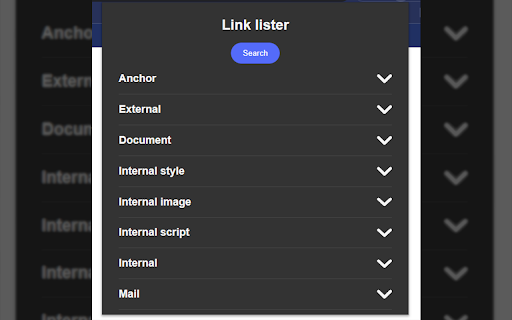


Extension that extracts and list links from a web page into categories, providing easy access to copy, navigate, and validate links. Link Lister is a powerful Chrome extension that lets you quickly extract and organize all links on a web page. With Link Lister, you can easily categorize links, copy them to your clipboard, navigate to them, and even check their validity. Perfect for web developers, researchers, and anyone who needs to quickly access links on a web page. Try Link Lister today and see how it can simplify your browsing experience! Support: If you encounter any issues with Link Lister or have any suggestions for new features, please feel free to open an issue on our GitHub repository. (https://github.com/pH0xe/Link-Lister/issues)

URL List – save and export lists of URLs
Save and export lists of URLs Tired of juggling a million browser tabs? Wish you could save all those important URLs to a list? "URL List" is here to rescue you from tab chaos! We get it – sometimes you need more than just bookmarks. You want a simple, organized way to save those links you stumble upon while browsing and easily access them later. That's where "URL List" comes in. This little tool is like a productivity ninja for your browser tabs. 🥷 2. Surf the Web: Go wild! Shop online, research like crazy, find inspiration – whatever your heart desires. 3. Find a URL Worth Saving? Click the "URL List" icon. Boom! 💥 It's instantly saved to a list. 4. Ready to Share? Open the extension, copy the URL, and paste it into a spreadsheet, a text message, WhatsApp, your notes – anywhere! "URL List" is perfect for: • Shopping Lists: Keep track of all those must-have items you find online. • Research: Organize all your articles and websites in one place. • Inspiration: Save designs, recipes, DIY projects – whatever sparks your creativity! • Sharing Links Quickly: Easily grab those URLs to share with friends, colleagues, or your social media followers. • ...And basically anything else that involves a URL! "URL List" helps you: • Stay Organized: Conquer tab overload and create order out of your digital life. Ready to become a URL-organizing master? Get "URL List" and join the 3xFaster revolution! P.S. This is just the beginning! Stay tuned for specialized versions of "URL List," tailor-made for your favorite websites. (Amazon wish lists, anyone?) 😉

External Link Extractor
This extension extracts all external links from the current webpage and generates a list in plain text. You can copy/paste using… This extension extracts all external links from the current webpage and generates a list in plain text. You can copy/paste using the clipboard function to save.

Link Roamer
A browser extension for gathering, organizing, and inspecting all the links on a web page. 1. Inspect links - Highlight broken links on a page (i.e. 404) - Highlight non-secure links on a page (i.e. http) - Quickly find, view, organize, and navigate links on a page - See the status and reasoning for requests that don't succed - View links and where they redirect to before navigating 3. Interact with links - Copy links to clipboard - Open links in a new window or tab - Open individual links in a background tab - Export links as `json`, `text`, or `csv` - Export detailed URL and fetch request data Open source This extension is open source and doesn't collect any information from users. You can inspect the source fode at https://github.com/rossmoody/link-roamer. It's free, and made available because I like making useful things for the web. Please consider contributing with an idea, bug fix, or feature request on GitHub.

External Links Detector
Detecting and Unhiding External Links. An indispensable tool for SPAM BUSTERS chasing malicious links hidden in comments and posts. FIGHTING SPAM HIDDEN IN USER COMMENTS AND POSTS? The External Links Detector can help you. The extension inspects the visited webpage, and highlights all external links, including hidden ones. It reveals not only links over blank characters, dots, but also hyperlinks over white-on-white text, or links hiding with complex techniques using injected CSS code. ------ I M P O R T A N T ! ----- SITE-BASED functionality - the External Links Detector (ELD) will only work on websites that you explicitly enable. You can do that either once per session by clicking the icon of the extension (we recommend keeping it pinned on the nav bar of the browser, otherwise you have to navigate through Chrome's menu to Extensions, and selecting ELD there), or permanently (recommended!) - visit the concerned website, right-click the icon of the ELD extension, and in the context menu, select the feature "This can read and change site data", and click the option with the domain name. Please see the last screenshot for illustration. ------ I M P O R T A N T ! ----- The extension is customizable in several ways. When you click the icon of the extension, or when you select "Options" in its context menu, you can adjust the following parameters: IGNORE LIST - you can enter multiple domains that you want to exclude from the external links checking. Note: you do NOT need to add the domain name of the web page, where you want to use the tool! COUNTER POSITION - you can select one of the four page counters for displaying the external links counter box. AUTO-RUN (labeled "Detect Links Automatically") - when enabled (default setting), detected external links will be counted upon loading the web page, and the number of external links is shown in the selected corner of the page. No rectangle appears when no external links are detected. When the option Auto-Run is disabled, then you have to click the icon of the extension in order to detect the external link on the current page. We recommend pinning the icon to the navigation bar of your browser. AUTO-HIGHLIGHT (labeled "Highlight links automatically") - when checked, all detected external links are automatically made visible, and highlighted with white text in a red rectangle, as soon as the visited page is fully loaded. Mouse-over tooltip over the rectangle shows the target URL of the link. If you keep this option disabled, the links will be only counted, and you have to click on the rectangle with the number of external links in order to reveal and highlight the links. SUBDOMAINS - by default, only 2nd level domains (i.e. "google.com", "xyz.org", ...) are being matched for exclusions (both from the ignore list, as well as the domain of the visited page). So for example if you are inspecting a page on the domain "forums.abc.net", and the page contains links to diverse subdomains of abc.net (i.e. "support.abc.net"), then those links will not be included (neither counted, nor highlighted). If you enable this option for strict matching, links to non-matching subdomains will be considered external links too. For example a link to www.microsft.com will be considered an external link, even if the domain "microsoft.com" is on the ignore list, or when you are inspecting pages on the domains "microsoft.com" or "support.microsoft.com". ZERO-COUNTS - by default, the counter of external links will appear in the selected corner of the page only when at least one external link (not appearing on the ignore list) is detected. If you prefer seeing the counter even when no links are detected, enable the option "Show zero counts". LINK LIST - by hovering the mouse cursor over the link counter box, you can view the full list of all detected links on the page. It is helpful, when the links are spread over diverse parts of the page, that may not be easily accessible, or perhaps may remain hidden in their original location. PRIVACY POLICY: This extension does not collect any user data, and does not connect to any remote servers. The code is secure and reviewable by any interested party. FEEDBACK: Comments with bug reports, feature requests, critics, or just with kudos welcome. Donations are welcome too, and help motivating me to maintain and improve the extension: • https://paypal.com/donate/?hosted_button_id=724KXVPMHE6DL • https://buymeacoffee.com/truxoft CREDITS: - External Link icon © by Fathema Khanom @ freepik.com - External-links Chrome extension by ua-cms.ru - initial inspiration - ChatGPT - valuable advices - seilogramp @ forums.garmin.com - motivation, testing
