
ekelmbmnkpfjcljpekjhlfpejjpfbkbn

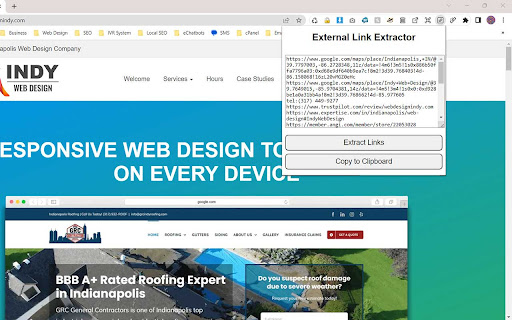
This extension extracts all external links from the current webpage and generates a list in plain text. You can copy/paste using… This extension extracts all external links from the current webpage and generates a list in plain text. You can copy/paste using the clipboard function to save.

Productivity Links Grabber
Boost how you capture links to your Notion with this very simple Links Grabber Productivity Links Grabber is a chrome extension that is designed to make capturing links a breeze. If you are someone who finds yourself frequently needing to save links from various websites for later reference, then this extension is the perfect tool for you. With just a few clicks, you can easily capture all the links you need and save them directly to your Notion database, saving you time and effort. One of the primary features of Productivity Links Grabber is its ease of use. Once you have installed the extension, all you need to do is navigate to the page where you want to grab links from and click on the extension icon in your browser's toolbar you will get a list of all links. Then you simply click on the "Copy" button, and the links will be added to your clipboard, ready to be pasted into your Notion database. The extension is particularly useful when you are working with pages that have a lot of useful links. For example, if you are conducting research on a particular topic and have found a webpage with a list of resources, you can use Productivity Links Grabber to quickly capture all the links and add them to your database without having to manually copy and paste each link one by one. This not only saves time but also ensures that you don't miss any important links in the process. Another great feature of Productivity Links Grabber is that it is specifically useful for Notion users. Notion is a powerful productivity tool that is becoming increasingly popular among professionals, entrepreneurs, and students alike. With its intuitive interface and flexible database structure, Notion is ideal for managing tasks, projects, notes, and more. However, one of the challenges of using Notion is capturing and organizing information from various sources, including links. Productivity Links Grabber addresses this challenge by providing Notion users with a simple and efficient way to capture links from the web. This means that you can spend less time on administrative tasks and more time on the work that matters. Overall, Productivity Links Grabber is a must-have tool for anyone who wants to boost their productivity by saving time and effort when capturing links. Whether you are a researcher, a student, a professional, or just someone who likes to stay organized, this extension will help you streamline your workflow and keep your information organized in one place. With its ease of use, seamless integration with Notion, and ability to handle multiple links at once, Productivity Links Grabber is an essential tool for anyone who wants to work smarter, not harder.

Link Extractor V2
Extracts all links from a page and copies them to the clipboard. Free Link Extractor & Copier: Ultimate Web Page Link Management Ever found yourself in need of capturing every link from a web page without manually trawling through each one? Enter the "Link Extractor & Copier" Chrome extension, meticulously designed for researchers, web developers, digital marketers, SEO professionals, and anyone looking to optimize their digital workflow. This tool not only amplifies your productivity but also positions you at the forefront of efficient web browsing. Core Benefits: One-Click Solution: Gone are the days of tedious link selection. This extension allows users to extract all visible hyperlinks in an active browser tab, streamlining the cumbersome process. Instant Clipboard Storage: No need to copy link-by-link. With a single click, all extracted URLs are automatically copied to your clipboard, ready for pasting anywhere you desire. Sleek User Interface: Enjoy a clean, intuitive, and user-friendly design, ensuring seamless interaction every time you're online. Transparent Feedback Mechanism: Whether you've successfully captured a list of links or encountered an issue, the extension immediately provides clear feedback, eliminating guesswork. SEO and Digital Marketing: Webmasters and digital marketers know the importance of analyzing and extracting links for competitor analysis, backlink research, and content audits. "Link Extractor & Copier" simplifies this process, making it an indispensable tool in your SEO toolkit. It's optimized for capturing hyperlinks from any page, whether they're deep links, outbound links, or internal navigational links, ensuring a comprehensive understanding of any website's link structure. Testimonials: "An essential for my digital marketing toolkit. Analyzing competitor websites has never been easier!" - Pamela T. Permissions & Privacy: We prioritize your online security. The extension only requires permission to read and change data on websites you visit, purely to extract links. Your privacy is paramount. Clipboard access is solely for the purpose of copying links for you, streamlining your experience without any secondary use. In an era of data-driven strategies and digital expansion, tools like "Link Extractor & Copier" pave the way for seamless digital interactions. As the web grows denser with information, having the right tools to efficiently navigate, capture, and analyze links becomes paramount. Install today and redefine your browsing efficiency!

External Links
List external links and anchor text. Lists all external links on the page and their anchor text. Shows the total number of external links.

External Links Detector
Detecting and Unhiding External Links. An indispensable tool for SPAM BUSTERS chasing malicious links hidden in comments and posts. FIGHTING SPAM HIDDEN IN USER COMMENTS AND POSTS? The External Links Detector can help you. The extension inspects the visited webpage, and highlights all external links, including hidden ones. It reveals not only links over blank characters, dots, but also hyperlinks over white-on-white text, or links hiding with complex techniques using injected CSS code. ------ I M P O R T A N T ! ----- SITE-BASED functionality - the External Links Detector (ELD) will only work on websites that you explicitly enable. You can do that either once per session by clicking the icon of the extension (we recommend keeping it pinned on the nav bar of the browser, otherwise you have to navigate through Chrome's menu to Extensions, and selecting ELD there), or permanently (recommended!) - visit the concerned website, right-click the icon of the ELD extension, and in the context menu, select the feature "This can read and change site data", and click the option with the domain name. Please see the last screenshot for illustration. ------ I M P O R T A N T ! ----- The extension is customizable in several ways. When you click the icon of the extension, or when you select "Options" in its context menu, you can adjust the following parameters: IGNORE LIST - you can enter multiple domains that you want to exclude from the external links checking. Note: you do NOT need to add the domain name of the web page, where you want to use the tool! COUNTER POSITION - you can select one of the four page counters for displaying the external links counter box. AUTO-RUN (labeled "Detect Links Automatically") - when enabled (default setting), detected external links will be counted upon loading the web page, and the number of external links is shown in the selected corner of the page. No rectangle appears when no external links are detected. When the option Auto-Run is disabled, then you have to click the icon of the extension in order to detect the external link on the current page. We recommend pinning the icon to the navigation bar of your browser. AUTO-HIGHLIGHT (labeled "Highlight links automatically") - when checked, all detected external links are automatically made visible, and highlighted with white text in a red rectangle, as soon as the visited page is fully loaded. Mouse-over tooltip over the rectangle shows the target URL of the link. If you keep this option disabled, the links will be only counted, and you have to click on the rectangle with the number of external links in order to reveal and highlight the links. SUBDOMAINS - by default, only 2nd level domains (i.e. "google.com", "xyz.org", ...) are being matched for exclusions (both from the ignore list, as well as the domain of the visited page). So for example if you are inspecting a page on the domain "forums.abc.net", and the page contains links to diverse subdomains of abc.net (i.e. "support.abc.net"), then those links will not be included (neither counted, nor highlighted). If you enable this option for strict matching, links to non-matching subdomains will be considered external links too. For example a link to www.microsft.com will be considered an external link, even if the domain "microsoft.com" is on the ignore list, or when you are inspecting pages on the domains "microsoft.com" or "support.microsoft.com". ZERO-COUNTS - by default, the counter of external links will appear in the selected corner of the page only when at least one external link (not appearing on the ignore list) is detected. If you prefer seeing the counter even when no links are detected, enable the option "Show zero counts". LINK LIST - by hovering the mouse cursor over the link counter box, you can view the full list of all detected links on the page. It is helpful, when the links are spread over diverse parts of the page, that may not be easily accessible, or perhaps may remain hidden in their original location. PRIVACY POLICY: This extension does not collect any user data, and does not connect to any remote servers. The code is secure and reviewable by any interested party. FEEDBACK: Comments with bug reports, feature requests, critics, or just with kudos welcome. Donations are welcome too, and help motivating me to maintain and improve the extension: • https://paypal.com/donate/?hosted_button_id=724KXVPMHE6DL • https://buymeacoffee.com/truxoft CREDITS: - External Link icon © by Fathema Khanom @ freepik.com - External-links Chrome extension by ua-cms.ru - initial inspiration - ChatGPT - valuable advices - seilogramp @ forums.garmin.com - motivation, testing
