
jigamimbjojkdgnlldajknogfgncplbh

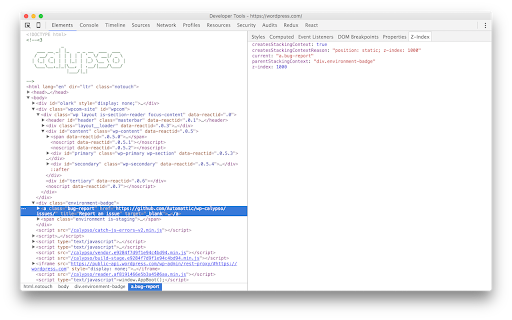
A Chrome DevTools Extension that displays stacking contexts and z-index values in the elements panel Why use it? Browsers support a hierarchy of stacking contexts, rather than a single global one. This means that z-index values are often used incorrectly, and arbitrarily high values get set. By Using Z-Context, you'll know: - If the current element creates a stacking context, and why - What its parent stacking context is - The z-index value -------- v3.0.0 - Update to manifest v3 and update stacking context rules https://github.com/gwwar/z-context/pull/29 v2.1.0 - Includes http protocol to facilitate development use cases https://github.com/gwwar/z-context/pull/23 v2.0.0 - Adds support for inspecting iframes https://github.com/gwwar/z-context/pull/21 https://github.com/gwwar/z-context/pull/22 v1.1.0 - Adds z-index stacking context rules as of 2021. Adds fixes for position sticky and shadow dom, props to roperzh and edenilan! See pulls 10, 17 and 18 at https://github.com/gwwar/z-context. v1.0.4 - fixes will-change case. a stacking context is created for opacity/transform but not other values https://github.com/gwwar/z-context/pull/9 v1.0.3 - fixes display reason for flex-items https://github.com/gwwar/z-context/pull/4 v1.0.2 - adds new z-index rules, fixes a bug when inspecting a shadow dom elements. https://github.com/gwwar/z-context/pull/3 v1.0.1 - fix reason message for non-static positions, props to giuseppeg. https://github.com/gwwar/z-context/pull/1

MobX Developer Tools
Dev-tools for MobX and React Inspect mobx-react observers. Edit values in observable objects (Doesn't support editing react props/state, use react-devtools for that) Track changes in MobX observables MST support

BrowserStack
Instantly test your webpage on any desktop or mobile browser. Launch a new test session in any browser using the BrowserStack Quick Launch Extension. Select any combination from "All Devices" dropdown OR set up to 12 browsers for quick access under favourites and minimise the time spent in switching browsers. Review changes immediately and make cross-browser testing an integral part of development. To use the integration: 1. Install the extension. 2. Open the webpage you want to test and click on the BrowserStack logo on your extension toolbar. 3. Select the browser & device combination you want to test on. Your webpage will be launched in the combination selected. Test this webpage using BrowserStack’s Dev Tools, check page behavior in real user conditions and file bugs directly. NOTE: You need to have a BrowserStack account to use this Chrome extension. You can sign up from the extension or use this link: www.browserstack.com/users/sign_up

Grid Ruler
Create grids and measure their distance easily. It allows web developers to create vertical and horizontal grids, Photoshop style. It has a ruler to measure distance between your grids too. - click & drag from main vertical/horizontal ruler to create grid guides. - click on intersection of vertical ruler and horizontal ruler to go into measurement mode. - while in measurement mode, hold `Shift` key to get a straight line.

axe DevTools - Web Accessibility Testing
Accessibility Checker for Developers, Testers, and Designers in Chrome ★Digital accessibility testing right in your browser: The Axe DevTools Extension is an automated accessibility testing tool that helps you find and fix accessibility issues early in web development right in your Chrome browser. It helps ensure your team gets fast, accurate, actionable results so you can save time on costly reworks, and create digital experiences that are compliant and work for everyone. ★Leverage the global standard in automated web accessibility testing: The free version of the Axe DevTools Extension gives you the tools to conduct page-by-page, automated accessibility testing—all run on Axe-core, the global standard in automated web accessibility testing. With the free browser extension, teams get a useful introduction to accessibility and a quick, automated way to catch defects, all while benefiting from the same reliable and consistent results trusted by industry leaders around the world. ★Find and fix even more accessibility issues with AI and automated testing: Upgrade to the pro version of the Axe DevTools Extension to move faster, smarter, and further streamline workflows with AI-enhanced features, intelligent guided testing, component-level checks, the ability to test entire user flows, central administration, deduplicated results, Jira integration, and more. Dev teams can use this pro version of the browser extension to fix a majority of issues before production by combining traditional test automation with AI, reducing remediation costs and saving time. It’s great for teams who want to check specific pages, groups of pages, or workflows for accessibility issues. To learn more about the Axe DevTools Extension visit https://www.deque.com/axe/devtools/extension Use of this extension is governed by this license agreement https://www.deque.com/terms-of-use/axe-ext/ and the privacy policy linked under the developer information Data collection information can be found here: https://docs.deque.com/devtools-server/4.0.0/en/data-collection#axe-devtools-browser-extension-free Upgrading to the Axe DevTools Extension pro plan gives you more control over what data is collected.
