
pfgnfdagidkfgccljigdamigbcnndkod
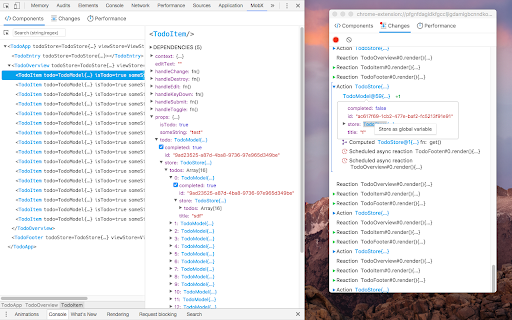
Dev-tools for MobX and React Inspect mobx-react observers. Edit values in observable objects (Doesn't support editing react props/state, use react-devtools for that) Track changes in MobX observables MST support

PerfectPixel by WellDoneCode (pixel perfect)
Drop your mockup on the live page for pixel-perfect comparison with your code. PerfectPixel adds a semi-transparent image overlay on top of any web page, letting you compare your frontend implementation against the original design mockup directly in the browser. Upload a design comp, adjust opacity, and immediately see where your code diverges from the spec — with pixel-perfect accuracy. No more switching between tabs or squinting at two screens side by side. How it works: install the extension, open any page, and drop in an image — drag and drop, paste a URL, paste from clipboard, or use the file picker. Position and scale the overlay, then adjust opacity to compare. - Overlay any PNG, JPG, or SVG on any web page - Adjustable opacity for real-time visual comparison - 4 blend modes (Difference, Invert, Multiply, Overlay) plus Normal — each useful for catching different types of mismatches - Lock the overlay to click through it and interact with page elements underneath - Per-domain persistence: your layers stay saved per site and restore automatically across browser sessions - Multiple layers per domain - Scaling, repositioning, and centering controls - Keyboard shortcuts for common actions - Unlimited simultaneous layers (free tier supports 2) - Folders to group layers - Layer rotation - Dark theme - Custom icon, accent color, and custom CSS Built for frontend developers, QA engineers, agencies, and development teams who need to verify that what they shipped matches what was designed. 350,000+ developers. 10+ years on the Chrome Web Store.

Vue.js devtools
DevTools browser extension for Vue.js Chrome devtools extension for debugging Vue.js applications.

Apollo Client Devtools
GraphQL debugging tools for Apollo Client. Apollo Client Devtools is a Chrome extension for the open-source GraphQL client, Apollo Client. This extension has 4 main features: 1. A built-in version of the Apollo Studio Explorer that allows you to make queries against your GraphQL server using your app's network interface directly (no configuration necessary). 2. A query watcher that shows you which queries are being watched by the current page, when those queries are loading, and what variables those queries are using. 3. A mutation inspector that displays the mutations made to your Apollo Client application data. 4. A cache inspector that displays your Apollo Client cache data. You can explore the cache through a tree-like interface, and search for specific field keys and values. Code for this extension can be found at: https://github.com/apollographql/apollo-client-devtools

Node Inspector Manager (NIM)
Manages DevTools with Node V8 Inspector (node --inspect) Debugging Workflow By installing you are agreeing to: PRIVACY POLICY - https://app.termly.io/document/privacy-policy/04164179-f943-4e87-ac8b-5afd0367dc6c PLEASE NOTE: Installing this via the Chrome Web Store does require the sharing of your email address with me (and only me). You are given notice of this via the webstore, but it's become and remains such an issue that I feel the need to make it OVER-abundantly clear. If you take issue with sharing your email address with me (mine is 667@june07.com by the way) please, I implore you to clone/fork a copy yourself and change what you don't like about the code and/or use alternate solutions (none of which are as good as NiM, but call me biased). Further feel free to contact me directly and have a chat. Unlike the behemoths like Facebook, Google, Amazon that you probably (and without hesitation) share your email address with, I actually care about the concerns of the actual people who choose to use the code I wrote (~99%) and am responsible for. Here is the privacy policy that goes along with NiM https://june07.com/privacypolicy. Thank you so much. This Chrome Extension streamlines your Node.js development cycle when using Chrome DevTools. NiM provides extended capabilities even compared with the new chrome://inspect option. Check out what Paul Irish of the Google Chrome team wrote about NiM... https://twitter.com/june07t/status/861664828909264896. NiM manages the Chrome DevTools window/tab life-cycle leaving you with more ability to focus on what matters... debugging your code. You no longer need to copy/paste DevTools URL's or continue opening/closing tabs/windows. NiM automatically detects the URL that is generated when running node (locally or remotely) with --inspect option. NiM provides you with the option of automatically opening and closing Chrome DevTools in a tab or window. Just toggle the Manual/Auto setting and then start a debugging session. DevTools will open either on clicking the "Open DevTools" button or after the specified timeout period. If set to auto close, once you end your debugging session, DevTools will close automatically. Use in 2 easy steps: 1. Install 2. Run node with --inspect flag (i.e. node --inspect hello.js) Features: - Manage and monitor Node Diagnostics and Reports - Manage and monitor local and remote debugging sessions - Manual or automatic control of DevTools interface - Open DevTools in a new tab or window - Make DevTools focused or inactive on start - Customize duration between v8 Inspector probes - Auto-save settings - Set custom DevTools bundle - Debug node processes launched by VSCode Note: By it's nature this extension requires permissions which "Read and change all your data on the websites you visit" Further to better serve and understand my user base the following permission is asked "Know your email address" The following URL will provide what I feel to be an informed viewpoint on the whole matter of permissions: https://palant.de/2016/07/02/why-mozilla-shouldn-t-copy-chrome-s-permission-prompt-for-extensions No information will ever be shared with 3rd parties. Further the source is open and available on GitHub. However should you still prefer it, a version is available which does not require sharing your email address: https://june07.com/NiM11. I will maintain the code (bug fixes), however feature additions will only be made to this branch. Please feel free to reach out to me 667@june07.com if you have any other concerns as I am open to discussion. Should any policies change there will be notice given of such changes. At the time of writing, the v8 --inspect option is fairly new. See https://nodejs.org/api/debugger.html#debugger_v8_inspector_integration_for_node_js for additional details on the option.d If you enjoy using NiM please give us a 5 star rating and/or a G+1. Any and all feedback is encouraged and welcome. 667@june07.com Thank you in advance. This project is open source and available at https://github.com/june07/NiM.
