
jhmfddlpcbhnjmnbkagdaoghacglnmii


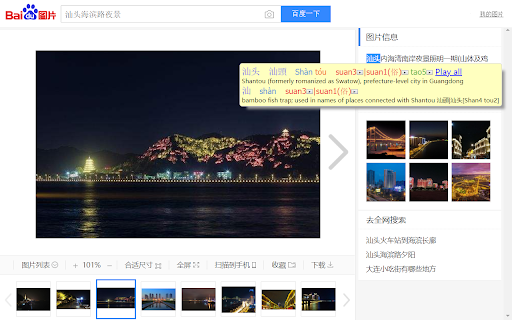
Teochew Pop-up Dictionary is based on Zhongwen: Chinese-English Dictionary (https://chrome.google.com/webstore/detail/zhongwen-chinese-english/kkmlkkjojmombglmlpbpapmhcaljjkde) [v. 5.4.3] by Christian Schiller. For non-Teochew usage info (like useful keyboard shortcuts), please refer to his page or the in-extension help. If Teochew functionality isn't needed at all, please directly use Zhongwen for Mandarin learning instead. Press the [潮] button to enable the extension and bring up the mini-help menu. Move the mouse outside the help menu to clear it or hit the [Esc] keyboard button. Mouse over Chinese to bring up the entry in a pop-up. For most users, you'll get the most mileage looking up a word in English on a translation website and then mousing over the Chinese characters. Each entry shows Simplified Chinese and then Traditional Chinese, if the characters are different, and then the Pinyin and Teochew Romanization with the definition underneath. The layout, including omitting Pinyin, can be customized on the options page. In many cases, a single Chinese character will have many Teochew pronunciations and the correct one for a multi-character word cannot be determined by software. In that scenario, the possible pronunciations are listed together. In order to help with the clutter that may cause, the Teochew pronunciations that belong to a character will be grouped by color. For example, in a three Chinese character word, all pronunciations associated with the first character will be red, with the second character green, and with the third blue. As it turns out, Teochew can differ from one location to the next where the amount of differences correlate strongly with geographical barriers. The Teochew in this extension is based on the prestige form found in the city center of Shantou and most widely reflects the Teochew spoken worldwide. Given that most users aren't familiar with Peng'im, almost every Teochew syllable also has a playable pronunciation. To facilitate learning the tone changes, a Play All button when clicked will play the audio for all characters with the tone changes. When a Chinese character has multiple pronunciations, the first pronunciation or a pronunciation marked with 训 or 俗 will be used. GOAL OF CHROME EXTENSION This extension intends to supplement those who already have a Teochew or Chinese background to expand and reinforce their vocabulary when talking with family or if they're studying Mandarin to leverage familiarity from already speaking Teochew. Confirm the correct Teochew pronunciation by asking a family member. My hope is that your Teochew and communication with family will both improve! [v. 2.0.0] - Extension download size reduced by 60% - "Play all" bug fixed when final character in a word does not have audio [v. 1.1.0] - Pop-up implemented using Shadow DOM to isolate the play buttons from the web page CSS - Dictionary updated with more Standard Chinese words

Zhongwen: Chinese-English Dictionary
Great tool for learning Chinese. Includes links to Chinese Grammar Wiki. Supports adding words to Skritter. The most popular Chinese popup dictionary. 100,000 active users worldwide. Quick, easy and simple to use. Includes useful tools for learners of Mandarin Chinese. (The source code is available on GitHub: https://github.com/cschiller/zhongwen) - Look up more than 100,000 words an expressions while reading Chinese web sites just by pointing at the words with your mouse. - Includes links to grammar and usage notes for more than 400 keywords - Skritter users can add new words to their study list with a simple keystroke. - Save words to a built-in word list - Create Anki flashcards by importing the text file exported from the built-in word list - Easily look up example sentences on tatoeba.org After installing the extension it can be turned on and off by clicking on the little icon in the upper right-hand corner of the browser. When it is activated, the word "ON" is displayed in red over the icon of the extension. Otherwise the extension is inactive. After activating it, simply go to a web page in Chinese and hover over the Chinese characters with your mouse to see a pop-up window open up showing the English translation along with the Pinyin romanization using the following colors: red = 1st tone, orange = 2nd tone, green = 3rd tone, blue = 4th tone. If simplified and traditional differ, then the simplified character is shown first. If you're typing Chinese text, like an email, for example, simply hovering over the characters might not work. In that case, simply hold down the Alt-key on your keyboard while hovering over the Chinese characters you just typed. In most cases, this will bring up the translation. This way you can proofread what you just typed. - Supports both traditional and simplified characters. - Includes the current version of the widely used CC-CEDICT Chinese English dictionary with more than 100,000 entries. - Displays Hanyu Pinyin along both the simplified and traditional characters. - Learners of Chinese can choose a large font size for the Chinese characters to help them clearly identify and memorize the different characters, especially those with a large number of strokes. On the options page of the extension you can choose between a large and a small font size. - As a learning aid it uses different colors for displaying the Pinyin syllables, depending on the tone of the Chinese character. The color scheme is the same as the one used by Skritter. Tone coloring can be deactivated on the options page. - Can be turned on and off with a single mouse-click. - Highlights the characters whose translation is displayed in the popup window. - Also supports keyboard navigation for translating the next character, the next word, or the previous character. - Bopomofo (Zhuyin) can be activated on the extension's options page. - Built-in Skritter support: Directly add words to a Skritter vocab list for studying. Just hit "s" on the keyboard. - Built-in word list that you can add your words to. Just type "r" to remember a word when the popup is shown, "Alt+W" to open the word list. Words can be exported from the word list to a file. - Look up example sentences on tatoeba.org by simply typing "t" while the popup window is shown. - Provides keyboard shortcuts 'Alt+1', 'Alt+3', 'Alt+4', 'Alt+5' and 'Alt+6' for looking up selected text in other online dictionaries (nciku, Dict.cn, iCIBA, MDBG and JuKuu). - In order to save a word to the internal word list, press "r" (for "remember") on your keyboard. To display the word list, use Alt+w, or "Open word list" from the context menu (right-click on the page). On the word list page, you can select the words you want to export to a file. You can then import them into other learning tools, like Anki. For power users: When reading an entire paragraph, you can easily navigate to the next word by hitting 'n' on the keyboard. The 'b' key takes you back to the previous character. You can also navigate to the next character (not the next word) by using the 'm' key. In addition, you can move the popup window around using the 'x' and the 'y' key, or move it to one of three alternate locations using the 'a' key. You can copy the dictionary entry of the currently selected characters to the clipboard by using the 'c' key on your keyboard. This is useful if you want to paste this data into a spreadsheet, for example. Each entry appears on a separate line, and the individual parts a dictionary entry consists of are tab separated, so they appear nicely aligned in separate rows and columns when pasting them into a spreadsheet. Note that using this copying method (using just 'c') differs from the standard copy-to-clipboard shortcut (Ctrl+C or Command+C) which would copy only the selected Chinese characters without the English translation. INPUT FIELDS AND TEXT AREAS Zhongwen also works in input fields and text areas. Simply hold down the Alt-key on your keyboard to see the dictionary entires, for example when composing an email.

CantoTranslate
This extension helps you learn Cantonese straight from your browser, by creating a Cantonese Popover Dictionary! Update 2.0 is finally here with massive improvements to the user experience and pronunciation accuracy! This extension will translate Cantonese (Traditional Chinese) to English, as well as provide text to speech so you can learn how to say the words in Cantonese! Update 2.0: * Uses an upgraded text to speech engine * Can select simplified characters as well as traditional * Will display multiple entries for a selected word for how it might be used in other contexts Version 1.0: * Double click or highlight and hover on Traditional Chinese to display a popup to show English meanings! * Click on the sound icon to hear how to say the word in Cantonese! * Extension will display jyutping, pinyin and also the Simplified Chinese equivalent word! Extension icon sourced from: https://www.flaticon.com/free-icons/hong-kong Dictionaries from: * CC-Canto: https://cantonese.org/download.html

HanViet: Từ điển Hán Việt
*Fork of the popular Zhongwen chrome extension by Christian Schiller, adapted for Vietnamese by Lien Hoang. ●────Nguồn từ điển: Nguồn Hán-Việt: Tổng hợp từ nhiều nguồn uy tín. Extension developer có biên tập lại để hiển thị các nghĩa của Hán tự đa âm tiết rõ ràng hơn. ──Hán Việt tự điển, Thiều Chửu, Hà Nội, 1942. ──Hán Việt Từ Điển Trích Dẫn Edition Paris © DTK 2006-2020 (được sự cho phép của chú Đặng Thế Kiệt). ──Từ điển Hán Việt, Trần Văn Chánh, NXB Trẻ, TP Hồ Chí Minh, 1999. Nguồn Hán-Anh: CEDICT Chinese English dictionary. Ngoài ra tiện ích cũng hộ trợ tra chéo trên nhiều từ điển trực tuyến uy tín: ──zdic.net Hán điển (https://www.zdic.net/). ──MOEdict của Bộ Giáo dục Đài Loan (https://www.moedict.tw/). ──hvdic của Thi Viện (https://hvdic.thivien.net/whv). ──Baidu (https://baike.baidu.com) -- thích hợp tra tên riêng, ngôn ngữ mạng. Trong quá trình xây dựng khó tránh khỏi sai sót. Các bạn vui lòng gửi góp ý đến lienhoangdev@gmail.com nhé. (Ứng dụng hoàn toàn phi lợi nhuận, làm vì nhu cầu sử dụng cá nhân nên phản hồi chậm trễ, mong mọi người thông cảm!) Chúc các bạn học tiếng Trung vui vẻ 😄😄 ●────Hướng dẫn cài đặt: 1. Cài extension từ Chrome Web Store https://chrome.google.com/webstore/detail/gilnapfdconbpkkigjdedkcilaalfnjb/. 2. Sau khi cài, bạn sẽ thấy biểu tưởng Hanviet (HV) trên thanh công cụ. Nhấn vào để bật (Sẽ thấy nút đỏ 'ON'). 3. Ứng dụng sẽ tự động chạy trên những trang mới mở. Trang đã mở sẵn thì cần load lại. (Nếu bạn không thấy ô định nghĩa hiện ra thì thử tắt trình duyệt rồi bật lại nhé.) ●────Links: Source code: https://github.com/alienngator/zhongwen The code for the Hanviet Chrome extension was forked almost verbatim from the popular Zhongwen extension by Christian Schiller https://chrome.google.com/webstore/detail//kkmlkkjojmombglmlpbpapmhcaljjkde. UI adapted for Vietnamese and Han Viet dictionary data compiled by Lien Hoang. Full credits: https://github.com/alienngator/zhongwen/blob/master/CREDITS.md.

简体繁体拼音广东话转换 Simplified/Traditional Chinese
Convert Automatically to Chinese (Pinyin, Cantonese GB2312 and BIG5) # A Chinese Tool This extension converts Chinese characters in the current tab to 1. Simplified Chinese (ZH-CN or GB2312) 2. Traditional Chinese (ZH-TW or BIG5) 3. Pinyin 4. Madarian 5. Cantonese Refresh the page if you do not see changes. Bugs reported to: dr.zhihua.lai@gmail.com You can also convert between Pinyin, Simplified Chinese, Traditional Chinese, Mandarin and Cantonese using the following online tool: https://justyy.com/tools/chinese-converter/ Support the development of this plugin: https://justyy.com/out/buymecoffee Crypto Accepted: https://buymeacoffee.com/y0btg5r/crypto-payment-accepted # Source Code https://github.com/DoctorLai/Simplified-and-Traditional-Chinese
