
olpihmabpjpllgmahlgiakkgaccigpfo
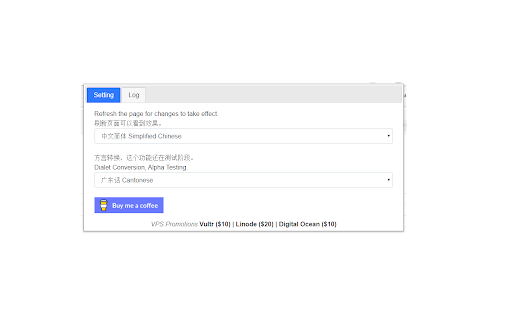


Convert Automatically to Chinese (Pinyin, Cantonese GB2312 and BIG5) # A Chinese Tool This extension converts Chinese characters in the current tab to 1. Simplified Chinese (ZH-CN or GB2312) 2. Traditional Chinese (ZH-TW or BIG5) 3. Pinyin 4. Madarian 5. Cantonese Refresh the page if you do not see changes. Bugs reported to: dr.zhihua.lai@gmail.com You can also convert between Pinyin, Simplified Chinese, Traditional Chinese, Mandarin and Cantonese using the following online tool: https://justyy.com/tools/chinese-converter/ Support the development of this plugin: https://justyy.com/out/buymecoffee Crypto Accepted: https://buymeacoffee.com/y0btg5r/crypto-payment-accepted # Source Code https://github.com/DoctorLai/Simplified-and-Traditional-Chinese

划词翻译
一站式划词 / 截图 / 网页全文 / 音视频 AI 翻译扩展,支持谷歌、DeepL、ChatGPT、百度、有道等 22 个国内外主流翻译服务,且均可用于全文翻译。能在 PDF 里使用。 划词翻译最初发布于 2013 年,距今已有 11 年历史,且仍在持续更新当中。 - 内置高准确度的谷歌翻译,能确保翻译结果跟 translate.google.com 是一致的。 - 鼠标划词功能,支持丰富的设置项,比如黑 / 白名单、关闭鼠标划词后通过快捷键来触发翻译等。 - 鼠标悬浮取词。 - 语音朗读。 - 内置独立翻译窗口,用于翻译浏览器外的文本。可以勾选持续监听剪切板,在任意程序复制文本即可自动弹出并翻译。 - 网页全文翻译,可以切换原文 / 译文 / 双语对照、自动开启等。 - 截图 / 图片翻译。 - 内置 PDF 阅读器,用于在 PDF 文件上实现鼠标划词、鼠标悬浮取词、截图翻译等功能。对 PDF 进行全文翻译的功能正在加紧开发中。 - 麦克风翻译。 - 音视频翻译(内测中),翻译网页中的音频 / 视频。 - 支持历史记录和收藏夹。收藏夹内容可以导出成多种文件,例如 json 和 csv。 完整功能介绍请查看 https://hcfy.ai/docs/guides/summary/ 英文单词会提供音标、详细释义、美音 / 英音朗读和词根,词根可以被点击,点击后即可查看词根的翻译结果。如果你需要,划词翻译也可以在划词后自动朗读被划选的单词。 默认使用弹窗在文本附近显示翻译结果,也可以固定在一处显示。 支持在任意程序里复制文本后,按下 Ctrl + Shfit + 1(macOS 将 Ctrl 改为 Command)查看翻译结果,无需切换回浏览器。这个快捷键是可以修改的。 支持历史记录和收藏夹,这两个功能也可以关闭。 如果你遇到了问题或者想要新的功能,可以在评论区留言,我基本上都会答复。官网(https://hcfy.ai)里也有其它反馈渠道。

Saladict - Pop-up Dictionary
Look up and translate selected text with multiple dictionaries, flexible selection modes, vocabulary notes, and PDF lookup. Saladict is a free, open-source browser extension for focused cross-language reading. Select text on a web page or in the built-in PDF viewer to open a dictionary panel with results from multiple dictionaries and translation services. Core features: - Look up and translate selected text on web pages and in PDFs. - Use flexible selection modes, including icon-triggered lookup, double-click lookup, modifier keys, and instant capture. - Combine multiple dictionaries and tune which dictionaries appear by language and word count. - Keep search history and save words to the vocabulary notebook. - Open a standalone quick-search panel for clipboard text or manual lookup. - Configure supported sync or export workflows with services such as WebDAV, Shanbay, Eudic, and Anki Connect. - Customize profiles, panel appearance, context menus, blacklists, whitelists, and keyboard shortcuts. Dictionary content and translation results come from the third-party dictionary services you enable.

CWS: Chinese Dictionary + Pinyin Annotator
The fastest Chinese dictionary. Lookups are instant. Look up the Chinese words of English words as well, and other great tools for learning Mandarin Chinese. The most configurable pinyin annotator, and zhuyin annotator too. "A study from 2008 showed that if spaces are placed after what are commonly regarded as words in Chinese, Chinese native speakers reading actually becomes faster and easier." -- Julesy https://www.youtube.com/watch?v=kCSe3dgGVMQ If the introduction of spacing provides measurable benefits for native Chinese readers, these benefits are likely to be even more pronounced for non-native readers. Learn Chinese by reading, listening, and practicing speaking Chinese with this CWS army knife. Oh, and you can practice writing with it too. Your personal pinyin tutor for every web page. Say goodbye to guessing games. Hello, effortless reading and learned words tracking. Turns any web page into your personal Chinese lesson. Never run out of reading material again. Text-to-speech, can read aloud sentences, phrases, words, characters, or pinyin/zhuyin. The audio can be played at a normal pace, or adjusted to a slower or faster speed to help you master pronunciation and improve your listening comprehension. Suddenly remembers a Chinese word (or needing to quickly know the Chinese word(s) of an English word(or phrase)) that is not in the page? CWS has a searchable dictionary (🔍 icon in CWS toolbar pop-up) that you can use in this situation. You can also use your device's microphone to search the word instead of typing it out. Set your own learning priorities by color-coding and/or annotating the words with Pinyin(or zhuyin/bopomofo), HSK, or Familiarity. You already know how to pronounce most words, and you need reinforcement on their tones? Just color-code or annotate the hanzi(Chinese character) with tone. You just want to learn the Chinese language without needing to learn hanzi? You can make CWS convert the hanzi to pinyin automatically. The learner decides what to learn based on his/her priorities, not the tool. Words separator for page and dictionary. Demystifies Chinese readability by words separation and pinyin(or zhuyin/bopomofo) annotation. Demystifies a Chinese character by separating it to its component characters, this can be done in the dictionary by right-clicking the character. Create Anki flashcards by importing the CSV file exported from Learning Tracking Sheet in Google Sheets. Learners can add more sentence mining sites by themselves without needing to ask the developer to update the list of 10 online sentence mining sites. Hover less, read more using the extension's sentence mode dictionary, saves a lot of time. Look up the meanings of a Chinese word(or phrase) while browsing the web. Lookup the Chinese word(s) of an English word(or phrase) while browsing the web. Easily change the hanzi's size and font of the page to make reading more relaxing. Quite configurable, and easy to use. Can be made to remember 3 websites visited for each word, this can be enabled in Recall and Rewrite modules. Catch tricky garden-path words even when using keyboard shortcut for word navigation. Unlike other Chinese dictionaries; in CWS, using keyboard shortcut for word navigation does not make it skip garden-path words. When your computer has built-in AI and the browser supports it, dual subtitles are available for leading video sites, such as Netflix, YouTube, Viki, iQIYI etc Read the complete functionalities of CWS in https://chinese-words-separator.github.io/ HOW TO USE THE DICTIONARY: Simply go to a web page in Chinese. Then to use the dictionary, hover the mouse cursor over any Chinese words (i.e., Chinese characters or even Chinese words that are not using pure Chinese characters, e.g., 3Q, AA制) to pop up the sticky note-like dictionary that shows the English translation of the Chinese word(or phrase) along with its pinyin (or zhuyin/bopomofo) romanization; on phone or tablet, just tap the Chinese word or sentence(or phrase). HOW TO USE THE WORD OR CHARACTER SEPARATOR IN THE DICTIONARY: Right-click the word(or phrase) or character in the dictionary. On phone/tablet, swipe the word(or phrase) or character to the right. HOW TO USE THE WORDS SEPARATOR IN THE PAGE: Choose any of the following: Beginner, Lower-intermediate, Intermediate, Advanced, or configure it in More Settings (⚙ icon in CWS pop-up toolbar) screen. To make the extension work on Android, install Kiwi browser on your Android device: https://play.google.com/store/apps/details?id=com.kiwibrowser.browser Note: Kiwi browser is discontinued since January 2025, some of Kiwi's code is now integrated to Microsoft Edge Canary Android browser. Follow the instruction here to install extensions on Microsoft Edge Canary Android browser: https://github.com/kiwibrowser/src.next. CWS's extension id on Microsoft Edge Add-ons store is peglphdebebicogkcpinemlaanfabeip If installing extensions on Microsoft Edge Canary Android browser is cumbersome, you can opt to use Lemur browser instead on your Android device: https://play.google.com/store/apps/details?id=com.lemurbrowser.exts To use the extension on Safari on iOS, iPadOS, and macOS, install CWS from: https://apps.apple.com/app/chinese-words-separator/id1598790017 For Chinese-Vietnamese, Chinese-French, Chinese-German, Chinese-Hungarian definitions, follow these instructions: https://github.com/chinese-words-separator/chinese-words-separator.github.io/issues/27#issuecomment-2235239809 * Optimized the words separator's processor, it is now using just a 160 KB memory lookup to perform a task. In the past, it was reading the word's HSK level from a big file which causes the words separator memory consumption to spike up to 100 MB; now the words HSK level info is embedded directly into the code, which is just 160 KB in size * Optimized memory footprint for CWS's dictionary, it can now be just 26 MB. CWS's dictionary can now be made significantly more lightweight than other dictionaries despite CWS having over 180K words (others have 120K words). This can be made possible by making CWS read the dictionary from the database instead of from file. To configure CWS to read the dictionary from the database instead of from file, go to CWS's Options screen and click the button labeled *Save the dictionary to database*. With database use, the dictionary's memory footprint will be reduced from 108 MB down to 26 MB Dictionary sources: * CC-CEDICT - Over 120K words * CedPane - Over 70K words, plenty of names and proper nouns If you need to contribute word definitions, prefer contributing to CC-CEDICT: https://cc-cedict.org/editor/editor.php?handler=ListChanges If you need to contribute names and proper nouns, prefer contributing to CedPane: https://github.com/ssb22/CedPane Why the name "Chinese Words Separator"? This tool began with a singular focus: helping learners bridge the gap between individual characters and modern multi-character words. Since virtually accurate word segmentation is the foundation of literacy, it became the perfect 'engine' to build upon. Today, it's a full-featured learning suite: * Instant Dictionary: Quick Pinyin and definitions without leaving the page. * Vocabulary Tracking: Mark and monitor learned words. * Frequency Analytics: See statistics on commonly occurring terms. * Familiarity Detection: Tracks your familiarity with each word. We're outgrowing our name! Since this tool does so much more now, we're looking for a new title. We know "Chinese Words Separator" is a mouthful, help us find a name that's as smart as the language learning tool itself! Got an idea? We're not just looking for name suggestions; we also welcome new feature ideas! Leave your thoughts in the support tab or review section.

為什麼你們就是不能加個空格呢?
自動在網頁的中文和英文、數字、符號之間插入空白。(攤手)沒辦法,處女座都有強迫症。 如果你跟我一樣,每次看到網頁上的中文字和英文、數字、符號擠在一塊,就會坐立難安,忍不住想在它們之間加個空格。這個 Google Chrome 外掛正是你在網路世界走跳所需要的東西,它會自動替你在網頁中所有的中文字和半形的英文、數字、符號之間插入空白。 漢學家稱這個空白字元為「盤古之白」,因為它劈開了全形字和半形字之間的混沌。另有研究顯示,打字的時候不喜歡在中文和英文之間加空格的人,感情路都走得很辛苦,有七成的比例會在 34 歲的時候跟自己不愛的人結婚,而其餘三成的人最後只能把遺產留給自己的貓。畢竟愛情跟書寫都需要適時地留白。 與大家共勉之。 更新內容: - 各位觀眾!Paranoid Text Spacing 演算法 v7 橫空出世! - 會自動判斷某些元素是不是被 CSS 隱藏來決定要不要加空格 - 不會把半形的標點符號轉成全形了 - 史詩級性能提升! - 把 XPath 換成 TreeWalker,快他媽 5 倍! - 比較慢的操作都丟到 requestIdleCallback(),內容太多的網站終於不卡了! - 姍姍來遲,終於支援 Manifest V3 啦 Star on GitHub: https://github.com/vinta/pangu.js
