
idagpklnbkefmgdajpopkngfnnjiiadj


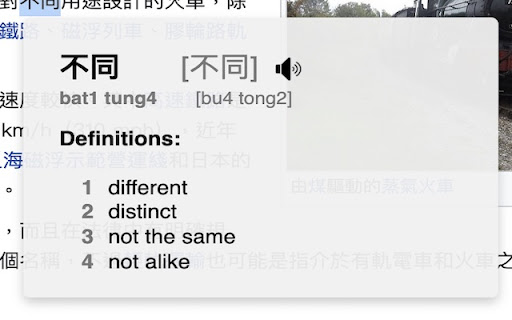
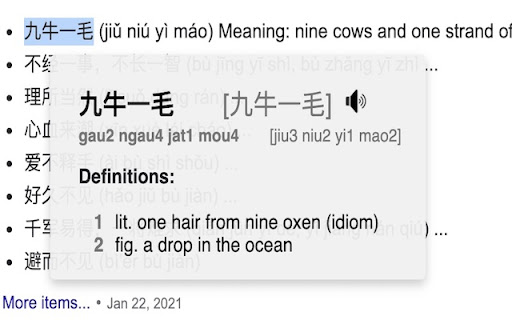
This extension helps you learn Cantonese straight from your browser, by creating a Cantonese Popover Dictionary! Update 2.0 is finally here with massive improvements to the user experience and pronunciation accuracy! This extension will translate Cantonese (Traditional Chinese) to English, as well as provide text to speech so you can learn how to say the words in Cantonese! Update 2.0: * Uses an upgraded text to speech engine * Can select simplified characters as well as traditional * Will display multiple entries for a selected word for how it might be used in other contexts Version 1.0: * Double click or highlight and hover on Traditional Chinese to display a popup to show English meanings! * Click on the sound icon to hear how to say the word in Cantonese! * Extension will display jyutping, pinyin and also the Simplified Chinese equivalent word! Extension icon sourced from: https://www.flaticon.com/free-icons/hong-kong Dictionaries from: * CC-Canto: https://cantonese.org/download.html

Speech to Text by cantonese.ai
把WhatsApp 語音訊息轉換為文字,可以幫助您節省聽取的時間,提高工作效率! Turn whatspp audio messages into text, saving you time to listen and boost your… 把WhatsApp 語音訊息轉換為文字,可以幫助您節省聽取的時間,提高工作效率! Turn whatspp audio messages into text, saving you time to listen and boost your productivity!

Chinese Tools
Useful Chinese learning tools are available in this extension, allowing you to convert selected Chinese text into Pinyin/Zhuyin, Traditional/Simplified versions, or English. Additionally, you can generate a vocabulary list. Tools provided in this extension includes: - Chinese to Pinyin/Zhuyin conversion - Traditional/Simplified Chinese conversion - Vocabulary list generator - Dictionary lookup - Translate to English - Chinese text to speech How to use: Select some Chinese text, right click, move to Chinese Tools, and select tool you want to use. Features: Chinese to Pinyin/Zhuyin conversion 1. Context-based Pinyin Correction: The tool will analyze the context of each character and suggest the correct Pinyin. Example: "行长认为方案是可行的" will be converted into "háng zhăng rèn wéi fāng àn shì kĕ xíng de," considering the different Pinyin results for the character "行" based on the context. 2. Support both Simplified Chinese and Traditional Chinese; 3. Translation result can be in Pinyin or Zhuyin (Bopomofo) or pinyin tone mark only; 4. Provide pronunciation for each character/word and paragraph; 5. Support export as EPUB, Mobi, PDF, Word document; 6. Built-in function to generate vocabulary list; 7. Support translating from Chinese to more than 30 languages; 8. Displays the boundaries of Chinese words, making it easier to read and understand the text; Traditional/Simplified Chinese conversion 1. Context based conversion. For example. 皇后发现后天是一个好日子 will be converted into 皇后發現後天是一個好日子, you can find based on the context, character 后 is get different treatments. 2. Terminologies conversion supported. For example, 软件 (ruanjian) in Simplified Chinese will be converted to 軟體 (ruanti) in Traditional Chinese. Dictionary lookup 1. Allow search by Simplified Chinese / Traditional Chinese / English word / Pinyin Chinese handwriting recognizer. Enter Chinese characters just by drawing them with your mouse/finger. 2. Provide Pinyin table, which lists all Pinyin combination used in standard Mandarin 3. Print and export details to Word document 4. Generate handwriting practice sheet

Pinyin Web
Parallel as-you-browse pronunciation hints for Chinese, covering Mandarin (Pinyin), Cantonese (Yale, Sidney Lau or Jyutping) or… Parallel as-you-browse pronunciation hints for Chinese, covering Mandarin (Pinyin), Cantonese (Yale, Sidney Lau or Jyutping) or Teochew, with word grouping, optional brief English as third line (also popups), fast open-source local processing and context-based handling of ambiguous readings. This is a port of the Android apps Pinyin Web & EPUB, Cantonese Web & EPUB and Teochew Web & EPUB.

CWS: Chinese Dictionary + Pinyin Annotator
The fastest Chinese dictionary. Lookups are instant. Look up the Chinese words of English words as well, and other great tools for learning Mandarin Chinese. The most configurable pinyin annotator, and zhuyin annotator too. "A study from 2008 showed that if spaces are placed after what are commonly regarded as words in Chinese, Chinese native speakers reading actually becomes faster and easier." -- Julesy https://www.youtube.com/watch?v=kCSe3dgGVMQ If the introduction of spacing provides measurable benefits for native Chinese readers, these benefits are likely to be even more pronounced for non-native readers. Learn Chinese by reading, listening, and practicing speaking Chinese with this CWS army knife. Oh, and you can practice writing with it too. Your personal pinyin tutor for every web page. Say goodbye to guessing games. Hello, effortless reading and learned words tracking. Turns any web page into your personal Chinese lesson. Never run out of reading material again. Text-to-speech, can read aloud sentences, phrases, words, characters, or pinyin/zhuyin. The audio can be played at a normal pace, or adjusted to a slower or faster speed to help you master pronunciation and improve your listening comprehension. Suddenly remembers a Chinese word (or needing to quickly know the Chinese word(s) of an English word(or phrase)) that is not in the page? CWS has a searchable dictionary (🔍 icon in CWS toolbar pop-up) that you can use in this situation. You can also use your device's microphone to search the word instead of typing it out. Set your own learning priorities by color-coding and/or annotating the words with Pinyin(or zhuyin/bopomofo), HSK, or Familiarity. You already know how to pronounce most words, and you need reinforcement on their tones? Just color-code or annotate the hanzi(Chinese character) with tone. You just want to learn the Chinese language without needing to learn hanzi? You can make CWS convert the hanzi to pinyin automatically. The learner decides what to learn based on his/her priorities, not the tool. Words separator for page and dictionary. Demystifies Chinese readability by words separation and pinyin(or zhuyin/bopomofo) annotation. Demystifies a Chinese character by separating it to its component characters, this can be done in the dictionary by right-clicking the character. Create Anki flashcards by importing the CSV file exported from Learning Tracking Sheet in Google Sheets. Learners can add more sentence mining sites by themselves without needing to ask the developer to update the list of 10 online sentence mining sites. Hover less, read more using the extension's sentence mode dictionary, saves a lot of time. Look up the meanings of a Chinese word(or phrase) while browsing the web. Lookup the Chinese word(s) of an English word(or phrase) while browsing the web. Easily change the hanzi's size and font of the page to make reading more relaxing. Quite configurable, and easy to use. Can be made to remember 3 websites visited for each word, this can be enabled in Recall and Rewrite modules. Catch tricky garden-path words even when using keyboard shortcut for word navigation. Unlike other Chinese dictionaries; in CWS, using keyboard shortcut for word navigation does not make it skip garden-path words. When your computer has built-in AI and the browser supports it, dual subtitles are available for leading video sites, such as Netflix, YouTube, Viki, iQIYI etc Read the complete functionalities of CWS in https://chinese-words-separator.github.io/ HOW TO USE THE DICTIONARY: Simply go to a web page in Chinese. Then to use the dictionary, hover the mouse cursor over any Chinese words (i.e., Chinese characters or even Chinese words that are not using pure Chinese characters, e.g., 3Q, AA制) to pop up the sticky note-like dictionary that shows the English translation of the Chinese word(or phrase) along with its pinyin (or zhuyin/bopomofo) romanization; on phone or tablet, just tap the Chinese word or sentence(or phrase). HOW TO USE THE WORD OR CHARACTER SEPARATOR IN THE DICTIONARY: Right-click the word(or phrase) or character in the dictionary. On phone/tablet, swipe the word(or phrase) or character to the right. HOW TO USE THE WORDS SEPARATOR IN THE PAGE: Choose any of the following: Beginner, Lower-intermediate, Intermediate, Advanced, or configure it in More Settings (⚙ icon in CWS pop-up toolbar) screen. To make the extension work on Android, install Kiwi browser on your Android device: https://play.google.com/store/apps/details?id=com.kiwibrowser.browser Note: Kiwi browser is discontinued since January 2025, some of Kiwi's code is now integrated to Microsoft Edge Canary Android browser. Follow the instruction here to install extensions on Microsoft Edge Canary Android browser: https://github.com/kiwibrowser/src.next. CWS's extension id on Microsoft Edge Add-ons store is peglphdebebicogkcpinemlaanfabeip If installing extensions on Microsoft Edge Canary Android browser is cumbersome, you can opt to use Lemur browser instead on your Android device: https://play.google.com/store/apps/details?id=com.lemurbrowser.exts To use the extension on Safari on iOS, iPadOS, and macOS, install CWS from: https://apps.apple.com/app/chinese-words-separator/id1598790017 For Chinese-Vietnamese, Chinese-French, Chinese-German, Chinese-Hungarian definitions, follow these instructions: https://github.com/chinese-words-separator/chinese-words-separator.github.io/issues/27#issuecomment-2235239809 * Optimized the words separator's processor, it is now using just a 160 KB memory lookup to perform a task. In the past, it was reading the word's HSK level from a big file which causes the words separator memory consumption to spike up to 100 MB; now the words HSK level info is embedded directly into the code, which is just 160 KB in size * Optimized memory footprint for CWS's dictionary, it can now be just 26 MB. CWS's dictionary can now be made significantly more lightweight than other dictionaries despite CWS having over 180K words (others have 120K words). This can be made possible by making CWS read the dictionary from the database instead of from file. To configure CWS to read the dictionary from the database instead of from file, go to CWS's Options screen and click the button labeled *Save the dictionary to database*. With database use, the dictionary's memory footprint will be reduced from 108 MB down to 26 MB Dictionary sources: * CC-CEDICT - Over 120K words * CedPane - Over 70K words, plenty of names and proper nouns If you need to contribute word definitions, prefer contributing to CC-CEDICT: https://cc-cedict.org/editor/editor.php?handler=ListChanges If you need to contribute names and proper nouns, prefer contributing to CedPane: https://github.com/ssb22/CedPane Why the name "Chinese Words Separator"? This tool began with a singular focus: helping learners bridge the gap between individual characters and modern multi-character words. Since virtually accurate word segmentation is the foundation of literacy, it became the perfect 'engine' to build upon. Today, it's a full-featured learning suite: * Instant Dictionary: Quick Pinyin and definitions without leaving the page. * Vocabulary Tracking: Mark and monitor learned words. * Frequency Analytics: See statistics on commonly occurring terms. * Familiarity Detection: Tracks your familiarity with each word. We're outgrowing our name! Since this tool does so much more now, we're looking for a new title. We know "Chinese Words Separator" is a mouthful, help us find a name that's as smart as the language learning tool itself! Got an idea? We're not just looking for name suggestions; we also welcome new feature ideas! Leave your thoughts in the support tab or review section.
