
aicnjppelckphnaiohdpicomfaedhnfk
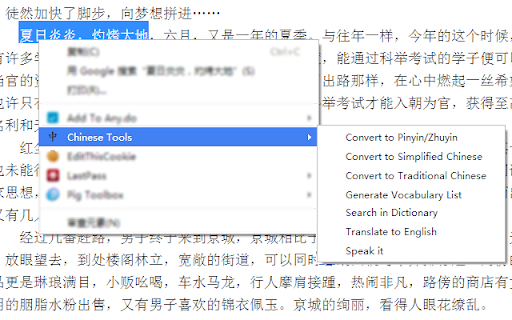

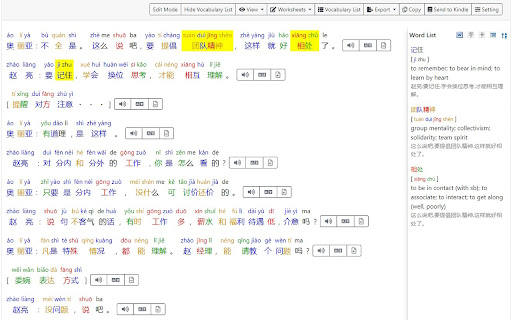
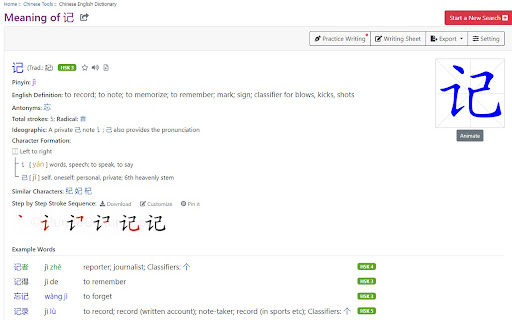
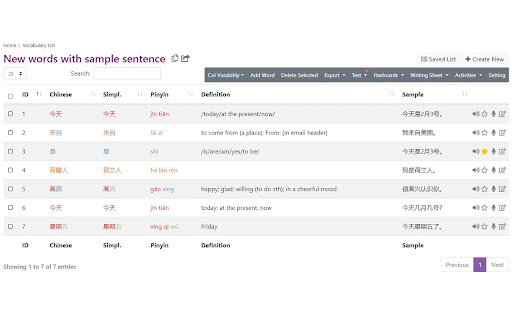
Useful Chinese learning tools are available in this extension, allowing you to convert selected Chinese text into Pinyin/Zhuyin, Traditional/Simplified versions, or English. Additionally, you can generate a vocabulary list. Tools provided in this extension includes: - Chinese to Pinyin/Zhuyin conversion - Traditional/Simplified Chinese conversion - Vocabulary list generator - Dictionary lookup - Translate to English - Chinese text to speech How to use: Select some Chinese text, right click, move to Chinese Tools, and select tool you want to use. Features: Chinese to Pinyin/Zhuyin conversion 1. Context-based Pinyin Correction: The tool will analyze the context of each character and suggest the correct Pinyin. Example: "行长认为方案是可行的" will be converted into "háng zhăng rèn wéi fāng àn shì kĕ xíng de," considering the different Pinyin results for the character "行" based on the context. 2. Support both Simplified Chinese and Traditional Chinese; 3. Translation result can be in Pinyin or Zhuyin (Bopomofo) or pinyin tone mark only; 4. Provide pronunciation for each character/word and paragraph; 5. Support export as EPUB, Mobi, PDF, Word document; 6. Built-in function to generate vocabulary list; 7. Support translating from Chinese to more than 30 languages; 8. Displays the boundaries of Chinese words, making it easier to read and understand the text; Traditional/Simplified Chinese conversion 1. Context based conversion. For example. 皇后发现后天是一个好日子 will be converted into 皇后發現後天是一個好日子, you can find based on the context, character 后 is get different treatments. 2. Terminologies conversion supported. For example, 软件 (ruanjian) in Simplified Chinese will be converted to 軟體 (ruanti) in Traditional Chinese. Dictionary lookup 1. Allow search by Simplified Chinese / Traditional Chinese / English word / Pinyin Chinese handwriting recognizer. Enter Chinese characters just by drawing them with your mouse/finger. 2. Provide Pinyin table, which lists all Pinyin combination used in standard Mandarin 3. Print and export details to Word document 4. Generate handwriting practice sheet

Pinyin Overlay | 拼音叠加
Pinyin Overlay is a Chrome extension that overlays Pinyin transliterations directly above Chinese characters on web pages, facilitating reading and language learning. Features -Right click to convert Chinese characters on a webpage to Pinyin. -Displays Pinyin above Chinese characters without altering the webpage layout. -Supports Simplified and Traditional characters.

简体繁体拼音广东话转换 Simplified/Traditional Chinese
Convert Automatically to Chinese (Pinyin, Cantonese GB2312 and BIG5) # A Chinese Tool This extension converts Chinese characters in the current tab to 1. Simplified Chinese (ZH-CN or GB2312) 2. Traditional Chinese (ZH-TW or BIG5) 3. Pinyin 4. Madarian 5. Cantonese Refresh the page if you do not see changes. Bugs reported to: dr.zhihua.lai@gmail.com You can also convert between Pinyin, Simplified Chinese, Traditional Chinese, Mandarin and Cantonese using the following online tool: https://justyy.com/tools/chinese-converter/ Support the development of this plugin: https://justyy.com/out/buymecoffee Crypto Accepted: https://buymeacoffee.com/y0btg5r/crypto-payment-accepted # Source Code https://github.com/DoctorLai/Simplified-and-Traditional-Chinese

NJStar Chinese Website Convertor
Automatically Convert Simplified Chinese Web Page to Traditional, or Convert Traditional Chinese Web Page to Simplified. Automatically convert a simplified Chinese webpage to traditional Chinese page, or convert a traditional Chinese webpage to simplified Chinese page.

New TongWenTang
Convert characters between Chinese Simplified and Chinese Traditional New Tong Wen Tang is a Browser Extension that provide functions for convert between Simplicity Chinese and Traditional Chinese.
