
jhjhjkoadlkanedlnhnhlihpmjbmnine
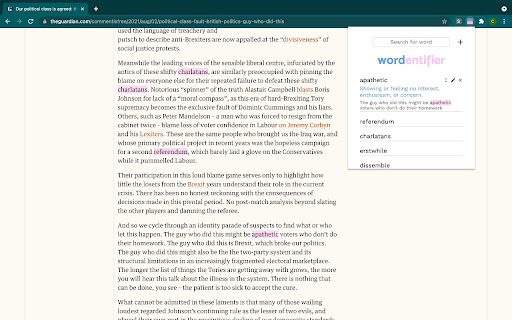
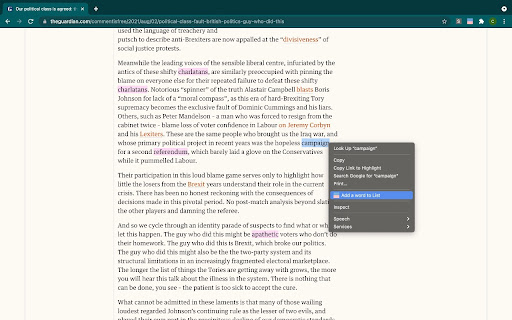
Improve vocabulary by automatically highlighting every word on your vocabulary list every time it appears on the website you visit. Wordentifier is a perfect tool to help you memorize vocabulary and familiarize with them in different contexts. Works in any language. The extension has three main functions: 1. You can add, edit, and delete words from your custom vocabulary list. You can add the word, its definition, and an example sentence on your list. 2. You can easily add words by right-clicking on the word on a website and click "Add a word to List." It will not only save the word on your vocabulary list but also automatically add its definition from a dictionary. 3. The extension highlights every instance of the words on your vocabulary list whenever they appear on the website you visit. ** Updates ** 0.0.0.2 - Fixed a bug on highlighting multiple words on the same paragraph, added the expand all button, added a highlight color picker functionality. 0.0.0.3 - Fixed some bugs on highlight color picker functionality. 0.0.0.5 - Added a survey form 0.0.0.6 - Updated survey form

Vocab Wallet - Your Online Word Bank and Vocabulary Builder
Vocab Wallet lets you effortlessly save, organize, and learn new words as you browse the web. Key Features: - Instant Word Capture: Right-click any word to save it instantly. - Automatic Word Lookup: Definitions, synonyms, and relevant word data is automatically gathered in the background—so you don't have to. - 🆕 ✨ Download CSV: Export any list as a CSV file for offline review, sharing, or importing into other tools. - Custom Word Lists: Organize words into personalized lists for focused study and review. - 🆕 ✨ Interactive Flashcards: Turn any list into self‑grading flashcards—mark words “Correct” or “Forgot,” track your progress, and drill only the ones you miss. - 🆕 🏷️ Smart Tag Filters: Use custom tags to organize and filter your list by topic, theme, or category—perfect for focused studying, organization and review. - Companion Website: Visit VocabWallet.com to explore curated vocabulary lists and expand your lexicon! Whether you're a student, professional, or language learner, Vocab Wallet is your go-to tool for building your vocabulary.

Dictozo - Save and Learn new words by auto-highlighting
Dictozo helps you memorize words by highlighting them along with their definitions or translations in webpages It is tough to recall the meaning of an English word you searched a few days ago. When you see it again you have to search the meaning again and the cycle goes on. Dictozo lets you save definitions and translations of those words and highlights them on every next occurrence on any webpages. It improves your reading ability and builds a strong vocabulary. Say goodbye to the frustration of forgotten words and embrace a more enriching reading journey with Dictozo. - Added URL and website blocker - Improved settings page - Improved dashboard - More storage for savings words - Bugs Fixes

GRE Words Highlighter
Scans and highlights the GRE words in a webpage on demand. Contains over 2000 words from three popular lists 1. To Start Highlighting On a page - " Ctrl + Shift + H/h " 2. To Edit Preference of Lists (Options Page)- "Ctrl + Shift + L/l " Note - Above actions can also be done manually by using the popup page pin the extension to the toolbar for ease of use (Refer Images above) UPDATE NOTES: - Version 2.5/2.6 - Added meanings, Now you can see the meanings of the highlighted word when hovering over it. - Added the GregMat List of words to the collection of words. So now users have option to choose from 4 lists. - You can edit your preferences and highlight words only from the list(s) of your choice from the Options Page. - Hover over the highlighted word to find extra information. You can also click on the word to get meanings and more via Google's web dictionary. - Different forms of the words are also highlighted to give you a complete experience. Eg - " Burgeoning " ( GRE Word is "burgeon"). - Please note that the extension does not read a webpage content without you enabling it either manually or using the shortcuts - Kindly avoid invoking the extension on the same webpage more than once. If you reload the extension, please also refresh any webpages already open you want to highlight from. - The extension may take more time if the webpage is very large. Consider a time of 3-4 seconds to finish highlighting for lengthy pages. - The extension does not scan hyperlinks to maintain the posture of the webpage. - The extension might not work in certain Google pages like the Home page. Please refer Chrome's policy on that.

Buttress Vocabulary
Strengthen your vocabulary while reading things on the browser. Coming across new words is easy and even knowing its definition. However, memorizing the words that you read doesn't come naturally. You have to work on it. This extension will ease this job. It lets you see the definition of a double-clicked word along with its pronunciation. However, this is not a striking feature as couple of other apps do it right now. You can quickly see all the words that you have looked up each day. Apart from a dictionary app it is also a vocabulary builder. Like other apps it doesn't inundates you with so many words that you have never seen. Memorizing the words for which you have a context will be much easier. WE DON'T HAVE ACCESS TO THE WORDS YOU LOOKUP!
