
dbhjkdbgppohbeioaklillegelmcaimh

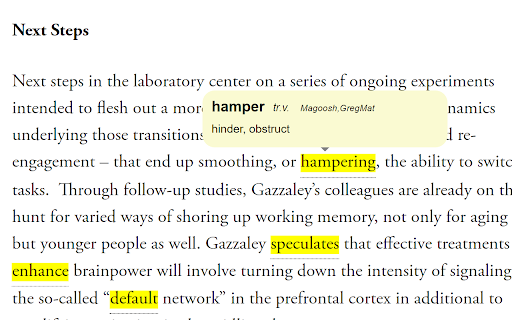

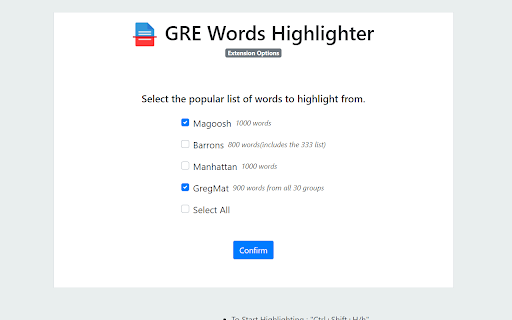
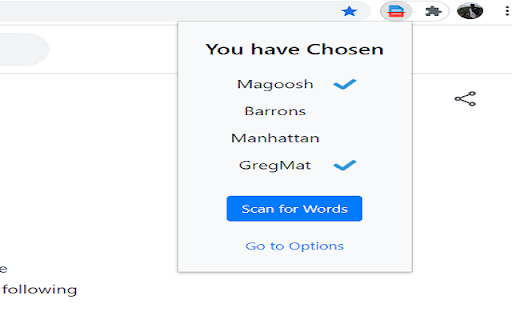
Scans and highlights the GRE words in a webpage on demand. Contains over 2000 words from three popular lists 1. To Start Highlighting On a page - " Ctrl + Shift + H/h " 2. To Edit Preference of Lists (Options Page)- "Ctrl + Shift + L/l " Note - Above actions can also be done manually by using the popup page pin the extension to the toolbar for ease of use (Refer Images above) UPDATE NOTES: - Version 2.5/2.6 - Added meanings, Now you can see the meanings of the highlighted word when hovering over it. - Added the GregMat List of words to the collection of words. So now users have option to choose from 4 lists. - You can edit your preferences and highlight words only from the list(s) of your choice from the Options Page. - Hover over the highlighted word to find extra information. You can also click on the word to get meanings and more via Google's web dictionary. - Different forms of the words are also highlighted to give you a complete experience. Eg - " Burgeoning " ( GRE Word is "burgeon"). - Please note that the extension does not read a webpage content without you enabling it either manually or using the shortcuts - Kindly avoid invoking the extension on the same webpage more than once. If you reload the extension, please also refresh any webpages already open you want to highlight from. - The extension may take more time if the webpage is very large. Consider a time of 3-4 seconds to finish highlighting for lengthy pages. - The extension does not scan hyperlinks to maintain the posture of the webpage. - The extension might not work in certain Google pages like the Home page. Please refer Chrome's policy on that.

Highlight Magic
*The tool went through a slight overhaul, please check the "What's new 1.1.3" below! - Assign color for each word - Import from raw list or text file - Group your words into lists for easier organization - Sync function to transfer your lists across devices. - Import/Export your lists. - Sort your lists *new* - Quickfind, ctrl-shift-f to bring up quickfind and search instantly, save later. - Each word in the list can be case sensitive - Can use regular expression tokens - Blacklist sites and pages - Can match complete words or part of a word - Stylize your words in Style tab - Dark mode If you have any issues please ask & I will help you out! If you found a bug report it and I'll fix it as soon as possible! Ideas how to make the extension better are encouraged! What's new: 1.1.5: Features - Added expand button on lists to view highlight stats - Added a save button that enables you to store changes without having to press enter - Added sorting methods (Ascending, Descening, By background color, By text color) - Added a warning in custom settings that when enabled the global settings are overriden - Removed character limit in excluded/exclusive lists Bug Fixes - Badge indicating number of words highlighted now works more consistently and less prone to breaking - Fixed issue where if single color is selected you couldn't change the color individually for each word - Effectively inform users that global settings won't be enabled for lists with custom settings enabled - Clear filter when closing lists - Toggling the tool or a list off will less likely break a page and also work a bit faster - Fixed a bug where changing the title of a list, returning to list menu and clicking the same list, the sheet would show the old one 1.1.4: Some bug fixes that manifested when updating from 1.1.2 to 1.1.3. 1.1.3: -Optimized highlighting and fix slowdowns when new elements are added to the page. - Added import options for raw lists and text files - Can copy (crtl-c) & paste (ctrl-v) words directly to the list editor - Press ctrl-a to select all visible words - Filter words - Made all lists a single random color by default, can be changed in style settings - New style tab that let's you customize your highlighted words - Dark mode! - Made some stylistic changes to the GUI to make it a bit more modern looking 1.1.2: Bug fix: Replaced additional event paths that broke the mass action option when ticking the a word's checkbox. - Toggling a list on/off now disables/enables the highlighting in the active tab. 1.1.1: Bug Fix - event path property is undefined, replaced event paths with composedPath method. 1.1.0: - Lists are now available! Group your words into lists. - Sync function to transfer your lists across devices. - Import/Export your lists. - Quickfind, ctrl-shift-f to bring up quickfind. - Bug Fix: contentEditable incompatibility elements no longer crash page. - Highlights in iframes. Extension icon and promotional tiles by Maria Gregoriou behance.net/MariaGregoriou

Multi Highlight
Efficiently and flexibly highlight your online reading. Are you tired of losing track of important information in your online reading? Multi Highlight is here to help! With this powerful and efficient chrome extension, you can easily highlight all your user-specified words in webpages with beautiful colors. Multi Highlight can do real-time highlighting as you type, automatically re-highlight your word list when the webpage content changes or when the page is loaded, and it accepts custom word separators. You can save your user-specified word list, do whole word and case-sensitive searches, and even group words by colors. With Multi Highlight, you can stay focused and efficient while reading online. It's perfect for students and professionals who regularly read online content for studying or work. Try Multi Highlight today and take your online reading to the next level! 2023 February * Adapt to manifest V3 * Refresh words (1) when textbox is focused but inactive for short a period (2) when popup is closed * Fix style broke in browser's built-in page and in pages that loaded before extension installation. In these pages, disable textbox and show notification * Update UI 2022 September * Feature Auto-Rehighlight * Bug fix: rehighlight words when extension is softly disabled * Bug fix: webpage broke if website customize element 2022 June * Improve adaptability -- add support to highlight asynchronous text (e.g. AJAX content) * Fix option page's saving issue 2022 January * Support nested highlight * Bug fix: innerHTML deleted unintentionally * Bug fix: Word boundary not working for keyword-list * DEV Change keyword data structure and update the version to "2.8.0" due to * Feature Re-highlighting. * Feature Toggle highlighting. * Improve stability * Adjust interface * Fix bug (show current keyword list right after popup; properly remove highlights when NewLineNewColor mode is on) 2021 December * Add options: Whole words only, Casesensitive * Update the highlight lib from [npmjs](https://www.npmjs.com/package/jquery-highlight) * Modified: Handle the options change in one callback function. * Modified: Use 2D array to store the keywords in `NewColorNewLine` mode. * Bugfix: Keywords removal should not remove the container. * Add keywords display zone * Check wheter the page contains the keyword(s) or not, if not, gray it * `Ctrl+Click` to delete the correspond keyword 2019 May * Minimize extension size 2019 January * Highlight any strings (not just full word) * Add Instant Search (highlight on-the-fly) * Add customizable delimiter * Make Highlight Words individual to each tab * UI changes * Add Ctrl+Shift+F as default shortcut 2018 December * Organize code * Change UI (based on Multi-Highlight) * Change extension icon

Burning Vocabulary - Learn words from reading
Master vocabulary effortlessly with the full cycle process. Mark and save the words you don't understand while surfing the web. The Burning Vocabulary will help you learn their meanings and memorize them effortlessly by associating them with paragraph snapshots, word audio, and translations in various contexts such as events, news, social media, tech posts, and articles. ★ Mark and highlight words on any website - Highlight words on any web pages. - Highlight words of Subtitles on Youtube/TED. - Highlight words on PDF File (online and local PDF file). - The saved words will be marked automatically while on other pages. ★ Very user-friendly Use Right-clicking, shortcuts, or double-clicking to mark words then shows a professional definition pop-up instantly. Save-automatically. Just focus on your reading. ★ Manage words with Vocabulary Calendar The Vocabulary Calendar shows words you marked day by day. You can feel the improvement in your vocabulary every day. You can delete a word if you are familiar. Export and import vocabulary. ★ Sync on your multiple devices Login on your multiple devices with license key. The marked word will be sync-auto in your multiple devices. The web App shows the marked words and sentence context. ★ Flashcards and Spaced Repetition Use the Flashcards and Spaced Repetition to practice your marked words. Use the Web App Flashcards to learn the marked words in anywhere. ★ Paragraph Sentence Snapshot Auto-generating paragraph snapshot so that you can recall words more easily through sentence snapshot. Mark a word by clicking, then save a word to the Vocabulary Calendar, practice a word with Flashcard, then apply a word to your daily reading with auto-highlighted. The process becomes more and more familiar with new words and memorize it forever. Privacy Policy - We respect your privacy. https://burningvocabulary.com/privacy-policy.html

HighVocab: Vocabulary Builder
Build English vocabulary while you browse. Highlights, translation, flashcards & quiz. Used for IELTS, TOEFL, GRE & academic study. HighVocab — Learn English While You Browse Whether you’re studying for IELTS, TOEFL, GRE, or just want to level up your academic, intermediate, or advanced vocabulary, HighVocab makes it easy and fun to improve your English while you browse. Save words from any webpage, study them with flashcards and quizzes, and actually remember them. How it works: 🔍 Highlights — saved words glow on every page. Hover for meaning, pronunciation, and examples instantly ➕ One-click save — click any word to save it with auto-translation 🧠 Flashcards & Quiz — study your saved words until they stick ✍️ Writing Help — AI fixes your English or composes replies using your vocabulary 🔥 Daily streak — 3 words a day keeps the forgetting away Explore our hand-curated dictionary of 50,000+ English words — every word comes with real definitions, natural example sentences, pronunciation, and level tags. Browse by topic like Business, Travel, Academic, Daily Life, IELTS, TOEFL, GRE, intermediate vocabulary, advanced vocabulary, and academic vocabulary to discover words worth knowing. Also available on iOS and Android — your words, streaks, and progress sync across every device. HighVocab is a vocabulary builder and English learning extension for anyone who wants to improve their English vocabulary while browsing the web. Whether you’re an ESL or EFL learner, preparing for IELTS, TOEFL, or GRE, or building intermediate, advanced, and academic vocabulary, HighVocab helps you learn faster and remember more. Save and highlight English words from any website, get instant translations, and review them with flashcards and quizzes. Explore a curated English dictionary of 50,000+ words with clear definitions, natural example sentences, pronunciation, and level tags across everyday, academic, intermediate, advanced, IELTS, TOEFL, and GRE vocabulary. HighVocab turns your browser into a personal language learning tool. Build vocabulary faster, track your daily progress, and improve your English writing with AI-powered sentence help — all in one extension.
