
kipmhailimmdakeeeciablodlijhkkac

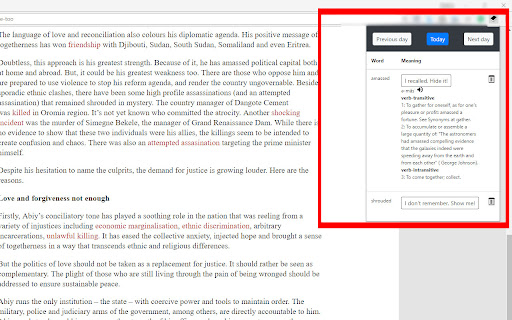
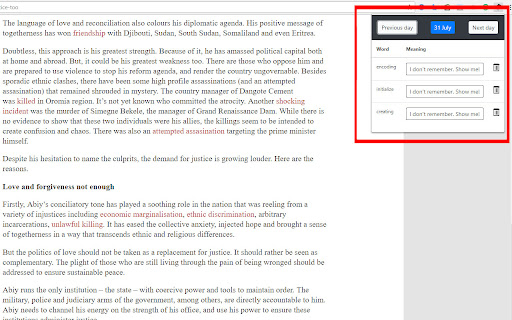
Strengthen your vocabulary while reading things on the browser. Coming across new words is easy and even knowing its definition. However, memorizing the words that you read doesn't come naturally. You have to work on it. This extension will ease this job. It lets you see the definition of a double-clicked word along with its pronunciation. However, this is not a striking feature as couple of other apps do it right now. You can quickly see all the words that you have looked up each day. Apart from a dictionary app it is also a vocabulary builder. Like other apps it doesn't inundates you with so many words that you have never seen. Memorizing the words for which you have a context will be much easier. WE DON'T HAVE ACCESS TO THE WORDS YOU LOOKUP!

WAVE Evaluation Tool
Evaluate web accessibility within your browser. WAVE is a web accessibility evaluation tool developed by WebAIM.org. It provides visual feedback about the accessibility of your web content by injecting icons and indicators into your page. No automated tool can tell you if your page is accessible, but WAVE facilitates human evaluation and educates about accessibility issues. All analysis is done entirely within the Chrome browser allowing secure valuation of intranet, local, password protected, and other sensitive web pages. To run a WAVE report, simply click on the WAVE icon to the right of your browser address bar, or select "WAVE this page" from the context menu. WAVE errors align with WCAG 2.2 failures. The WAVE interface facilitates human evaluation of many other aspects of accessibility and Web Content Accessibility Guidelines, ADA, and Section 508 compliance. Version 3.3.1.0 (May 2026) - Various bug fixes and performance enhancements. Update AIM score to align with 2026 WebAIM Million. Version 3.3.0.4 (December 2025) - Bug fix for scripting exception with some pages with small text. Minor interface improvements. Version 3.3.0.3 (November 2025) provides performance, interface, and testing improvements. Improved support for ARIA headings and prefers-reduced-motion user settings. Version 3.3.0.0 (October 2025) adds numerous new features, enhancements, and bug fixes. Resetting the extension no longer refreshes the page, thus supporting better testing of dynamic content. The Summary and Details panel are now combined. The AIM Score is presented. Viewing the Order, Structure, or Contrast tabs now filters to only relevant page icons. The WAVE sidebar can now be collapsed out of view. Version 3.2.7.2 (September 2024) fixes a bug that disallowed checking of local files and suppresses errors in some cases where role="presentation" is present. Version 3.2.7.0 (August 2024) adds compatibility with Manifest v3. Inputs with aria-disabled=true are no longer considered for contrast checking. Version 3.2.6.0 (August 2024) adds support for contrast checking when foreground alpha/opacity is defined. The Contrast sidebar tools are updated to support foreground alpha. Also numerous minor bug fixes and improvements. Version 3.2.5.3 (February 2024) fixes numerous minor bugs and adds testing refinements. Some hidden inputs are no longer incorrectly flagged as not labeled. Version 3.2.4.4 (October 2023) fixes a few minor bugs with testing hidden content and with the sidebar contrast tools. Version 3.2.3.9 (June 2023) removes the warning message on UserWay pages due to them removing code that changes page content when the WAVE extension is activated. Version 3.2.3.8 (June 2023) includes numerous accessibility test enhancements, several minor bug fixes, and simplification of the contrast checking tools. Users are informed that WAVE results may be manipulated on pages that utilize UserWay or accessiBe overlays. Version 3.2.3 (March 2023) includes several minor bug fixes. A previous update to test for contrast errors in hidden elements has been reverted. While this was useful for finding contrast errors in drop-down menus, tab panels, dialog windows, etc., identification of errors in hidden elements caused user confusion and, in some rare cases, false positives. Version 3.2 (December 2022) includes over 100 bug fixes and performance enhancements. The extension no longer utilizes jQuery, resulting in faster testing and better compatibility with a variety of pages. A new Navigation Order panel is available that shows the navigation order, element roles, and accessible names (what is read by a screen reader) for all navigable elements. Version 3.1.6 (October 2021) includes numerous bug fixes and test rule enhancements for better testing contrast (filters, background images, and other complex color definitions are better handled), document language (IANA-defined language values are now tested), empty links and buttons (better ARIA support for accessible name computations), broken ARIA references, etc., etc. Performance and accessibility has been improved. Version 3.1.3 (November 2020) includes performance enhancements and fixes several minor bugs, including fixes for multiple alerts for some pseudo-lists and disabled controls being incorrectly flagged for contrast failures. Version 3.1.2 (October 2020) fixes several minor bugs, including with the Structure tab sometimes incorrectly showing no structure, and improves performance and accessibility testing reliability. Version 3.1 (September 2020) includes new accessibility tests (region, figure, possible list, select element missing label, and image with title), improved contrast checking, expanded lang attribute value checking, and numerous other bug fixes and improvements. Version 3.0.9 (July 2020) includes numerous bug fixes, improved accessibility, and improved color contrast checking including fewer false positives and expanded contrast checking for form inputs.

Vocabulary builder
Highlight new words in pages with the Vocabulary Builder app. Learn their meanings and build vocabulary with your dictionary online 📖 Read texts and Learn new words in context with Vocabulary Builder application Are you ready to increase your vocabulary easily? 🛠️ Our tool is the improved vocabulary builder app designed to help you expand your word bank and improve your language skills. Whether you're looking to learn new words, improve your English vocabulary, or even translate from Spanish to English vocabulary etc, vocab builder has you covered. ❓ How does it work? 1️⃣ Easily add new words and phrases Highlight new words and phrases on any page in your browser. Learn the meaning in your native or target language, listen to the pronunciation and save it in your online dictionary. 2️⃣ Remember effectively and for a long time Train your vocab with flashcards using the Ebbinghaus Curve Memorization Interval Method. This scientifically proven technique ensures that you will remember new words for a long time and effectively expand your vocabulary. 😊 Why Choose Vocabulary Builder? Building: Easily add words to your dictionary in 2 clicks with our vocab builder Improver: Use AI-driven tools to learn new phrases and their meanings. Expander: Constantly add new words while reading texts that interest you 💎 Perfect for Language Learners Whether you're wondering how to build english vocabulary or asking yourself how do I improve my english vocabulary, our vocabulary builder is designed for learners at all levels. It's not just an English vocabulary builder; it's a tool that supports multiple languages, making it perfect for anyone looking to improve their language skills. 🧐 FAQs about the extension How to highlight text on pages with your vocab builder app? 💡 Click on the word twice or place the mouse at the beginning of the phrase, press the left mouse button and drag to the end of the phrase and release Is it possible to add new words to the dictionary from all sites? 💡 Yes, the extension works on all sites where it is allowed What languages can be studied? 💡 Our vocabulary builder supports learning 28 languages How to get access to saved flashcards? 💡 You can create an account and always have access to all created dictionaries in our vocabulary builder site or mobile application online What devices does the application support 💡 We have a browser extension, a website and a mobile application for Android How Can I Expand My English Vocabulary? 💡 Our vocabulary improver provides structured methods and diverse practice modes to help you build your vocab effectively. Whether you’re learning for academic purposes, career advancement, or personal growth, this app is your go to vocabulary builder online. 💎 Benefits 🌐 Multilingual Support - Vocabulary Builder supports multiple languages, breaking the boundaries of traditional lang learning. It’s perfect for anyone looking to improve their English vocab or translate from Spanish to English. 🖱️ Easy and Intuitive to build vocabulary - The user-friendly interface makes it simple to navigate and use. From creating flashcards to practicing new words & phrases, every feature is designed to enhance your learning experience. You'll find that building your vocabulary has never been easier. 🔄 Regular Updates and Support - With regular updates and customer support, Vocabulary Builder online ensures that you always have the best tools at your disposal. Keep your vocabulary practice fresh and engaging with our continuously updated features. 🚀 Conclusion - Our extension is more than just a vocab builder; it’s a comprehensive platform designed to help you build your vocabulary, learn the meaning of new words & phrases, and improve your language skills. 📥 Download Now Don’t wait any longer to improve your vocab. Download Vocabulary Builder app today and start your journey to learning new words and vocabulary building your language skills. 🤖 With features like AI analysis, multilingual support, and interactive flashcards, you’ll find it easier than ever to expand your word bank and understand how to build a better vocab. 🧩 Embrace the power of words with your ultimate vocabulary builder app. Start learning today and see the difference it makes in your language journey. 📃 Conclusion Vocabulary Builder is not just an app but a powerful platform for anyone looking to enhance their language skills. With its AI analysis, multilingual support, and interactive learning methods, it makes vocabulary building an engaging and effective process.

Vocab Master
Reminds you vocabulary while you are surfing. Reminds you English vocabulary while you surfing. Activate reminder and set reminder period. It will popup a random vocabulary from your selected vocabulary list. Most of vocabulary items have example usages beside simple definition in English.

Sign Learner
Learn sign language passively as you surf the web. As you browse the internet normally, Sign Learner will highlight words on each webpage randomly. Simply hover over the highlighted word and a video with the corresponding sign will appear! Support for either American Sign Language (ASL) or British Sign Language (BSL). ✨ Features: - Learn new signs in sign language and reinforce signs you know in a fun and easy way (4000+ signs) - Focus on learning specific topics, with with available signs split into categories such as Nature, Family, Animals, and more - Need a break from learning? Pause Sign Learner at any time or on any website - Customise your learning experience by changing the size of the video popup and the colour of the highlighted word - Exclude words from being shown that you want to ignore or have already learnt fully - Handy search box to lookup specific signs at any time 🏗️ Coming soon: - Additional context for BSL signs - Support for Australian Sign Language (Auslan) Make the most of your time on the internet and learn sign language along the way! Please note that Sign Learner should be used as a supplement to other learning tools such as an official course and/or lessons with a sign language teacher. If you have any feedback or questions, or find an incorrect or misleading sign, please email me at linus@signlearner.com :) *************** About Privacy *************** When you install Sign Learner, a message appears saying that the extension can “read and change all your data on the websites you visit.” - That's actually just the default permission required, specifically we need it to be able to identify the words on each webpage so that we can add in a sign to show you, and keep you learning. Sign learner does not track, use, or need any personal data from you :)
