
jhendcajfhhpnombbfdanbdkhifbaeee
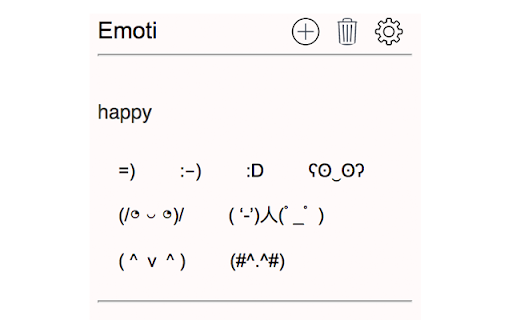
Emoti creates an easy-to-use dropdown menu for inserting emoticons. Emoti is a chrome extension that allows users to easily save custom emoticons and insert them into text box inputs, such as Facebook status updates or tweets.

Lenny Face Copy
Lenny Face Copy helps you create and copy/paste Lenny Faces to anywhere. Quickly copy the Lenny Face and other funny faces and paste them everywhere! Copy lenny face and paste it into Youtube/Twitch Chat. *** Now with a lot more faces suggested by users! *** Guide: click on the lenny face you want and it will be copied to the clipboard, and there you go: you can start pasting it on other websites! With our software, it becomes very easy to lenny face copy and paste. Disclaimer: Please note this extension is NOT made by Google and is made by an independent development team. All copyrights belong to their respective owners. Google does not endorse or sponsor this Chrome extension. Lenny Face Copy is not owned by, it is not licensed by and is not a subsidiary of Google Inc.

Fancy Letters Generator
𝐹𝒶𝓃𝒸𝓎 𝐿𝑒𝓉𝓉𝑒𝓇𝓈 𝒢𝑒𝓃𝑒𝓇𝒶𝓉𝑜𝓇 - Generate ℭ𝔬𝔬𝔩 & ⓢⓣⓨⓛⓘⓢⓗ text with ✅ symbols and emojis for your Simple Text. ✨ Fancy Letters Generator is a fun and powerful Chrome Extension that lets you turn normal text into stylish, fancy, and cool-looking fonts with just a click! Whether you're updating your social media bio, messaging friends, or creating eye-catching content, Fancy Letters Generator helps you stand out with: ✅ Stylish Fonts (𝓛𝓲𝓴𝓮 𝓣𝓱𝓲𝓼) ✅ Cursive, Bold, Italic, Gothic, Bubbly, and more ✅ Fun Symbols & Emojis 💥🔥😎 ✅ Easy Copy & Paste Functionality ✅ 100% Free & Easy to Use! 📌 Perfect for: Instagram, Facebook, Twitter, WhatsApp, Discord, YouTube, Blogs, and even Gaming Names! 🎨 Make your plain text POP with personality and style.

Emoji Finder
Easily find & copy any emoji(s) from your browser toolbar popup UI. Emoji Finder extension lets you find and copy desired emoji(s) from your browser's toolbar popup with just one click. Few features: 1. Over 1800 emojis to choose from. 2. Toolbar popup has a built-in finder to search and find the desired emojis. 3. Click on each emoji to see details and copy the icon to the clipboard. 4. No settings or options to adjust. Note 1: to copy each emoji icon, simply click on it. The emoji will be copied to the clipboard automatically. Note 2: depending on your browser's version and operating systems, some emoji icons may not render properly. To report bugs, please fill the bug report form on the addon's homepage (https://mybrowseraddon.com/easy-emoji.html).

Emoji Magic
Find Emoji instantly. Safe and secure - clipboard permissions only. Emoji Magic makes it easy to find emoji and copy them to your clipboard. 1. Click the extension icon: `🔮` 2. Type in what you want, like "cat" 3. Hit "enter" or click on the exact emoji you want Keyboard shortcut: Ctrl+Shift+O (or customize with "chrome://extensions/shortcuts") 1. 🔧 Actual unicode chars -- no images, native emoji rendering 2. 📘 Rich Text Matching -- Uses a thesaurus to support broad keyword matching. 3. 🔗 Multi-word queries -- try "sad cat", or "blue heart" 4. 🧠 Remembers locally -- Saves the last emoji you picked so you can pick them again easily 5. 🔒 Strong security -- Doesn't ask for dangerous Chrome permissions, just clipboard access This app doesn't require permissions to "read and change data on all the sites you visit". Instead, it only asks for clipboard access. - `1898` total unique emoji supported, Up to Unicode Emoji version `15.1`. - A few new manual keywords. eg: "van" and "rv" - Migrate to manifest v3 Updated the database with great new emoji like "ice cube" and "sloth". One note: new v12 and v13 emoji are not supported yet by all systems. As a result, you might start seeing little "[]" boxes. This means your platform does not yet support this particular emoji. (for example: MacOS Mojave doesn't support the cool 🧊 "ice" emoji from the `v12.0` set put out by unicode. But, MacOS Catalina does.) You should now see much broader results with better sorting (try: "red car", "blue diamond"). It now accounts for both keyword and thesaurus matches, but ranks the results: keywords are a better match than thesaurus terms, and the more the search term overlaps, the stronger the match is.
