
jfegjdogmpipkpmapflkkjpkhbnfppln

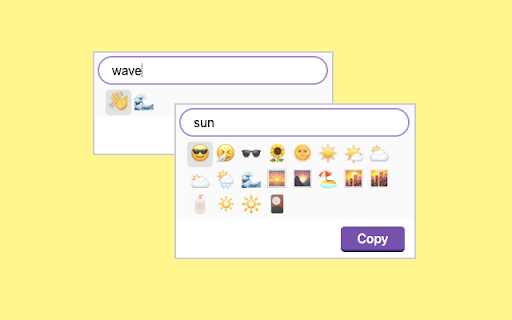
Find Emoji instantly. Safe and secure - clipboard permissions only. Emoji Magic makes it easy to find emoji and copy them to your clipboard. 1. Click the extension icon: `🔮` 2. Type in what you want, like "cat" 3. Hit "enter" or click on the exact emoji you want Keyboard shortcut: Ctrl+Shift+O (or customize with "chrome://extensions/shortcuts") 1. 🔧 Actual unicode chars -- no images, native emoji rendering 2. 📘 Rich Text Matching -- Uses a thesaurus to support broad keyword matching. 3. 🔗 Multi-word queries -- try "sad cat", or "blue heart" 4. 🧠 Remembers locally -- Saves the last emoji you picked so you can pick them again easily 5. 🔒 Strong security -- Doesn't ask for dangerous Chrome permissions, just clipboard access This app doesn't require permissions to "read and change data on all the sites you visit". Instead, it only asks for clipboard access. - `1898` total unique emoji supported, Up to Unicode Emoji version `15.1`. - A few new manual keywords. eg: "van" and "rv" - Migrate to manifest v3 Updated the database with great new emoji like "ice cube" and "sloth". One note: new v12 and v13 emoji are not supported yet by all systems. As a result, you might start seeing little "[]" boxes. This means your platform does not yet support this particular emoji. (for example: MacOS Mojave doesn't support the cool 🧊 "ice" emoji from the `v12.0` set put out by unicode. But, MacOS Catalina does.) You should now see much broader results with better sorting (try: "red car", "blue diamond"). It now accounts for both keyword and thesaurus matches, but ranks the results: keywords are a better match than thesaurus terms, and the more the search term overlaps, the stronger the match is.

Emoji Keyboard - Ilovemoji
This is a tool that can quickly access and insert emojis in Chrome browser. It has the following functions: 1. Quick access to emoticons: The Emoji plugin adds an icon to the browser's toolbar, and clicking on the icon opens a emoticon panel. Users can browse and search for emoticons in the panel, and directly click to copy them for use. 2. Multiple sets of emojis: The Emoji plugin provides users with a wide range of emojis to choose from, including smiley faces, animals, food, transportation, symbols, and more. Users can browse and use these emoticons as needed. This Chrome plugin makes it easier and more convenient for users to use emoticons in their browser, adding more fun and diversity to their text expression.

Emoji Keyboard for Google Chrome™
Emoji keyboard helps you create and copy Emojis to any website. Emoji Keyboard for Google Chrome ™ is a free extension that lets you input emojis on the web browser of your computer Emoji Keyboard for Google Chrome ™ - This Emoji Keyboard extension lets you input emojis right in a web browser. It also comes with an extensive search functionality that helps easily get emoji by keywords. Click on the extension icon to invoke an emoji keyboard. Please hover on emojis to see their meanings. And just click on an emoji to copy it to the clipboard & insert it to an input element. Disclaimer: Please note this extension is NOT made by Google and is made by an independent development team. All copyrights belong to their respective owners. Google does not endorse or sponsor this Chrome extension. Emoji Keyboard for Google Chrome ™ is not owned by, it is not licensed by and is not a subsidiary of Google Inc.

Emojis table
Get the right emojis from your browser in any tab! Tired of looking for emojis on your computer ? Simply search for its name or a related keyword in this extension. You’ll be able to copy it with a single click!

Emoji Keyboard for Google Chrome™
Emoji keyboard helps you create and copy Emojis to any website. Want to have access to over 100+ Emojis for Youtube comments/Facebook status updates/ Skype / Yahoo Messenger/ Whatsapp conversations or Instagram updates? We make it easy for you, simply install our software Emoji Keyboard for Google Chrome™ and get FREE access to the top 100+ emojis. Make your conversations more memorable today once you install this software as you can decorate every comment/status update with a new emoji. To begin using the software Emoji Keyboard for Google Chrome™, simply click on the software icon and choose the emoji you want to use. Paste the emoji you wish to use into Skype/Slack/Facebook Messenger etc once you have chosen the emoji which best describes your mood at the moment. Its that easy & simple to use! Disclaimer: Please note this extension is NOT made by Google and is made by an independent development team. All copyrights belong to their respective owners. Google doesn’t endorse or sponsor this Chrome extension. Emoji Keyboard for Google Chrome™ is not owned by, is not licensed by and is not a subsidiary of Google Inc.
