
ehhfiaolgafmlbnjnapdgjegpjofolfe

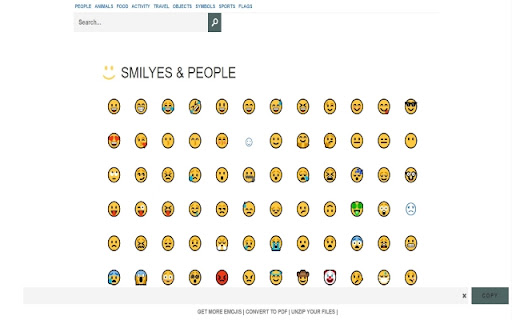
Emoji keyboard helps you create and copy Emojis to any website. Want to have access to over 100+ Emojis for Youtube comments/Facebook status updates/ Skype / Yahoo Messenger/ Whatsapp conversations or Instagram updates? We make it easy for you, simply install our software Emoji Keyboard for Google Chrome™ and get FREE access to the top 100+ emojis. Make your conversations more memorable today once you install this software as you can decorate every comment/status update with a new emoji. To begin using the software Emoji Keyboard for Google Chrome™, simply click on the software icon and choose the emoji you want to use. Paste the emoji you wish to use into Skype/Slack/Facebook Messenger etc once you have chosen the emoji which best describes your mood at the moment. Its that easy & simple to use! Disclaimer: Please note this extension is NOT made by Google and is made by an independent development team. All copyrights belong to their respective owners. Google doesn’t endorse or sponsor this Chrome extension. Emoji Keyboard for Google Chrome™ is not owned by, is not licensed by and is not a subsidiary of Google Inc.

Emoji Copy and Paste
Pin the extension icon on the browser toolbar. Click on this icon, and look for your desired emoji. Now, click on that emoji, and it would be automatically copied to your clipboard. Now, you can paste it anywhere. Visit our home page for more information: https://browsernative.com/emoji-copy-and-paste-extension/ Based on the `emoji-picker-element` project by Nolan Lawson. Extension by BrowserNative.

Emoji Keyboard Live
Supercharge Your Communication with Emoji Keyboard Live: Instant Emoji Access on Any Website! Enhance your communication and express yourself like never before with Emoji Keyboard Live! This powerful browser extension gives you instant access to symbols and icons on any website—no more hunting through confusing menus or switching tabs. 🔍 Fast Search and Selection Quickly find the right symbol with an intuitive interface designed for speed and ease of use. Stop wasting time scrolling—just search and click. 💯 Always Up-to-Date Enjoy full support for the latest Unicode standard, ensuring access to the most current set of expressive icons and symbols available online. 📋 Instant Copy to Clipboard Select a symbol and it’s automatically copied—no extra steps required. Paste it directly into chats, emails, or social media posts in seconds. ⌨️ One-Click Insert Effortlessly insert icons directly into active web pages. Whether you're typing in a comment, message box, or form, integration is seamless. 🔒 Flexible Layout Options Choose between docked and floating modes depending on your browsing style. Whether discreet or always-on-top, the layout works your way. ⏱️ Recent History Tracking Your most recently used icons are saved and easily accessible, helping you keep your favorites just a click away. ⌨️ Quick Keyboard Access Launch the panel instantly with customizable shortcuts like Alt+Shift+E or Ctrl+Shift+E—no need to click or navigate menus. ✅ Lightweight, Fast, and Reliable Optimized for performance, Emoji Keyboard Live runs efficiently without slowing down your browser. Why Choose Emoji Keyboard Live? Whether you're chatting, posting, commenting, or responding to emails, Emoji Keyboard Live makes it easy to express yourself clearly and visually. With lightning-fast search, instant copy, and effortless integration, it’s your go-to emoji tool for daily browsing. Download now and bring smarter, faster, and more expressive communication to your digital life.

Cool Cursors for Chrome™
Fun cool cursors for Chrome™. Use a big collection of free cursors or upload your own. Try using the Chrome browser with cool free mouse cursors. This extension allows you to modify your cursor for Google Chrome. Our extension supports a wide range of topics such as and many more topics Create your own collection of mouse cursors from any images. Note: - Use pictures less or equal to 128x128 pixels; - Use transparent background in your images, such as .png. Please note we need "Read and change all your data on the websites you visit" permissions to allow the custom cursor to be shown on the webpage you are visiting. We do NOT collect/sell any of the websites data you are using. For this extension to work, it will only work on new tabs/pages you open after installation of the software. The webpages which you were on previously before the installation of our software would not show this custom cursor. This extension works on any web page except the Chrome Web Store, Google internal pages, and the Chrome home page, as Google’s policy prohibits the use of custom cursors on these pages.

Copy and Paste Emoji
Copy and Paste Emoji offers cool and cute emoji keyboard. Get all new emoticons and text symbols from emoji list on your desktop. 🚀 With Emoji Copy and Paste Chrome extension, access a full list of all emojis instantly. Easily enhance your texts, emails, and social media posts with fun and flair. 📋 Easy Emoji Copy and Paste: • Say goodbye to the hassle of manually searching for cool emojis. • Quickly copy your best emojis with just a few clicks. • Paste cute emojis wherever you need them effortlessly. • It's as simple as select, copy, and paste! ✨ All Emojis Updated Regularly: - Stay up-to-date with the latest trends. - We're constantly adding new emoticons to keep your messages fresh. 🔄 Copy and Paste History: 1. Never lose track of your recently used emojis copy paste with our emoji list history feature. 2. Easily recall and reuse your most frequently used emoticons with ease. 3. Keep your usage organized and efficient, even across different platforms and devices. 4. Access a detailed log of your history to analyze your messaging trends and preferences. 💫 Wide Variety of Text Symbols: 🌈 Explore a vast collection of emoticons for every mood and occasion. 🌈 From smileys and animals to food and travel, we've got you covered. 🌈 Whether classic symbols or the latest trends, find them here. 🌟 Cute and Cool Funny Emojis: 💖 Express yourself with over 1000 heart emojis that add a touch of cuteness. 💖 Brighten someone's day or send warm messages with ease. 💖 Our getemoji collection is sure to make an impression. 🔖 Organized Categories: 📂 Finding the perfect discord emojis is a breeze with our organized categories. 📂 Browse by theme, emoticon, or symbol effortlessly. 📂 Discover new favorite star emoji copy and paste list with our intuitive interface. 🔍 Search Functionality: 🎯 Use our built-in search functionality to find, copy and paste emojis. 🎯 Type a keyword and find what you need in seconds. 🎯 A selection of relevant emoticons is just a search away. 🎨 Customizable Emoji Keyboard: • Personalize your experience with our customizable keyboard. • Choose your favorite emoticons for easy access. • Customize the layout to suit your preferences. 🖱️ Seamless Integration: - Our Chrome extension seamlessly integrates with your browser. - Access your favorite cross emojis from any website or application. - Whether composing an email, commenting, or chatting, we're there. 🚀 Lightweight and Fast: • Designed to be lightweight and fast for a smooth user experience. • Enjoy speedy performance without slowing down your browsing. • Whether on desktop or mobile, count on fast performance every time. Frequently Asked Questions: 1️⃣ Is the Emojis Copy and Paste extension free to use? ➤ Yes, this extension is completely free to download and use. Simply add it to your Chrome browser from the Chrome Web Store, and you're ready to start using skull emoji copy and paste in your messages! 2️⃣ Can I use the Emojis Copy and Paste extension on other browsers besides Chrome? ➤ Currently, this extension is only available for Chrome. However, we may consider expanding to other browsers in the future. 3️⃣ How frequently are new emojis added to the extension? ➤ We strive to keep our library up-to-date with the latest trends and additions. New emoticons are added regularly to ensure that you have access to the freshest and most relevant ones. 4️⃣ Are the emojis in the extension compatible with all platforms and devices? ➤ While we strive to provide text symbols that are compatible with a wide range of platforms and devices, there may be some variation in appearance depending on the recipient's device and software. However, our extension offers a diverse selection of emoticons that are widely compatible across most platforms. 5️⃣ Is there a limit to the number of text symbols I can copy and paste at once? ➤ There is no limit to the number of emoji and copy paste at once using our extension. Feel free to express yourself with as many emoticons as you like! 6️⃣ Can I suggest new emojis to be added to the extension? ➤ We welcome suggestions for new symbols to add to our library! If you have any requests or feedback, feel free to reach out to us through our website or social media channels. We'd love to hear from you! ✨With Emoji Copy and Paste, expressing yourself has never been easier. 🚀Download our extension today and unleash your creativity with a world of emojis at your fingertips!
