
jgpbnjjkpfehnjdkaaldhnhbedjcpkia


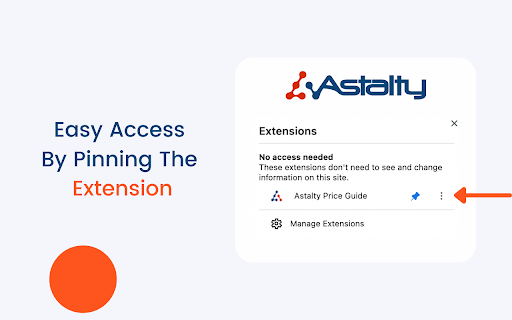
Astalty's Browser Extension Astalty For Chrome 💻 Astalty For Chrome is a multipurpose tool for people working within the NDIS. Its purpose is to streamline the search for support items and give you quick calculations and breakdowns of budgets and sub categories. Our initial product is a simplified version of the NDIS Price Guide. It allows users to easily search for NDIS Support Items directly from their browser. Prices are up to date with the most recent NDIS Price Guide. You can switch between Price Guides in the settings page. Our second release is a budget building tool, that allows you to quickly calculate budgets and work out funding levels for your Participants. Whether you're a Support Coordinator breaking down a plan or an Administration Officer building a service agreement, you'll definitely find value in Astalty For Chrome. We've recently added the ability to get breakdowns of support hours, simply add in your budget, select your line item and you will know exactly hour many hours you can receive with the remaining funding. 📍 Don't Forget, for easy access to Astalty For Chrome, complete the following; 2️⃣ Click the “Extensions” button (jig-saw icon) beside your profile pic. 3️⃣ The drop-down will list the Chrome extensions installed and enabled. 4️⃣ Beside each extension, you'll see a pushpin icon. 5️⃣ Now you can click and drag the icons to the order you wish. After adding the extension as a pushpin, you will be able to select line items with a few clicks of a button. We plan to implement many more features and improvements 📈

乐游导航主页
乐游导航给您一个高效的起始页。 可以高效自定义的浏览器主页。可以方便快捷管理标签。可以更改任何分类和标签的位置,添加删除等。支持本地图片壁纸、视频壁纸。

Chant-GPT_Prompt
ChatGPT Prompt Extension - You can summon ChatGPT anytime. Shortcut (Alt+P, Option+P). Context menu. Text selection icon. - You can utter multiple prompts. - You can save the prompts.

Proteus: Window Resizer
✨ Features ✨ - Simply sort by ascending area of window size (A = wl) - Ability to add description on each window size - Cool looking interface inspired by 1988 MacOS System 6! - More predefined window sizes - One text input for window dimension for speed ⚡ - Import/export window sizes as JSON 🆕

Pluma
Spellcheck and edit text. Pluma allows you to spellcheck and edit text as you browse. Proofread and mockup changes with immediate visual feedback. Save time by not having to use slower document and image editing programs to explore what-if possibilities. • Edit text as you browse. • Spellcheck when editing. Editing and spellchecking are provided by your browser. The more capable your browser is, the better your experience will be. For a full list of limitations, please read the included guide after installing. Pluma respects your privacy. https://nightmode.fm/software/pluma/privacy This software is provided under a no-contact and no-support model. Do not contact the author, for any reason, even if you think it would benefit the author.
