
pibokobfalphoinnffmknnhaoidljknl
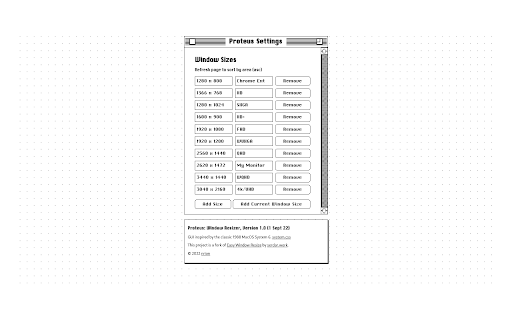


✨ Features ✨ - Simply sort by ascending area of window size (A = wl) - Ability to add description on each window size - Cool looking interface inspired by 1988 MacOS System 6! - More predefined window sizes - One text input for window dimension for speed ⚡ - Import/export window sizes as JSON 🆕

Easy Window Resize
Resize window with a keystroke. - Resizes the active browser window to the predefined list of sizes. - Use the default keyboard shortcut Ctrl+Shift+A (Command+Shift+A for Mac) to resize to the next window size in your list. Keep using the shortcut to rotate window sizes. - You can add and remove sizes in the window sizes list. Go to extension options to do that. - You can change the shortcut. Use "Keyboard shortcuts" in the Chrome extension settings to do that. - You can add the current window size using the "Add Current Window Size" button in the options page.

Window Resizer
Resize and align the current window to the predefined position with multi-monitor support This is a powerful layout resizer extension for browser windows. This extension enables the user to adjust the current window's layout size based on the pre-defined set or any new custom dimension. Each dimension is visually shown in a toolbar popup for easy access. The extension gets left, top, right, and bottom positions in percent unit and changes the window size to these values. This extension detects all the monitors in your system and allows one of the monitors to be the reference for the alignment. Also, this extension supports keyboard shortcuts for the first six alignments in the popup. It means that you can re-align to any of these six alignments without opening the popup and just by pressing a user-defined keyboard set. Each item in the popup is draggable. The user can change the arrangement of the items or even remove or add new items. Features: 1. Supports percent values. So it is compatible with different monitors 2. Automatically fill the current window size when the popup is open. This way, you can add this layout size to the table without any configuration needed. 3. Supports layout adjustment by moving blocks around. 4. Supports import and export options to sync settings between different browsers. 5. Written on top of manifest version 3. The extension is completely idle when it is not active (no resource usage). 6. You can define a custom window size for the startup. Once the extension loads, it sets this user-defined window size for the currently active window.

Key Accept and Sync
Keybank is an embedded payment terminal that enhances the productivity and functionality of QuickBooks Online. Help Save Money KeyBank for QuickBooks Online helps users save money by embedding a KeyBank Merchant Account. Get paid without leaving QuickBooks or changing existing processes. Help Save Time Provide multiple frictionless payment options and a 24x7 self-service Customer Portal. All payments reconcile to Invoices following GAAP standards. No more chasing payments, manual processes, double entry, or reconciliation. Help Increase Cashflow Email or text payment links to multiple Customers and set automated reminders. KeyBank reduces Invoice-to-cash time by 40% on average. Never stress over paying vendors or making payroll again. Banking products and services are offered by KeyBank National Association. All merchant services, credit, and leasing products are subject to credit approval, terms of service, and any applicable collateral requirement(s).

Window Resizer
Easily set the layout (size & position) of your browser window Window Resizer is an extension that lets you easily resize and reposition the current window to your desired values. Simply open toolbar popup UI and click on the desired layout set (size & position). Once you click a layout, the window will be positioned and resized to the chosen layout. There are 20 predefined layouts available to choose from in the toolbar popup. If you need a custom layout, please click on the - Add a new layout - button at the top left corner in popup UI. A new tab will be open with a custom design layout UI. Simply drag your desired size within the orange area, then click on the - Save - button to store the custom layout. The new layout will be added to the popup UI. Note 1: Tiles within the toolbar popup UI are draggable ,and the new order will be auto-saved to memory. Note 2: The Window Resizer interface supports dark mode. To switch the interface theme to dark, please press the moon icon in the top-right toolbar. To report bugs, please fill out the bug report form on the addon homepage (https://mybrowseraddon.com/window-resizer.html).
