
amjbjafbfajolchpcbfjpdggaeheicmb
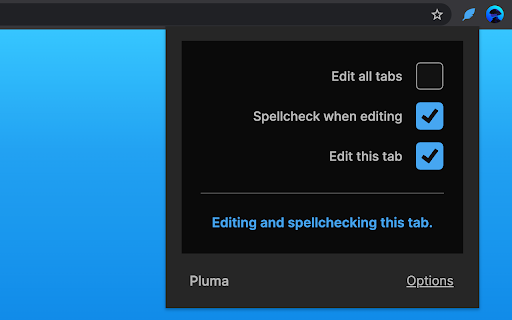

Spellcheck and edit text. Pluma allows you to spellcheck and edit text as you browse. Proofread and mockup changes with immediate visual feedback. Save time by not having to use slower document and image editing programs to explore what-if possibilities. • Edit text as you browse. • Spellcheck when editing. Editing and spellchecking are provided by your browser. The more capable your browser is, the better your experience will be. For a full list of limitations, please read the included guide after installing. Pluma respects your privacy. https://nightmode.fm/software/pluma/privacy This software is provided under a no-contact and no-support model. Do not contact the author, for any reason, even if you think it would benefit the author.

Cloudmark - Collaborative Bookmark Manager
Cloudmark is a collaborative bookmark manager that allows you to save and organize your bookmarks in the cloud. Introducing Cloudmark Chrome Extension: Your Collaborative Bookmark Manager in the Cloud Cloudmark is the ultimate collaborative bookmark manager designed to revolutionize the way you save, organize, and access your favorite online resources. With the Cloudmark Chrome Extension, keeping track of your bookmarks has never been more effortless and efficient. Gone are the days of worrying about losing your bookmarks due to browser crashes or device changes. Cloudmark empowers you to store your bookmarks securely in the cloud, ensuring that they are accessible from any device with an internet connection. Also, it allow you to create folder to share links with your team. 1. Cloud-Based Bookmark Storage: Cloudmark takes your bookmark management to the next level by providing a secure cloud-based storage solution. Say goodbye to the limitations of local bookmark folders, as now all your bookmarks are backed up and readily available whenever you need them. 2. Collaborate and Share: Sharing bookmarks / links with friends, family, or colleagues has never been easier. With Cloudmark's collaborative features, you can effortlessly share collections of bookmarks, fostering seamless collaboration and knowledge-sharing. 3. Intuitive Organization: Cloudmark lets you create custom folders enabling you to efficiently organize your bookmarks. 4. Sync Across Devices: Seamlessly sync your bookmarks across multiple devices, ensuring you have access to your favorite webpages, articles, and resources, no matter where you are. 5. User-Friendly Interface: Cloudmark's intuitive interface makes bookmark management a joy. Our user-centric design ensures that both beginners and seasoned users can maximize the full potential of the extension effortlessly. Get started with Cloudmark Chrome Extension today and embrace a smarter, more collaborative approach to bookmark management. Streamline your web browsing experience and never lose another valuable resource again. Discover the freedom of cloud-based bookmarking, and stay connected to your favorite links, wherever you go.

Michael's Upgrade for TrakED
Upgraded features for TrakED in the THS. (This extension is not an official product of the THS or Intersystems TrakCare software.) Upgraded features for Trak ED in the LGH. Features: - Re-enable spell check in the triage page - Use the enter key when logging in - Handover sheet for ED Main Floor and EMU - ED Main Floor filters and persistent sort - Triage Summary print out - Filter and count results of an enquiry - Count patients currently breaching length of stay targets -- This extension is not an official product of the LGH or InterSystems Trak software.

Binge It
Binge watch your favorite shows hassle free. This extension auto clicks the annoying buttons that hinder your binge progress. Enable the features you want the extension to handle by selecting them on the Extension's icon. And then just Sit Back, Relax, and Enjoy! Happy Binging!

WhatBots - ChatGPT Chrome Extension
Your GPT Assistant on every website you visit WhatBots is a privacy focused ChatGPT Chrome Extension that answers all your complex questions with just CMD+M press. It seamlessly works with Google Search and any website you visit, providing instant assistance whenever you need it. Just press Cmd+M or Ctrl+M to start chatting. The best thing is that it does not collect any chat data, and your queries to the GPT API are anonymous🕵️♂️ 2. WebChat: Mini ChatGPT chat window inside of any website (Yes inside the site, not in another tab) just press Cmd+M or Ctrl+M! 💬 3. GitHub Enhancer: Explains source code files on Github. Yes click on Explain Code button on GitHub and it will write documentation for the code 👨💻 Super Smart AI: Powered by cutting-edge GPT technology, WhatBots offers intelligent explanations for any challenge you face. Easy Integration: WhatBots seamlessly blends into GitHub and Google Search, making your online journey smoother and more productive. Real-Time Help: Instant, on-demand assistance is just a click away with our in-page chat feature on any website. User-Friendly: Simple and easy to use, WhatBots understands your needs and offers context-aware solutions. Privacy-Focused: Rest assured, WhatBots cares about your privacy. It doesn't collect any personal info or browsing data, ensuring a secure and reliable experience. Download WhatBots now and boost your productivity to new heights! It's the perfect companion for everyone, no matter your background or expertise. Let WhatBots make your online life easier and more enjoyable!
