
jgnigeenijnjlahckhfomimnjadmkmah
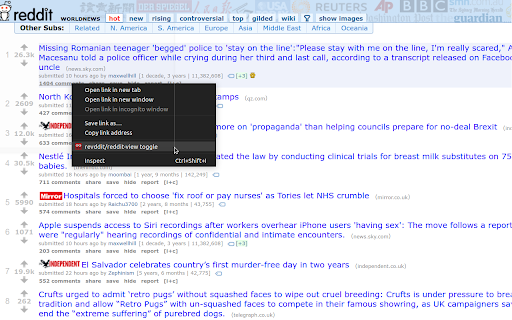
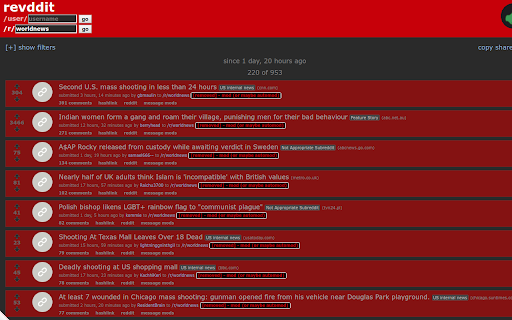
Switch between viewing content on reddit and reveddit. There are a few ways to use this extension: (1) On old reddit, click the "reveddit" button under a removed comment or any post. (2) Click the extension icon when viewing a reddit or reveddit page. (3) Right-click on a link or page and select "View on re(ve)ddit" in the context menu. Shift+click opens the page in a new window. 2021-08-17 - 0.0.0.9 - keep the sort setting from reddit 2021-07-29 - 0.0.0.8 - adds a button to removed comments and all posts on old reddit 2021-03-02 - 0.0.0.7 - updated to work with chrome extension manifest version 3 2020-08-31 - 0.0.0.6 - updated to work with new reveddit subreddit and user paths 2019-11-27 - 0.0.0.5 - changes for revddit.com -> www.reveddit.com

DeArrow - Better Titles and Thumbnails
Crowdsourcing titles and thumbnails to be descriptive and not sensational DeArrow is a browser extension for crowdsourcing better titles and thumbnails on YouTube. The goal of DeArrow is to make titles accurate and reduce sensationalism. DeArrow is a paid (if you want) browser extension. You can purchase an unlimited-use license key for 1$. However, if you cannot, or do not want to pay, you can use the extension by clicking the "I can't/don't want to pay" button. Titles can be any arbitrary text. Thumbnails are screenshots from specific timestamps in the video. These are user submitted and voted on. By default, if there are no submissions, it will format the original title to the user-specified format, and set a screenshot from a random timestamp as the thumbnail. This can be configured in the options to disable formatting, or show the original thumbnail by default. If the original thumbnail is actually good, you can still vote for it in the submission menu, and then it will act like a submission. No more dealing with clickbait, arrows, or annoying faces. Users can submit better titles and thumbnails for each video and vote on them. How does DeArrow differ from Clickbait Remover for YouTube - Unlike Clickbait Remover, DeArrow's main purpose is for crowdsourcing better titles and thumbnails - When a crowdsourced title is not available, DeArrow will auto-format it according to your setting, but does it in a more sophisticated way than Clickbait Remover. Instead of only setting all words to lower case, or capitalizing every word, DeArrow supports casing systems such as "Title Case" and "Sentence case". These will still allow acronyms and proper names to remain capitalized. - When a crowdsourced thumbnail is not available, DeArrow by default shows a screenshot at a random timestamp in the video. Clickbait Remover's thumbnails use YouTube auto-generated thumbnails, and while they are seemingly random, they are chosen by a machine learning algorithm to favor faces with expressions, and other overstimulating features. DeArrow uses truly random timestamps generated by its own server. DeArrow will also check the SponsorBlock database to ensure the randomized thumbnail is not inside of a sponsor segment. Access your data for youtube.com, www.youtube-nocookie.com: - Used to modify the YouTube webpage

Reddit Comment Collapser
A more elegant solution for collapsing reddit comment trees Collapse a comment and all of it's replies by clicking on the column of the comment you wish to collapse. No longer get stuck in the middle of a huge comment chain - simply select the outermost column to collapse the whole top-level-comment. Note - this extension is only compatible with old.reddit.com. You can use Old Reddit Redirect (https://chrome.google.com/webstore/detail/old-reddit-redirect/dneaehbmnbhcippjikoajpoabadpodje) to ensure you always load old.reddit.com. Compatible with Reddit Enhancement Suite and subreddit themes. Reddit Comment Collapser is free and open source. The code is available at https://github.com/tom-james-watson/reddit-comment-collapser and contributions and bug reports are very welcome.

Moderator toolbox for reddit
Toolbox is an extension that adds a myriad of much needed features and functionality to reddit for moderators. Containing: - Queuetools - Mod Button - Mod Mail Pro - Mod Domain Tagger - Toolbox Notifier - User history analyzer - Comment Nuke tool - User notes - Personal notes - Syntax highlighter for subreddit css - Much more

Reddit (Au) Comment Highlights
Highlight unread comments since your last visit to a Reddit comment section. Lightweight and customizable alternative to a feature normally reserved to Reddit gold users. It requires minimal permissions and syncs between browser sessions! It supports RES (Reddit Enhancement Suite) night mode and custom CSS! Note that highlights won't show until the second time you visit a comment thread after you install the extension. Please report any problems you encounter to github issues page. Update Log: ========== Version 3.0.0: • Feature: Support for Manifest v3 (Chrome 88 and above) Version 2.0.0: • Feature: Support for `reddit.com` ("redesign"). • Feature: Choice between local or synced storage. • Feature: Optional storage compression. • Feature: Automatic refresh on configuration change. • Feature: Opt-in error reporting. Version 1.2.0: • Feature: Firefox support. • Fix: Issue where comments would not get highlighted. • Notice: Having the options page in a separate tab is deprecated, so it's now shown in a modal window. Version 1.1.1: • Fix: Issue where comments not shown on page load (like comments shown after clicking "load more comments") would not get highlighted (thanks @madLyfe for the bug report). • Fix: Issue on options page where RES usage setting would not be saved unless all settings explicitly saved. • Fix: Issue where viewing a perma-linked comment would mark the whole thread read. Version 1.1.0: • Feature: Proper RES (Reddit Enhancement Suite) night mode support! • Feature: Advanced settings (link & quote color). • Feature: Native color picker. (thanks @Two-Tone for the suggestions) Version 1.0.0: • Feature: Option to clear highlight on click. • Feature: Option to redirect mobile to desktop site. • Fix: More lightweight (reason for color picker change). • Fix: More responsive options page, minor color/layout fixes & no silent errors. • Note: This update will ask for your permission to access all reddit pages (previously the extension only had access to subreddit pages). Version 0.10.0: • Fix: No longer highlight logged in users' comments (thanks @Two-Tone for the suggestion). Version 0.9.0: • Feature: Use custom CSS for styling (thanks @jtraub for the suggestion). • Feature: Customizable font color. Version 0.7.0: • Fix: Issue where last comment wouldn't get highlighted (thanks @SilentException for the bug report). Version 0.5.0: • Feature: Options page. • Feature: Customizable highlight color and border.
