
jgfjphpcldeifiifdmjpjoidkdhbcboe
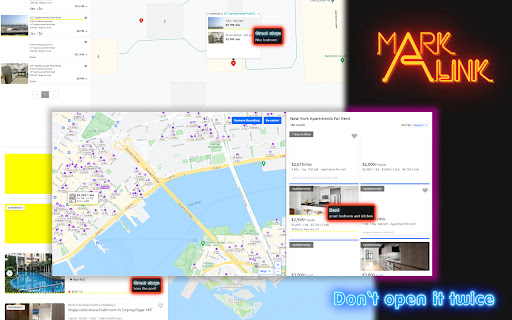
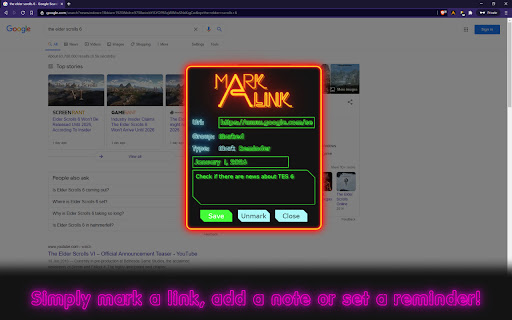
We all know what “bookmark” in every browser does, don’t we? What if I told you that bookmarks were insufficient and could be improved? I’m here to show you how :) We usually add something valuable there, stuff we want to read later when we have time or not feeling lazy. It’s pretty usual for most of us that the “read later” folder is becoming “probably read later” and then finally “don’t know what’s here”. How do we change it? Add the reminder to the link: set it up for the day you’re going to have some spare time, add a Mark to remind why you should do it. That’s the spirit! What about valueless stuff? Links we don’t want to open again. “Why would we want it?” - you’re going to ask. Fair question. Have you ever been looking for an apartment? You should know then how it is to open the same apartment every day forgetting that you rejected it (and why). Once again you open the photo of the bathroom: “Ah, yeah, this bath is ugly...”. Don’t worry, you’re going to open the same room again tomorrow, the title photo is so promising… Not with MarkALink! Add the link to the “Hide” group and forget about coming to this useless page henceforth. Whenever and wherever you see this link on the web, you’ll recognize it. And it’s only one of the cases where it could optimize your processes and save your time!

Tab Control
The holy grail of tab managers Tab Control - The holly Grail of Tab Managers I am a heavy tabs producer and I don't have the self discipline to close them. This behavior causes me huge problems like no ability to search and navigate between tabs, Chrome memory consumption raises and many other productivity issues. Over the years I've tried almost any tab extension out there, just name it - I tried it. Almost any extension had a feature I like but there is no extension where I can get all the benefits I am looking for. Therefore I decided to create the holly grail of Tab Managers. This extension is ready for use and under highly development in order to provide many useful features and tools fast. Available features: - Search tabs everywhere, easily and without loosing focus (set keys on settings) - Easy navigation between recently used tabs (set keys on settings) - Tagging (tagging rules and tab filtering by tags) - Hide tabs - Measure page visits duration - Get an overview on opened windows and tabs Some of the upcoming features: - Sync tabs between devices and the cloud - Bulk operations (close, move, ...) - Aggregations and grouping - Manage workspaces - Clutter reducing tools - Configurations that will help you keep your chrome usage optimal - Tabs insights - Share abilities and many other productivity features. If you have any request, issue or just want to share your opinion, please contact us. - Click on Tab Control icon to go to the dashboard - Under settings / keyboard shortcuts you will see all the app shortcuts - You can change any shortcut Your privacy is important for us, information about your tabs are never transmitted or disclosed to the Tab Control developers. - Integrate eslint, tsc and fix many issues - Searcher optimizations: make it lite and faster - Refactor browser events and state initialization - Remove localStorage usage - Assistant Window - Refactor and simplify windows state - Huge refactor and performance improvements - System refactor and improvements - Tagging Rules Page - Improve user experience - Add "Add new tag" button to each item in Tagging Rules list - Window Page - Improve user experience - Add Hide and Restore buttons - Add Copy Url button - Add Page Tags button with tags indication - Page visits - Improve flow - Fix incorrect calculation issue - Clear old visits once a week - Searcher and Switcher speed improvements - Bug fixes, improve stability - Add "Add" button on tag input - New tag matching mechanism - Support hiding and restoring specific tabs - Add support for keyboard settings - Improve Tab Searcher and Tab Switcher: memory optimisation, bug fixes, make it work like a charm - Show "Current Tab" section in Tab Searcher - Tagging Rules - ability to define tagging rules for url patterns - Tag filtering - hide and show tabs by tags [1.0.13] - 2020-04-19 - Page Visits: Fix and improve time spent calculation - Page Visits: Add date range selection [1.0.11] - 2020-04-11 - Improve Insights: add Page Visits and locally persist visit information

Policy Control
Policy Control is an extension that helps you easily adjust all content settings (via contentSettings API) from the toolbar popup UI. These settings are adjusted on a website (domain) basis. Once you open the toolbar popup UI, the tab URL will appear at the top section in the UI as a pattern (i.e. http://example.com/*). Adjust what you need for this pattern and then reload the webpage. Please note, all changes are auto-saved to the memory. If you want to reset the content setting changes to the default values, please press the reset button at the top toolbar. Note: The extension interface supports dark mode. To switch the interface theme to dark, please press the moon icon in the top-right toolbar. To report bugs, please fill out the bug report form on the addon's homepage (https://mybrowseraddon.com/policy-control-wext.html).

NoDetour
Changes links passed through redirection scripts to point straight to the final URL. Changes links passed through redirection scripts (e.g. /cgi-bin/redirect.cgi?url=http://foo.com - often used for tracking click-throughs or forcing visitors through an intermediate adverts page) to point straight to the final URL. Based on my "link neutraliser" bookmarklet http://www.splintered.co.uk/experiments/48/

Bookmarkme - Bookmark Manager
Save, organize, and rediscover your favorite corners of the internet. AI-powered summaries, collections, tags, and more. Bookmarkme is a visual bookmark manager that helps you save, organize, and rediscover your favorite corners of the internet. ORGANIZE YOUR WAY • Create collections and nested sub-collections to group bookmarks by topic • Tag bookmarks for flexible cross-collection organization • Drag and drop to reorder collections and move bookmarks between them • 4 view modes: Grid, Masonry, List, and Headlines SAVE EFFORTLESSLY • Right-click any page or link to save instantly • Save all open tabs to a collection in one click • Import bookmarks from Chrome, Firefox, Safari, or Edge • Smart duplicate detection warns you before double-saving AI-POWERED (Pro) • One-click AI summaries with key points, reading time, and category • Auto-tag bookmarks with AI-suggested labels • Ask AI questions about your saved content and get answers with citations READ & ANNOTATE (Pro) • Built-in reader view for distraction-free reading • Highlight and annotate text on any bookmarked page • Read Later queue with progress tracking • Page archives — save permanent snapshots of pages FIND ANYTHING • Full-text search across titles, URLs, notes, and tags • Advanced search with filters for date, collection, and more • Command palette (Ctrl+K) for keyboard-first navigation SHARE & COLLABORATE • Share collections as public links • Password-protect shared collections • Perfect for team resources, reading lists, and research DESIGNED FOR YOU • Beautiful dark mode • Responsive — works as a Chrome extension overlay or full web app • Bookmark reminders with push notifications • Set it up in seconds — import your existing bookmarks and go Free plan includes unlimited bookmarks, collections, tags, and all view modes. Upgrade to Pro for AI features, highlights, archives, and more.
