
gfeannmglnjdmnpigailhcoepplcacaf


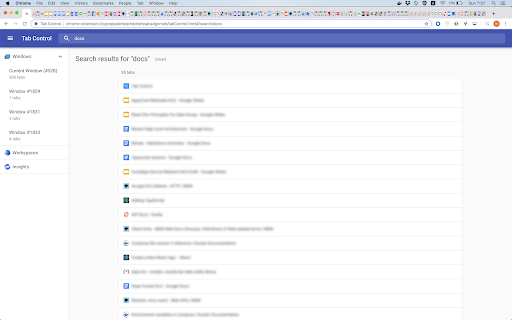
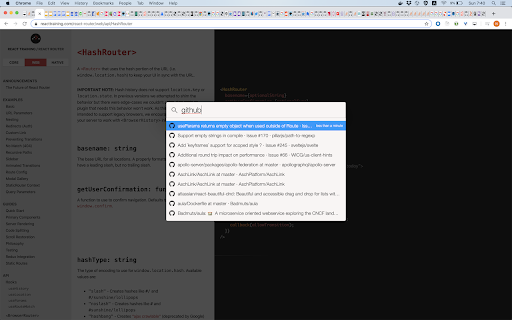

The holy grail of tab managers Tab Control - The holly Grail of Tab Managers I am a heavy tabs producer and I don't have the self discipline to close them. This behavior causes me huge problems like no ability to search and navigate between tabs, Chrome memory consumption raises and many other productivity issues. Over the years I've tried almost any tab extension out there, just name it - I tried it. Almost any extension had a feature I like but there is no extension where I can get all the benefits I am looking for. Therefore I decided to create the holly grail of Tab Managers. This extension is ready for use and under highly development in order to provide many useful features and tools fast. Available features: - Search tabs everywhere, easily and without loosing focus (set keys on settings) - Easy navigation between recently used tabs (set keys on settings) - Tagging (tagging rules and tab filtering by tags) - Hide tabs - Measure page visits duration - Get an overview on opened windows and tabs Some of the upcoming features: - Sync tabs between devices and the cloud - Bulk operations (close, move, ...) - Aggregations and grouping - Manage workspaces - Clutter reducing tools - Configurations that will help you keep your chrome usage optimal - Tabs insights - Share abilities and many other productivity features. If you have any request, issue or just want to share your opinion, please contact us. - Click on Tab Control icon to go to the dashboard - Under settings / keyboard shortcuts you will see all the app shortcuts - You can change any shortcut Your privacy is important for us, information about your tabs are never transmitted or disclosed to the Tab Control developers. - Integrate eslint, tsc and fix many issues - Searcher optimizations: make it lite and faster - Refactor browser events and state initialization - Remove localStorage usage - Assistant Window - Refactor and simplify windows state - Huge refactor and performance improvements - System refactor and improvements - Tagging Rules Page - Improve user experience - Add "Add new tag" button to each item in Tagging Rules list - Window Page - Improve user experience - Add Hide and Restore buttons - Add Copy Url button - Add Page Tags button with tags indication - Page visits - Improve flow - Fix incorrect calculation issue - Clear old visits once a week - Searcher and Switcher speed improvements - Bug fixes, improve stability - Add "Add" button on tag input - New tag matching mechanism - Support hiding and restoring specific tabs - Add support for keyboard settings - Improve Tab Searcher and Tab Switcher: memory optimisation, bug fixes, make it work like a charm - Show "Current Tab" section in Tab Searcher - Tagging Rules - ability to define tagging rules for url patterns - Tag filtering - hide and show tabs by tags [1.0.13] - 2020-04-19 - Page Visits: Fix and improve time spent calculation - Page Visits: Add date range selection [1.0.11] - 2020-04-11 - Improve Insights: add Page Visits and locally persist visit information

TabStacks: tab and history search
View and search through open tabs and browser history. TabStacks is a vertical tab menu that helps you find the content you were looking for. Filter the tabs you have open and TabStacks will list the open tabs that match. If TabStacks can't find an open tab, it searches through your history to see if you had a tab open previously! TabStacks is designed to be keyboard and screen reader accessible. Press [CTRL]+[SHIFT]+[K] to open the menu, start typing to filter your tabs, and use the [DOWN] arrow key to navigate to the tab you want, and [ENTER] to open that tab. You can always use your mouse as well. You can search through your history during a tab search by pressing [CTRL+SHIFT+S]. You can close a tab by highlighting it in the list using the arrow keys or right-click and pressing [DELETE] or by clicking the close button on the tab. TabStacks is a high performance and secure extension for Chrome. TabStacks doesn't download external files, doesn't store any information about your activity. *** UPDATES *** Version 2.0.2 * Fixed bug where the popup doesn't close on tab change * Added a settings item to allow the option to hold the popup open Version 2.0.1 * The default keyboard shortcut for toggling the search is now CTRL+SHIFT+S due to the browser using nearly all possible combinations of CTRL+ a single key. * The keyboard shortcut key is now configurable, you can modify it in the settings page. Click the gear icon at upper right of the popup to access settings. * Minor cosmetic updates to the settings page. Version 2.0 * Tabs shown in the popup are synchronized with the state of the tabs in the browser: * Title updates are reflected in real-time. * New or deleted tabs are reflected in the tab list. * Close tabs using a button on the tab. Close buttons show on hover or focus. * Tabs display an audio icon if playing audio. * For audible tabs, clicking the icon will mute and unmute the tab. * Settings page has been added, click the gear icon top-right to access settings. Version 1.0.8 * Added lazy loading for site icons to speed up rendering * Reduced requested browser permissions Version 1.0.7 * Linux support for launching TabStacks from keyboard with [CTRL+SHIFT+K]. * PopupMenu now has a max-height instead of fixed height. * Fixed bug on Windows where the scroll bar was rendered even if the tabs would not scroll. Version 1.0.6 * Improved search algorithm for both tabs and history. * Searches much longer history time period. * Tabs in the current window always appear at top when popup is opened (User suggestion). * URLs for tabs appear on focus or mouseover (User suggestion). * Engineering improvements under the hood to use Web Components for rendering.

Tab Sorter 2
Enhance your browsing experience, one click at a time Introducing TabSorter2 - the browser extension designed to revolutionize the way you manage your tabs! Say goodbye to tab clutter and hello to seamless organization with just one click. 🅴🅵🅵🅾🆁🆃🅻🅴🆂🆂 🆃🅰🅱 🅼🅰🅽🅰🅶🅴🅼🅴🅽🆃 [FREE]: • 💫 Quickly sort your tabs by domain and title for easy navigation. • 🔄 Merge all your windows into one streamlined interface. • 🎲 Spice things up by shuffling your tabs for a bit of fun! • 💥 Collapse: Create groups of domains with more than 2 tabs opened [NEW] 🅰🅳🆅🅰🅽🅲🅴🅳 🅵🅴🅰🆃🆄🆁🅴🆂 🅵🅾🆁 🅿🅾🆆🅴🆁 🆄🆂🅴🆁🆂: • ↔️ Split your window vertically or horizontally to tailor your browsing experience. • 🏷️ Take control with Domain Uniting, perfect for grouping or isolating tabs from the same domain. • 🧠 Optimize your memory usage with Memory Optimization, freezing and unloading tabs to save valuable resources. • 🧹 Say goodbye to clutter with Domain Cleanup, closing all tabs from a specific domain across all windows. • 🚫 Eliminate duplicates with Tab Deduplication for a cleaner browsing experience. 🅲🅾🅼🅱🅰🆃 🆃🅰🅱 🅰🅳🅳🅸🅲🆃🅸🅾🅽: • 🎯 Dive into Focus Mode to eliminate distractions and boost productivity with a clear canvas. • 📚 Easily return to your tabs with Unfocus when you're ready to dive back in. 🅾🆁🅶🅰🅽🅸🆉🅰🆃🅸🅾🅽🅰🅻 🅱🅻🅸🆂🆂 🆆🅸🆃🅷 🆂🆃🅰🅲🅺🅸🅽🅶 🅼🅾🅳🅴: • 🗂️ Keep your windows neat and clutter-free after a domain split with Stacking Mode. • ✨ Tidy up: Feeling overwhelmed? In one clean sweep, tidy up your messy tab life 🧹 [FREE - Experimental for 50+ tabs opened] Why wait any longer? Embrace the essentials for free indefinitely or subscribe to support continuous development and unlock all current and forthcoming features 🙌. Seize control of your browsing journey today with TabSorter2. Your tabs will thank you for it 😉!

Tab Extract
A simple & lightweight tool to reduce tab clutter, using just the address bar. ● Too many disorganized tabs open? ● Slow to find the tab you're looking for? ● Want to reduce tab and window clutter quickly? Tab Extract helps you easily re-organize your tabs according to the subject or site, or quickly find a tab, or easily remove multiple tabs. How it works: Tab Extract will move all tabs from any window with a keyword match (in their URL or page title), into a new window. To use, type "ex" followed by a tab/space into the address bar, then enter keywords. ✓ "ex facebook news" will extract all facebook tabs and any tab with "news" or "facebook" in their title or URL, into a new window. ✓ "ex ." merges all tabs into the same window. This works because all URLs have a "." in them. ✓ Batch-remove tabs by extracting tabs to a new window using Tab Extract, and then closing the window. ✓ Tab Extract can merge tabs from across different windows into the same window by using a common keyword amongst the tabs. Notes: There is no need to select anything in the auto complete box, just press enter. If your Chrome has saved some "ex " as a search term for autocomplete, clear your history. Migrated from Chrome Extension Manifest v2 to Manifest v3 - Background script now runs as a service worker - Updated minimum Chrome version to 88 - Removed alert() for service worker compatibility (omnibox already provides feedback) Support for Marvellous Suspender suspended tabs - Extension now searches within the original URL and title of suspended tabs - Suspended tabs are moved while maintaining their suspended state Support for Chrome's natively unloaded tabs - Removed status filter to include tabs in all loading states - Fixes issue where unloaded tabs were not being found Fixed compatibility with modern Chrome versions that use tab unloading for memory management

TabPlus
The most feature-packed tab manager. Save & organize your tabs, sync across devices! Tab++ allows you to save your tabs for later. You can organize, categorize, and name them, then restore individual tabs or tab groups at any time. You can even sync them across devices! Tab++ is inspired by similar extensions like OneTab, only with WAY more features... Like folders, cloud-syncing, easy backup and restore, and more! # Note: Usage help can be found in the options page. # NEW IN v1.7.3 - Dark mode, woot! - Implemented more settings in the options page - Confirmation prompt before clearing all data - Don't save pinned tabs by default (configurable) - Bug fixes & improvements to automatic corruption recovery
