
jgadddgchehpdgmifhflamcgmphdlneg
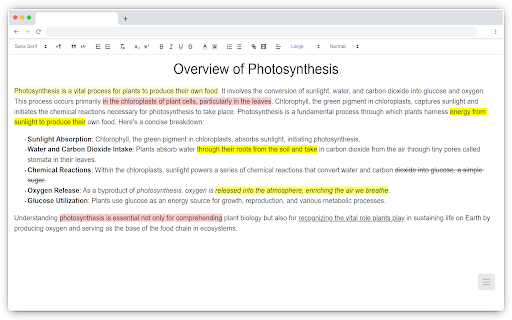


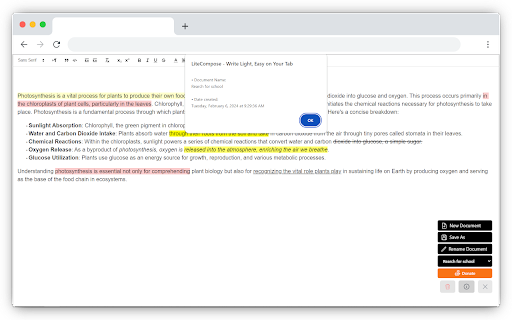
Write without distractions right in your browser. Stay focused with offline, private, and ad-free writing. With LiteCompose, your notes are kept private and secure, securely stored directly in your browser's storage and not in the cloud. It's incredibly easy to use, enabling you to open a new tab and start writing in an instant — no accounts or permissions required. You can either click on the extension icon or use the keyboard shortcuts below to open it quickly: - For Windows, press Ctrl+Shift+L - On a Mac, use Command+Shift+L - For Chrome OS, it's Ctrl+Shift+L - And if you're using Linux, go for Ctrl+Shift+L Effortlessly jot down notes, save them, rename, and delete them — all securely stored directly in your browser's Local Storage. LiteCompose does NOT collect ANY personal data or information from its users. We do NOT track your activity, store your browsing history, or gather ANY identifiable information. - Auto-save: Your work is automatically saved as you write. - Saved Documents: Access and manage saved documents with ease. - Rename and Delete: Customize document names and remove unwanted documents. - Privacy Assurance: Your data remains securely stored on your computer. - Rich Text Editor: Enjoy text color, highlights, backgrounds, and more — like a word processor. - Offline Mode: Access your notes anytime, even without an internet connection. And much more awaits you! Try it out. You won't be disappointed. Feel free to reach out to us at info@sfer.dev with any concerns, feedback, or suggestions you might have.

Tab Origin
Return to the page from which you opened this tab. Shortcut to return to the page from which you opened the current tab. Motivation: you have a list of search results. You opened the first 5 in new tabs and closed the results list. Now you read the 5 top results, but they do not answer your question so you want to go back to the search page. Without this extension, you would need to search your history or spam undo close tab. This extension conveniently solves the problem by taking you straight back to the origin page, re-opening it if necessary. You can even use it recursively on tabs opened by tab origin; the extension tracks the history. I suggest the shortcut is cmd/ctrl-shift-u, set from the bottom of Extensions page. When origin information is unavailable for a tab a "N/A" badge is shown.

Write on PDF
Enhance your files with Write on PDF! Easily draw on PDF and use this Chrome Extension as a PDF filler to edit documents quickly. 📝 Enhance your document workflow with the Write on PDF Chrome Extension! Whether you need to modify, annotate, or simply manage your documents, this tool is your ultimate solution. 📑 Are you wondering how to write on a doc? Write on PDF makes it incredibly easy. Just upload your file and start using our intuitive interface to add text wherever you need. This feature is perfect for both professionals and students who need to fill out forms or add comments to their documents. 👥 Write on PDF is not just about writing; it's a comprehensive pdf filler that allows you to seamlessly edit PDFs online. You can: ✏️ If you need to change PDF online, our extension has got you covered. Adjust, rewrite, or completely overhaul your files without the need for complicated software. This is editing made easy. 🌍 For those who frequently ask "how can i edit a pdf," our tool provides a straightforward answer. With functionalities like customize your PDFs exactly how you want them. 🔸 As a pdf editor online, Write on PDF offers tools, making it ideal for creative professionals and anyone who needs to make detailed annotations or artistic additions to their documents. 🎨 Many users find the ability to add text to docs particularly useful for quickly filling in dates, signatures, and more. This makes Write on PDF an essential tool for anyone looking to: 🔝 How to write on a pdf? Modify PDF online with ease using our array of editing tools. These tools make it simple to adjust your documents in real-time, ensuring your documents always meet your afneeds. With our edit document feature, you can: ① Change fonts and colors ② Resize and align text ③ Add or remove pages 🌐 As a versatile online document editor, Write on PDF is perfect for professionals who need to edit documents on the go. It supports multiple formats, ensuring that your editing process is as efficient as possible. ✨ When it comes to editing PDFs, our free online editor stands out by offering robust functionality without any cost. Write on PDF free allows you to: ▸ Use all basic editing features ▸ Save and share documents instantly ▸ Access your files from anywhere 📊 How to annotate a PDF? Highlight text, add notes, and mark up your files to make studying or reviewing documents easier than ever. 🎉 For those needing to know how to type on PDF, our tool provides an easy-to-use interface that lets you enter text directly onto your pages. This is particularly useful for filling out applications or official forms that require typed responses. ➤ Drag and drop to rearrange pages ➤ Edit pdf online ➤ Rotate and crop pages 🌟 Lastly, our document editor is more than just a PDF tool. It’s a comprehensive solution designed to handle all types of documents, making it the only editor you’ll ever need. Whether you’re editing a report, drafting a letter, or finalizing a contract, our PDF editor web is here to help. 📈 For those curious about how to edit a document: · Choose a write on document tool that suits your needs. · Open the write on pdf online service in your web browser. · Upload the file write on file to the platform. · Select the write on a pdf tool within the application to start editing. · Use the write text on pdf feature to insert your text. · Utilize the write on file online tools to save your changes automatically. · Download the modified write on file to your device. · If necessary, use the app to write on to make further edits on-the-go. 🚀 With text editor online, take control of your documents today and experience a new level of efficiency and productivity. 📲 How to type on pdf for academic purposes? - Use an online write on service to edit documents directly in your browser. - Download a write on pdf app for more mobile-friendly editing. - Try write free tools available online for basic text additions. - Explore advanced features with an app to adding images or changing layouts. - Open a write on pdf file online platform when you need to collaborate with others in real-time. 👥 If you're looking for a comprehensive solution to how can you write in a pdf Write on PDF is your go-to platform. This online document editor provides everything you need to: ❗️ Streamline document management ❗️ Enhance collaboration among team members with draw on PDF. ❗️ Securely store and access your files online

pile
pile is a material design-ish chrome extension that can show results from an Algolia index of your choice (more to come). the icons colors are dynamically computed. ⚠️ it is working, however, it is still a work in progress ⚠️ 1.13.1: - fixes for previous release 1.12.1: - force refresh when refreshing from the popup list 1.12.0: - optimistic update for all pocket action (add, archive, delete, add tag, remove tag)

Web Paint - Page Marker & Editor
Web Paint - Page Marker & Editor enables you to make annotations and modifications on websites. This extension allows you to draw, add text, insert lines, and highlight content directly on web pages and PDFs. The tool is compatible with both mouse and touchscreen inputs, giving you the ability to create and save your edits to your device. Whether you're a student, a professional, or simply an avid web user, this extension is a valuable addition. It offers a range of advanced annotation tools, such as a pencil, highlighter, color picker, arrow, polygon, text, and emojis. Are you accustomed to highlighting important text in books or do you want to draw directly on websites in real-time from your browser? Perhaps you need to share your screen for tasks like reporting technical issues, creating product demonstrations, or crafting how-to tutorials. Here's why you should consider using our extension: - It includes all the features found in MS Paint. - You can adjust the thickness, transparency, and choose preset colors. - Capture a screenshot of the entire page. Paint Online is a lightweight and free Chrome extension designed for educational purposes, introducing anyone to the world of drawing right within their browser. Additionally, it offers the opportunity to practice the alphabet, numbers, and artwork while learning. The extension allows for full-page screen captures, saving the screenshots as PDFs or images. These instant captures are stored locally and don't generate online traffic. The screenshot tool functions offline and is incredibly user-friendly. You can easily choose between full-screen or partial area captures with a single click. Furthermore, you have the flexibility to customize the screenshots by adding text, drawing lines, arrows, and shapes. The extension provides the following features: 1.Convenient hotkeys for each tool 2. Save drawings along with screenshots 3. Save images to your PC or print them 4. Crop and save specific image areas We value your feedback! Our team is dedicated to offering you the best Chrome experience possible. If you find our extension helpful, please consider giving it a 5-star rating.
