
injagampgkalbbmhpemnfknoeghfenif
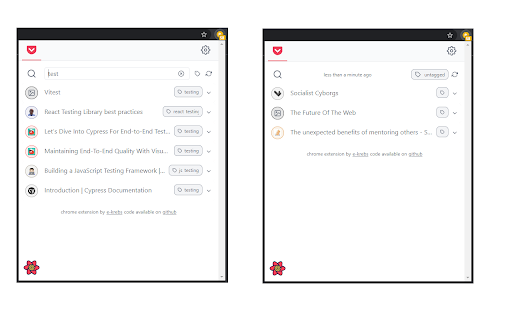
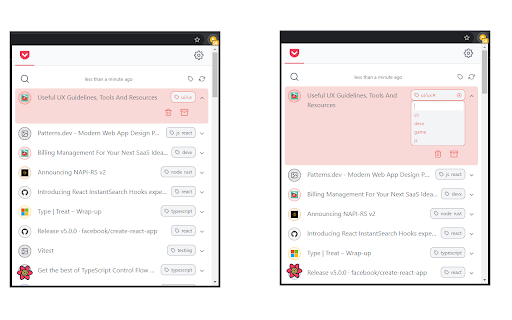
pile is a material design-ish chrome extension that can show results from an Algolia index of your choice (more to come). the icons colors are dynamically computed. ⚠️ it is working, however, it is still a work in progress ⚠️ 1.13.1: - fixes for previous release 1.12.1: - force refresh when refreshing from the popup list 1.12.0: - optimistic update for all pocket action (add, archive, delete, add tag, remove tag)

GoldDust
Ask a question about a company or a person. If the answer is on the internet - our AI agent will locate, synthesize, and display it. Welcome to GoldDust, the Chrome extension that automates the tedious and repetitive research you need to effectively qualify leads, prioritize opportunities, and customize outbound messaging. ⭐ Seamless Integration: Whether you're scrolling through LinkedIn, checking out a company’s website, checking latest news or deep in your CRM, GoldDust is there to enrich your experience without the hassle of switching tabs or tools. ⭐ Rich Info, On Demand: You've got a treasure trove of information, when and where you need it. It’s like magic, but for work. ⭐ Custom Insights: You’re getting the good stuff – customized insights that matter to you. Say goodbye to info overload and hello to insights that make a difference

PageTrail
This Extension tracks your daily surfing activity PageTrails is designed to enhance productivity by tracking time spent on various websites. It records active browsing time, aggregates it at the domain level, and provides a concise summary of web activity. This extension is ideal for users seeking to monitor their web usage patterns and optimize their online time.

Pull Tabs
Save open tabs to disk as files or put them in your Pocket. Manage Your Open Tabs Efficiently with Pull Tabs! Pull Tabs is a versatile browser extension designed to help you manage your open tabs by saving them to disk, adding them to Pocket, bookmarking, copying to clipboard, or even closing them—all in just a few clicks. Simple and Advanced Workflows Simple Workflow: Applies to all tabs in the current window. Example: Download all tabs—this might download the entire webpage (HTML) or the actual file (e.g., images) depending on the link. Allows individual actions for each tab. Example: Out of ten open tabs, you could download two, close two, save two to Pocket, copy two URLs to the clipboard, and ignore the remaining four. Option to close tabs upon a successful action (except for ignoring). Key Features: Bulk Save to Pocket: Effortlessly save multiple tabs to your Pocket account. Download Tabs: Download the entire content or specific files from each tab. Bookmark Management: Quickly add tabs to your bookmarks. Copy to Clipboard: Easily copy URLs of open tabs to your clipboard for quick access or sharing. Advanced Tab Control: Customize actions for each tab individually with a user-friendly interface. Close Tabs Automatically: Option to close tabs after successful actions for a clutter-free browsing experience. Try Pull Tabs Today and Take Control of Your Browsing Experience! If Pull Tabs has helped you and you can and want to feel free to buy me a coffee here: https://buymeacoffee.com/adampdotcom

Page Info
Show the page info and the canonical URL, Copy as Markdown, and more This is a Chrome extension with many features to help check the information about the pages you are viewing. No SEO hypes, no access to any external server. This extension serves as a simple and unobtrusive utility for daily browsing. - Canonical URL Checker and quick access with a shortcut key When a web page is loaded, the extension checks if the URL is canonical and changes its icon face depending on the canonical state. A shortcut key is available for visiting the canonical URL of the current page if set. (Default: Command+Shift+Home on macOS, Ctrl+Shift+Home on Windows and Linux) - Page Information Viewer Clicking the extension icon shows a popup window in which you can check out the following pieces of information: - the canonical URL you can follow or copy () - the site name (og:site_name) and icon (og:icon or ) - the image (og:image) - the page title (og:title or ) - it also works as a button to copy the link to the page as Markdown - Twitter flavored equivalents for the above items (twitter:*) - the modification and publication time stamps (article:published_time and article:modified_time) A customizable Save URL button can be added to the popup window, with which you can bookmark the current page online with any popular service on the fly, optionally in the background. Background saving works with Raindrop, Pocket, Pinboard and Inoreader. This extension provides context menu items to copy any link or image as Markdown. Copying a Markdown link also stores a rich text version in HTML in the clipboard so you can paste a link right away to any WYSIWYG editor, Slack, Google Docs, etc. A shortcut key can be configured to copy a link to the current page as Markdown. (Default: Command+Shift+L on macOS, Ctrl+Shift+L on Windows and Linux) - Use the name "X" instead of "Twitter". - Update library versions. - Update library versions; ESLint to v9, React to v19, and Semantic-UI-React to v3 beta. - Update background saving for Raindrop. - Update library versions. - Fall back to the tab title when the document is not accessible nor have a title such as when it is a PDF document. - Fix the link title always being "Link" when copied other than from the context menu. - Use alt/title attribute values in Markdown/HTML snippets generated via the context menu. - Relax URL constraints and enable content scripts everywhere so that the context menu items work in iframe without src. - Stop showing placeholders when the title is empty. - Always show a popup as long as the active tab has a URL. - Detect dynamic changes to the canonical URL of a tab and update the icon face. - Bind "Visit the canonical URL in new tab" to Shift+C. - Make internal improvements and avoid harmless errors. - Middle click on the Canonical URL button opens it in a background tab. - Show the extension name and version in the help modal. - Revise the check mark icon. - Slightly improve the help modal. - Add support for Inoreader to the Save URL feature. - Show an in-progress badge while transitioning pages in the Save URL process. - Bring the background Save URL window to the front if a login form is detected in it. - Implement a new shortcut key assignable command: "Visit the canonical URL of the current tab if available". - Rename the feature "Share URL" to "Save URL online". - Add a shortcut key "C" for copying the canonical URL in the popup. - Copy a Markdown link to the current tab page when the context menu item "Copy a Markdown link to the current page" is invoked from within the popup. - Close the popup when the Share URL button is clicked. The result is shown by a badge. - Make typing Command/Control+Shift+C in the popup copy a Markdown link. - Make typing Command/Control+C in the popup copy the canonical URL. - Refactor shortcut key handling and fix key event propagation. This prevents Command/Control+D from getting unwantedly propagated to the browser and adding a local bookmark. - Add a direct keyboard shortcut to copy a Markdown link to the current page. - Copy the text/html version of a link in addition when copying a Markdown link. - Implement a help modal. - Fix Markdown escaping. - Fix unreliable background saving to Raindrop. - Ignore invalid timestamp strings. - Set the default shortcut key for this extension to Command/Control+Shift+I. - Make typing Command/Control+C in the popup copy a Markdown link. - Make typing Command/Control+D in the popup invoke Share URL. - Make typing H/L and Left/Right in the popup switch between panels. - Navigate to the canonical URL without sending a referrer. - Fix a regression where the canonical state is reset via the Share URL button. - Allow for copying and sharing a non-canonical link. - Show a Non-canonical tab if the canonical URL is different from the tab URL. - Add a hover popup to the title copy button and the Share URL button. - Update the icon face even when the tab URL changes via the history API. - Keep the popup open and update the content when the tab is updated while it is open. - Do not reset the canonical state when the Share URL button is clicked. - Show the publication and modification timestamps if present. - Check the canonicality by comparing normalized URLs. - Automatically close the popup when the current tab loads a new page. - Fix placeholder coloring in the dark mode. - Implement context menu items to copy any link or image as Markdown. - Enhance the extension popup - The site title is now a button to copy a Markdown link. - The site image accepts the context menu item to copy it as Markdown. - Adjust colors in the dark mode. - Implement background URL sharing. - Add an option to open the share URL popup in background and auto-close it. - Add basic support for twitter:* meta tags and show a Twitter tab panel if they are found. - Add support for the dark mode and adjust styles. - Fix error handling and show the URL and title when run in Chrome extension gallery. - Fix a performance bug in the popup window. - Improve Options UI. - Set the tooltip of the share button. - Implement a Share URL feature and add an options page for that. - Extend support for icons; `shortcut icon` and `apple-touch-icon`. - Avoid HTML over-unescaping. Version 0.2.0 - Show the site name and icon if available.
