
jfpjdflfhdepbejldkmakbfpicpgnjjj


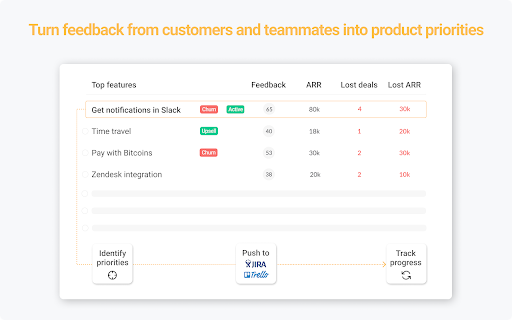
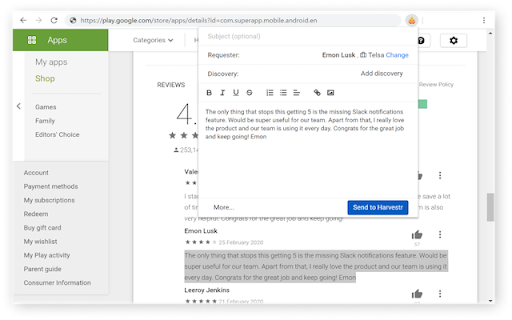
Harvestr Chrome extension Use the Harvestr Feedback Clipper to gather feedback from all teams and turn it into outstanding product experiences. Harvestr is a product management platform that helps you leverage customer feedback and revenue data to build successful products. Track feedback, prioritize your backlog, and communicate on your roadmap - all in one place. Our Feedback Clipper makes it easy for everyone to escalate product feedback from any web page to a central repository. From there, product teams can analyze the voice of the customer and identify unique insights to build the right features. From the Feedback Clipper, everyone can also keep track of the status of their feedback and even search for feedback sent by specific customers. Note: a Harvestr account is required to use this extension. Join your team or sign up for a free trial at https://app.harvestr.io/register ★ HOW TO ESCALATE FEEDBACK TO HARVESTR Do you have some valuable feedback you would like to share with your product team to influence the roadmap? - select some text content on the page you're currently on - hit the Harvestr button on the top right of your browser - add additional text content or images - add a feedback requester if any - link your feedback to a Discovery (optional) - press send If you do not choose any specific Discovery, your feedback is sent to the Harvestr feedback inbox for later processing. - gather feedback from customer-facing teams, app stores, or online user communities - send feedback from your product's interface while you are using it - capture fresh product ideas when browsing the web - close the feedback loop by giving teams visibility on feedback statuses

Gainsight Assist
Access Gainsight email templates and easily sync emails to Timeline directly from Gmail to save time & effort in your day. Make managing your day-to-day customer communications easier than ever before with the Gainsight Assist plugin. Gainsight users can access your Gainsight email templates directly within Gmail, saving you time when composing customer emails and helping to drive consistency in your communications. And, the ability to log emails to Timeline from within your inbox saves time and ensures that every important conversation is captured. By installing this extension, you agree to the Gainsight Privacy Policy at https://www.gainsight.com/policy/privacy/ For more information, please visit https://www.gainsight.com.

Contentsquare - CS Live
Contentsquare’s CS Live extension will allow you to display Contentsquare’s unique UX metrics directly on your website. For every zone on each page, you can seamlessly see metrics like click recurrence, hesitation time or engagement rate.

HighlightAI
Chat on highlighted cell number on Whatsapp. Search highlighted text on FB, LinkedIn, X, Quora and TikTok. Search using AI Unlock a smarter way to browse and connect with Highlight AI, the Chrome extension that transforms your online experience. Highlight text to instantly search across Quora, TikTok, X, and Facebook, or start a WhatsApp chat by selecting a phone number—no copying or pasting needed. With its intuitive design, Highlight AI seamlessly boosts your productivity and engagement. Perfect for social media fans, researchers, and professionals. Download now and elevate your digital life! This concise, engaging description highlights key benefits, targets a broad audience, and includes a strong call to action to attract more users.

PromptSync
Ask ChatGPT, Bard AI, and Bing Chat with one single prompt! Unlock the power of four dynamic chat platforms with a single prompt! Introducing PromptSync, your all-in-one solution for chatting with ChatGPT, Bard AI, and Bing Chat, through a convenient Chrome extension. Multi-Platform Chat Engage in conversations effortlessly with ChatGPT, Bard AI, and Bing Chat from a single prompt. Get diverse perspectives and responses to your queries. Customizable Experience Tailor your chat experience to your liking! Enable or disable individual chat platforms according to your preferences through the settings menu. Efficient Workflow Streamline your workflow by accessing multiple chat services without switching tabs. Save time and stay productive as you harness the combined intelligence of four powerful chat systems.
