
jfmnlfhjhfgdffanfdjnechklgblccni
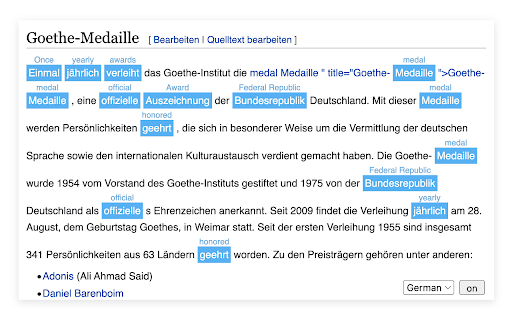


Features: * Translate the selected content, highlight it and show the translation above * Double click on the translated word to cancel the translation * You can customize the translation and use it automatically the next time you look up a word * Select the source language of the current interface in the bottom right corner * Easily show and hide the translation interface * Ability to configure the source language for a specific website * Ability to configure the language used for translation of a specific language * If the wrong language was selected before, retranslation requires holding down `cmd/ctrl` * `cmd/ctrl + click` on the translated word to open custom dictionary Note: Not all websites have been adapted. If there are websites that need to be dealt with separately, please provide feedback or contact the developer.

Simple Translate
Quickly translate selected or typed text on web pages. Supports Google Translate and DeepL API. When you select text, the translation button pops up and the translation is displayed instantly. If you enable "Do not display the button if translation is not required" option, you will not get frustrated by the button appearing when it is not necessary. In the toolbar popup, translate the input text in real time. If you enable "Automatically switch to the second language" option, you can do : When English is input, it is translated into Japanese, and when Japanese is input, it is translated into English. You can also translate from the context menu. You can select "Translate this page", "Translate selected text", and "Translate selected link" from the menu on the page or tab. Supports Google Translate and DeepL API.

Google Translate
View translations easily as you browse the web. By the Google Translate team. Highlight or right-click on a section of text and click on Translate icon next to it to translate it to your language. By installing this extension, you agree to the Google Terms of Service and Privacy Policy at https://www.google.com/intl/en/policies. UPDATE (v.2.0): Now you can highlight or right-click a text and translate it vs. translate the entire page. You can also change extension options to automatically show translation every time you highlight text. UPDATE (v.2.14+): Page translation is now supported natively in Chrome browsers and is no longer supported in the Google Translate extension. See https://support.google.com/chrome/answer/173424 to learn how to use it.

Simple Select to Translate
Simply select text to translate and send it to Google Translate. Tired of constantly switching tabs, copying, and pasting text just to get a quick translation? Simple Select to Translate revolutionizes your workflow by bringing the power of Google Translate directly to you, wherever you are on the web. This extension is designed for students, professionals, researchers, and anyone who reads content in multiple languages. It's the cleanest, fastest, and most intuitive way to translate selected text. Stop wasting time and streamline your browsing experience! 🚀 Instant In-Page Translation Bubble: The star of the show! Simply select any text, and a small, convenient icon will appear right next to it. Click the icon, and get your translation instantly in an elegant popover bubble without ever leaving the page. It's seamless, fast, and incredibly efficient. ⚡️ Powerful & Customizable Right-Click Menu: Prefer the classic approach? * Translate Selection: Right-click your selected text to instantly open the translation in a new tab or a separate, resizable popup window. You decide what works best for you in the options! * Translate Full Page: Need to understand an entire article? Just right-click anywhere on the page and select "Translate this page" to open a fully translated version in a new tab, powered by Google Translate. ⚙️ Highly Customizable & User-Friendly: * You Are in Control: Easily toggle the in-page translation bubble on or off from the modern and clean options page. * Choose Your Target Language: Set your default translation language once, and the extension will remember it for all future translations. * Popup or New Tab: Decide whether the right-click menu opens a compact popup window or a full new tab. ✨ Clean, Simple & Modern: No clutter, no ads, no unnecessary features. Just a fast, beautiful, and efficient translation tool that integrates perfectly with your browser. 1. Select Text: Highlight any text on a webpage. 2. Choose Your Method: * Click the small translation icon that appears next to your selection for an instant in-page translation. * OR, right-click the selected text and choose "Translate with Google". 3. Get Your Translation! It's that simple. Stop letting language be a barrier. Install Simple Select to Translate today and experience a smarter, faster way to browse the multilingual web! Privacy First: Your privacy is a top priority. This extension does not track you or store any of your personal data. All your settings are saved locally on your computer, and nowhere else.

DeepTranslate - Full Page & Bilingual Translator & AI-Powered Translation
Translate web pages effortlessly with Google Translate and OpenAI. Supports quick text translation and PDF imports for translation. 🔵 Why Choose DeepTranslate? 🔵 DeepTranslate integrates multiple translation engines into a simple, easy-to-use tool, providing comprehensive language support and bilingual display. There's no need to switch between websites or apps—just one click allows you to translate and seamlessly toggle between the original text and translation. It supports popular services like Google Translate, OpenAI, and Microsoft Translator, making it ideal for translating websites, news, Gmail, WhatsApp Web, X, Twitter, Facebook, Google Scholar papers, and more. 🔵 Why Use DeepTranslate? 🔵 DeepTranslate is not just a translation tool—it’s your multilingual world exploration assistant. Here are its key features: 1️⃣ Completely Free: Enjoy all features without a subscription. 2️⃣ Powerful Multilingual Support: Automatically detects and supports over 120 languages, including Chinese, English, Spanish, Japanese, and many others. 3️⃣ One-Click Web Translation: Translate entire web pages, from news sites to social media and academic papers, with a single click, and view them in bilingual mode. 4️⃣ Social Media Translation: Effortlessly translate posts, comments, and private messages on WhatsApp, X, Twitter, Facebook, and Instagram. 5️⃣ Academic Resource Translation: Quickly understand foreign academic papers on platforms like Google Scholar and PubMed. 6️⃣ Flexible Engine Switching: Switch between OpenAI, Google Translate, and Microsoft Translator for the best translation quality. 7️⃣ Convenient Text Translation: Access quick text translation anytime, anywhere. 8️⃣ User-Friendly Experience: Whether you’re a first-time user or an expert, enjoy a smooth and intuitive interface. 🔵 Upcoming Features 🔵 We’re developing new features to make DeepTranslate seamless across various scenarios: ✅ Auto Video Subtitle Translation: Generate bilingual subtitles for platforms like YouTube and Vimeo, ensuring you understand every video. ✅ Floating Window: Translate quickly with a floating window, without delays. 🔵 How Does DeepTranslate Stand Out? 🔵 1️⃣ All-in-One Platform Support: Whether browsing, reading academic papers, or interacting on social media, DeepTranslate offers comprehensive language support, eliminating the need for multiple tools. 2️⃣ Bilingual Learning Assistant: Improve your language skills with bilingual mode and multi-engine comparison for better understanding and memory retention. 3️⃣ Real-Time Updates & Support: We focus on innovation and continuously enhance features through fast iterations and user feedback, ensuring access to the latest translation technology. 📪 For any questions or suggestions, contact us at support@deeptranslate.ai. We look forward to your feedback and are committed to improving your DeepTranslate experience.
