
jflcifhpkilfaomlnikfaaccmpidkmln

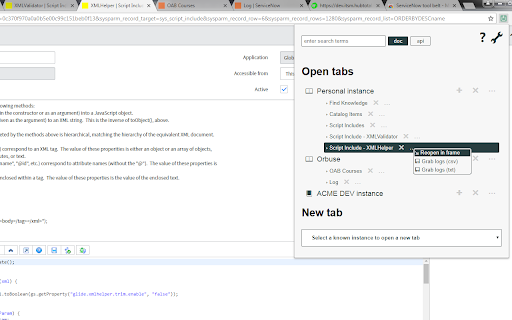


A set of tools for ServiceNow developers and administrators This extension provides a set of tools for Servicenow users and developers. Grouped tabs: View tabs organized by ServiceNow instance Instance switching: Open records/lists on different instances Custom colors: Assign colors to distinguish instances Tab groups: Auto-organize tabs with colored groups (when supported) Universal search: Find records by sys_id, task number, username, or group name Smart detection: Automatically identifies correct table and record class Wildcard search: Use * for "starts with" searches Cross-instance: Search on any available instance Field name toggle: Switch between display names and technical field names (disabled in modern workspaces) Background scripts: Enhanced script editor with better UX Version history: Quick access to record versions for any object, incl. from Flow Designer Frame navigation: Reopen pages in ServiceNow's navigation frame Console: Built-in command console with search, stats, and navigation commands Auto-discovery: Automatically detect visited instances Export/Import: Backup configurations as JSON Theme support: Light/dark themes based on system preference Keyboard shortcuts: Configurable hotkeys for common actions

Scriptionary
Scriptionary acts as a repository for various ServiceNow client and server side code snippets. Users can quickly save and paste… Scriptionary acts as a repository for various ServiceNow client and server side code snippets. Users can quickly save and paste code on the fly using the built in context menu or adding a script utilizing the pop out mode. Scriptionary features an inline script editor with a multi-tab capable system, allowing the storage of full code snippets in a single file Features: - 55+ common code snippets - Context menu system that allows you to save and load code snippets on the fly - Category manager that lets you create and organize script categories using multiple combinations of HTML, JS and CSS. - Full documentation included within the extension INSTALLATION INSTRUCTIONS: 1. Download the application 2. Pin the application to the chrome toolbar 3. Open the application and open the guide from the hamburger menu for getting started NOTE: Pin mode was replaced with Pop out mode due to temporary technical limitations

SwissNow OnPrem - ServiceNOW toolbox
Swiss Knife for ServiceNOW. Lightweight toolbox for ServiceNOW. A version of SwissNow extension supporting on premise versions of ServiceNow. Both versions of the plugin share the same code base and functionality. This version of the plugin requires additional permissions to be able to access ServiceNow instance. If you do not plan to use on premise ServiceNow instances, please use the base version: https://chrome.google.com/webstore/detail/swissnow-servicenow-toolb/jneeammdkdmlfgidcacmjmbijdmkdbjm

ServiceNow Monitor
Monitor ServiceNow Lists and Notify changes ServiceNow Monitor is a chrome extension for scrapping and monitoring ServiceNow lists in the Agent workspace. The extension monitors changes to the lists in the background and sends notifications if new items are available avoiding the need to constantly manually refresh the list and monitor the window. (Personal work, not affiliated to ServiceNow). Not just that - The extension also allows you to scrape any list in ServiceNow and download the list in a JSON format.

SN ScriptMaster
Generate powerful ServiceNow scripts with natural language. SN ScriptMaster is the perfect solution for streamlining and automating your development processes. With just a few simple clicks, you can easily create custom scripts from natural language that can be used to automate a wide range of tasks within ServiceNow. Need to find all of the Computer records on the cmdb_ci_computer table that are assigned to "John Cena" and update the location to Building C? No problem! SN ScriptMaster will generate a script for you to use immediately. Try it out today and see the benefits for yourself!
