
ggfnhpnjafcnfdccnjhohmobekdicghn

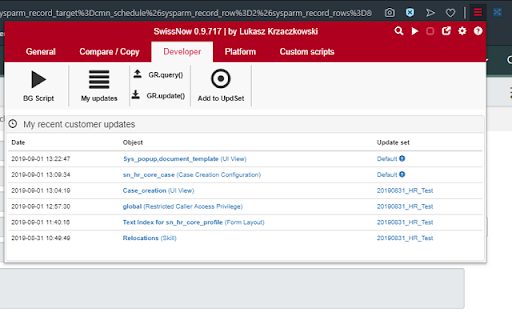

Swiss Knife for ServiceNOW. Lightweight toolbox for ServiceNOW. A version of SwissNow extension supporting on premise versions of ServiceNow. Both versions of the plugin share the same code base and functionality. This version of the plugin requires additional permissions to be able to access ServiceNow instance. If you do not plan to use on premise ServiceNow instances, please use the base version: https://chrome.google.com/webstore/detail/swissnow-servicenow-toolb/jneeammdkdmlfgidcacmjmbijdmkdbjm

SwissNow - ServiceNOW toolbox
Swiss Knife for ServiceNOW. Lightweight toolbox for ServiceNOW. Using SwissNow, you can: 1. Check current logged in user, selected Update Set, Scope and Domain 2. Check plaftorm information (e.g. nodes). Switch active node. 3. Switch to the same record/view in another ServiceNow environment 4. View recent changes tracked in Update Sets 5. Custom utility scripts (= parametrized background scripts) 6. Configuration packages - export records from multiple tables into single file with just one click 7. Compare the same record or the same list of records on different environments. Multi-line values (e.g. scripts) highlights changed lines. Comparison of workflow activities on a list (wf_activity_list.do) includes activity variables (e.g. script in RunScript action) 8. Compare all rows/records in a list with each other 9. Add a prefix in your tab title - the prefix will indicate the ServiceNow environment you're connected to 10. Watch list. You can monitor a result of a list query. Once list content has been changed, you will receive a desktop notification from Chrome. 11. Embed current view in the ServiceNow UI. Pop-pop current view from the ServiceNow UI 12. Generate GlideRecord code for selected query 13. Edit ServiceNow background scripts locally, using your favourite IDE/editor (press CTRL-Enter to execute script) 14. Cancel your long-running blocking transactions 15. Search table by name 16. Context menu search global search 17. Add arbitrary records to an update set There is a separate version of the plugin to be used with OnPrem ServiceNow instances.

Semiant
Your Virtual Quality Assistant NEW: Major version 5 of Semiant makes team use even easier! Share glossaries with your team, your organization or even external collaborators while maintaining privacy. Generate and manage your product glossary with Semiant. The AI scan works with Polarion, Jira, Confluence, DOORS Next, Jama Connect and many other web applications. You can try it for free. Semiant has many more skills. Contact us to find out how Semiant can make your product development teams more efficient and effective. Like Semiant? Then please rate it. Not so much? Then contact us for suggestions: support@formalmind.com Want to stay informed? Sign up for our newsletter: https://www.semiant.com/get-started/

ServiceNow Helper
ServiceNow Helper allows you to use ServiceNow faster and in a more efficient way. - New in v1.5: Add notes to your instances. - Open your ServiceNow instances with one click. - Switch easily and fast between instances. - Measure client-side dashboard performance on a Service Portal. - Add the Application navigator when it's not shown. There are no customizations needed on your ServiceNow instances for this extension to work.

NeoOffLine
yet another NEO thin wallet for chrome extension NeoOffLine is based on NeoLine, equipped with the following features: - public key only wallet - THE MOST IMPORTANT FEATURE TO PROTECT YOUR CRYPTOS - create a wallet by its public key and store your private keys offline; - when signatures are required, the extension will ask you to sign and provide them; - zero priority gas fee by default - do NOT install NeoOffLine and NeoLine together - although all the features from NeoLine are supported, it is NOT recommended to `generate new wallet` or `import a PRIVATE key` or `use the wallet on Neo2` - USE AT YOUR OWN RISK, see source code https://github.com/neo-off-line/extension - potential bugs from NeoLine can also be introduced to NeoOffline
