
jeklddnnadkjkciakbjkomlnockfkofe
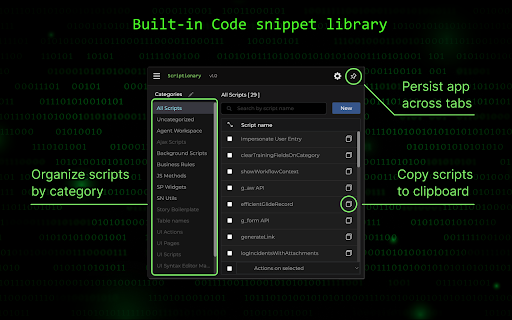
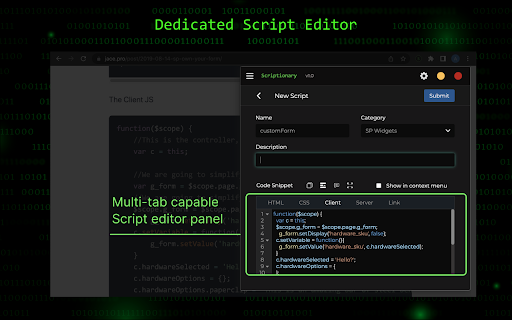
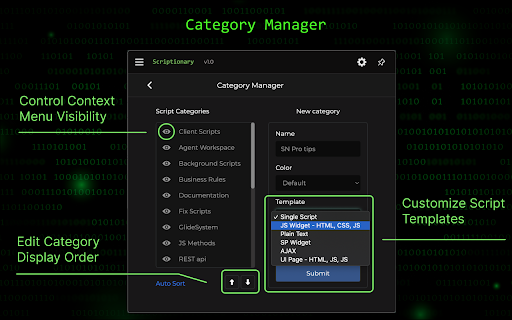
Scriptionary acts as a repository for various ServiceNow client and server side code snippets. Users can quickly save and paste… Scriptionary acts as a repository for various ServiceNow client and server side code snippets. Users can quickly save and paste code on the fly using the built in context menu or adding a script utilizing the pop out mode. Scriptionary features an inline script editor with a multi-tab capable system, allowing the storage of full code snippets in a single file Features: - 55+ common code snippets - Context menu system that allows you to save and load code snippets on the fly - Category manager that lets you create and organize script categories using multiple combinations of HTML, JS and CSS. - Full documentation included within the extension INSTALLATION INSTRUCTIONS: 1. Download the application 2. Pin the application to the chrome toolbar 3. Open the application and open the guide from the hamburger menu for getting started NOTE: Pin mode was replaced with Pop out mode due to temporary technical limitations

Breakdown, for Mint and Personal Capital
Breakdown slices and dices transactions downloaded from Mint and Personal Capital. First, briefly check out the Breakdown demo for Olympic Medals: The interface works on all kinds of multidimensional data. Applied to personal financial data, it can answer questions like: Breakdown works by loading your Mint or Personal Capital data into Lovefield, the browser-based local database written in javascript by a team at Google. Your data stays on your machine. Install the Chrome Extension. In Empower (formerly Personal Capital), go to Overview/Transactions, select All, and click the CSV button. Save the csv file to your hard drive. A new tab will appear for Breakdown, thanks to the extension. Click the big Import button. Select the csv file you just downloaded. Breakdown relies on you to download data yourself and pass it on manually to Breakdown, which passes it on to Lovefield. That sounds painful but it's only a few button clicks whenever you want the latest transactions. There are no user accounts or logins because there is no interaction with any server. All data is local. The Lovefield database can be seen in the Chrome Developer Tools under the Applications tab, in IndexedDB and Local Storage.

SN Tabs - ServiceNow tab organizer
Organize your ServiceNow tabs automatically. Important: To make this extension work better, please disable “Automatically pin new tab groups created on any device to the bookmarks” option in your browser settings. Features: • Automatically group tabs by instance • Open current page on any instance Zero configuration required for cloud hosted ServiceNow. For on-premise, simply add your domain via the menu.

Unwanted Opinions
Lets you block tweets using various options. Unwanted Opinion saves your eyes by blocking tweets using filters you specify. Still want to see the tweet? Press the Show button!

Stefan's Mastodon Tools
A collection of useful tools for Mastodon. This is a growing collection of enhancements for Mastodon, currently including the following features: - Mastodon instance switcher: easily switch between multiple Mastodon instances to reply to posts and follow accounts - Expanded quote post previews - Tag browser: explore a larger portion of the fediverse when browsing tags
