
jfkeeldgldifmcpckpmkjpoceamojgnk
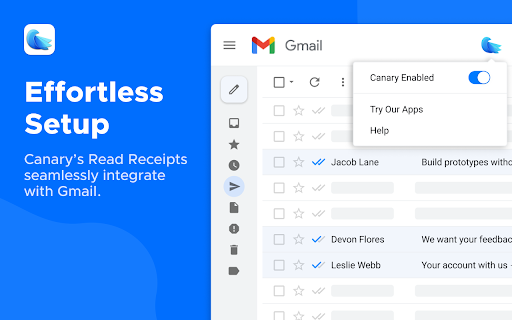
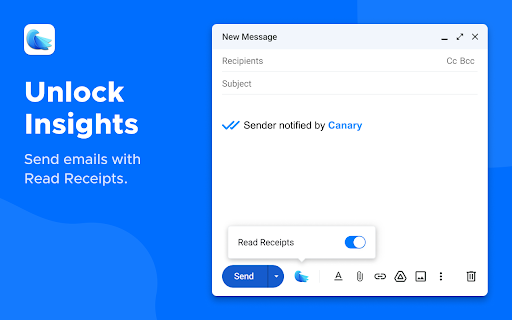

Unlimited email open tracking notifications for your messages. Get instant read receipts to know if your emails are opened or not. The Canary Mail Chrome extension revolutionizes your emailing experience, providing comprehensive insights into your sent emails. Offering a sophisticated Read Receipt feature, this extension ensures you’re informed precisely when your emails are opened by recipients, elevating your communication game to new heights. Key Features and Benefits: • Real-time Insights: Gain comprehensive insights into sent emails. • Read Receipt Feature: Monitor communication with distinctive Read Receipts. Track messages effortlessly. • Enhanced Security: Follows strict privacy guidelines to ensure strong data protection. • Tailor Your Approach: Track individual emails for recipient engagement and tailor your approach accordingly. • Optimal Usage Scenarios: ⁃ Professional Networking: Monitor email engagement during job searches and client interactions. ⁃ Business Transactions: Track proposals, quotes, and invoices for reception and prompt follow-ups. How to use Canary Mail to track Read Receipts: • Enable Canary Mail extension by clicking on the Canary icon at the top-right corner of your Gmail window. • Enable Read Receipts for your mail by clicking on the Canary icon next to the Send button in your Gmail compose window. How to see Read Receipts for your mails: • Go to the ‘Sent’ Folder to see Read Receipts for your mails. • Blue ticks show delivered and read mails. • Grey tick show mails that were not tracked. • A mix of Blue and Grey tick show mails that were delivered and tracked but not read. Privacy and Compliance: Canary Mail complies with rigorous privacy standards, including GDPR regulations, ensuring your data remains secure and protected. Regular audits and stringent privacy policies ensure optimal security for your peace of mind. Canary Mail app on other platforms: Canary Mail app is a multi-platform app available on iOS, macOS, Android and Windows. With a full set of productivity features including Snooze, Pin, Email Prioritisation, Bulk Cleaner, Send Later etc along with AI integration and advanced security features, the email app fulfils all the requirements for efficient email management. Found out more on our website: https://canarymail.io/

Email Tracker For Gmail - MailerPlex
Free email tracker for Gmail. See email tracking and link click stats in real-time Mailerplex email tracker extension is a simple tool, which lets you see email opens and clicks in real-time. It's available as a chrome add-on for Gmail. With the extension, you can track your email opens, clicks and do appropriate follow-ups. Depending on your profession, email open tracking can give a boost to your outreach. For example, if you know when someone opens your email, how often, you can gauge their engagement levels and tailor appropriate content. Also you can reach them as soon they open, so that your email is fresh in their mind. If you are sending a number of emails from your Gmail account, here are some of the questions that are important for you. What happens after you send an email? Are your important emails being read? Do your prospects click on the resource links that you send them? With Mail Tracker extension, you can get these questions answered. You can also track Gmail location of your recipient and know if they have clicked on any link included in your email. It also comes with real-time notifications and detailed dashboard for your analysis. Listed below are the features of the chrome extension. REAL-TIME EMAIL OPEN NOTIFICATIONS (How do I know when someone opens my email) You will get a real-time notification, as soon as your email is opened by the recipient. This will help you to do perfectly-timed follow-ups and make your overall communication better. WE OFFER A FREE VERSION in the free version of MailerPlex, you can send 30 tracked emails per months without any signature. Also, it comes with real-time notification and access to a detailed dashboard. QUICK AND DETAILED DASHBOARD ACCESS Both free and paid versions come with access to a real-time dashboard. The dashboard has a detailed activity stream for your emails. Also, you can access your quick dashboard by clicking on the extension icon. MULTIPLE EMAIL ACCOUNTS IN THE SAME BROWSER Want to use both professional and personal email? MailerPlex comes with a robust multi-account feature. IDENTIFY ENGAGED LEADS AND THOSE WHO NEED FOLLOW-UPs With our detailed dashboard, you can easily identify the leads that are engaged with your content. Also, you can identify the ones who are not opening your emails and tune your communication accordingly. GET STARTED INSTANTLY. VERY SIMPLE TO USE We have designed MailerPlex to be extremely simple to use. And we would like to keep it that way. AFFORDABLE PAID VERSION Our pro version is priced at $6/User/Month ($4/user/month for annual plan) and comes with additional capabilities such as link click tracking, email support and other advanced features. We continuously add useful and essential features to our pro version, so that we can deliver more value to your sales process. WHAT OUR CUSTOMERS SAY - *Very useful for sales professionals like me. Helps with right communication and follow-ups. Add low price and simplicity to that.* - Kurt Eichenwood, VP Sales *Mailerplex enables my team to hire premium candidates better. We immediately act on the ones who have opened or clicked our mails. Those who don't open, we try to pitch them better. Must have for recruiters.* - Amy Christian, Recruitment Lead The $6/User/Month ($4/user/month for annual plan, cancel anytime) Mailtrack extension Pro version comes with link click tracking and additional pro-level functionality. For our customers, MailerPlex is an essential tool for their overall outreach and follow-up strategy. If you send professional as well as personal emails, tracking email opens and clicks could be very useful for you. Knowing whether someone opened your email, when they opened, their devices and location etc. may help you for better outreach. Here are some of the the ways you can use this information. To Do Better Followups - If you know that someone opened your email at a particular time, you can do a follow-up immediately to get better response. This is very useful when you are doing sales, business development, recruitment, job search and in many other professions. Studies have shown that if you reach your prospect at a time she is going through your content, you can get much higher response rate. To Know Highly Interested Prospects - If you see your recipient is opening your email multiple times and clicking on multiple links in your email, they are more interested. So you can tailor your follow-up email accordingly and can get better response. To Improve Subject Line or Offer More Value - If your emails are not getting opened, that may mean the subject line is not generating enough interest. You may need to work upon your subject or offer better value, so that they can engage with you. Depending on what you do, email open and click tracking may be very useful or even essential for you. But the challenge here is most of the email providers don’t track this information. For this you have to use a email Tracking tool like MailerPlex. MailerPlex is a simple Chrome extension for Gmail. Using MailerPlex, you can get detailed insight into the emails that you are sending.

Email Tracker
Free Email Tracker for Gmail Email Tracker – Real-Time Email and Link Tracking for Gmail Supercharge your Gmail with Email Tracker, the simple and powerful Chrome extension that tracks email opens and link clicks in real time. Perfect for professionals, marketers, and business owners who want instant engagement insights without leaving Gmail. • 📬 Real-Time Open Tracking – Know exactly when your emails are opened for perfectly timed follow-ups. Read Receipts in Gmail. • 🔗 Link Click Tracking – See when recipients click links to measure interest and engagement. • ⚡ Instant Notifications – Get desktop alerts the moment your emails are opened or links are clicked. • 💼 Native Gmail Integration – Works seamlessly inside Gmail with no setup or extra apps required. • 📊 Analytics Dashboard – View clear, detailed insights and engagement trends. • 🎯 Smarter Follow-Ups – Focus your time on leads that are opening and engaging. • 📈 Data-Driven Insights – Understand when and how people interact with your messages. • 🔒 Privacy and Security – Email content is never stored. All data is encrypted end-to-end. • ⚙️ Flexible Tracking – Choose visible tracking (adds a small “sent with Email Tracker” tag for up to 40% more replies) or invisible tracking (20 free invisible trackers each month). Install Email Tracker today and start tracking emails instantly. Gain real-time visibility into your Gmail communication and boost your productivity with actionable insights.

SONAR Email Tracker for Gmail - Secure & Free
Unlimited and forever free tool to track your emails easily. SONAR Email Tracker is a Chromium-based browser extension for Gmail that makes you able to track your email activities, such as when your email is opened. Other than that, SONAR Email Tracker will give you peace of mind and a hint of what is the next email you should send or the next action you should take after you send an email, know who opened your emails, how many times your emails are opened, and how many times the links are clicked. With SONAR Email Tracker, you can: - Track email activities. Never lose track of your most important emails. - Get real-time notifications when your urgent email is opened. - Have a daily report on every email activity to analyze and improve your strategy. And with SONAR Email Tracker Pro features, you can: - Hide SONAR signature. - Track links in your email. - Get the first open alert via email. - Get reminder for unopened emails. - Track emails for 7 days. - Get a more detailed, in-depth daily email report. - Get an in-depth activity dashboard. Why should you use SONAR Email Tracker? - Easy to install, easy to use. - It has a very low learning curve. - High-powered tool. - Free and unlimited in tracking your email journey. - You can use it as a personal email marketing tool. - Tracking emails has never been this easy. - Boost your email productivity like never before. - Know your next action when the recipients open your email. How to start using SONAR Email Tracker? - Go to Chrome Web Store, hover your mouse to “Search” on the top navigation bar, and type SONAR Email Tracker. - Click and continue with the installation of the SONAR by MTARGET extension for your Google Chrome Extension. - Compose your email as usual, and hit send. SONAR will automatically track your email without you having to do any settings. - You can start email tracking by clicking the “Sent emails” folder. - Grey double-dashed line -- means that the email you sent wasn’t powered by SONAR. - Two grey check marks ✓✓ mean that the recipient hasn’t opened your email. - Two blue check marks ✓✓ mean that the recipient has opened and read your email. Perfect Time to Use SONAR Email Tracker: - Job application: Know when your application has been opened or not by the recruiter. - Marketing or sales activities: Know if your potential clients have already read your emails and engaged with it. - Most important emails: Know when your most important and urgent email is opened to make the right move after it's opened. Enjoy SONAR features forever free: - Tracked first open and notification on Chrome. - Track your email for up to 48 hours. - Tracked email indicator. - Report on a daily basis. SONAR Email Tracker works with: - Google Chrome - Opera - Microsoft Edge - Samsung Internet - Vivaldi - Brave - Epic Privacy, and other chromium-based browsers. SONAR v1.1.0 - Fixed issues with Gmail becoming slow and relatively unuseable when too many emails in the sent folder. - Loading performance improved.

Streak Email Tracking for Gmail
Know when your email is viewed. Real-time tracking built into Gmail for sales, support, hiring, and outreach. 👀 KNOW WHEN YOUR EMAILS ARE OPENED - Get real-time notifications when your emails are opened or links are clicked - Track activity from your Gmail inbox—no extra tools or apps needed - Use open data to follow up at the right time and close more deals ✉️ BUILT INTO GMAIL - Recently viewed folder helps you engage with active recipients - See full tracking details, including timestamps and devices - Toggle tracking on or off for individual messages 💁 WHO IT’S FOR - Sales reps who want to follow up when leads are warm - Founders and recruiters doing cold outreach - Anyone who wants to know what happens after hitting send 🤝 WORKS ALONE OR WITH STREAK CRM - Pairs with Streak CRM to track emails across your pipelines - https://chromewebstore.google.com/detail/streak-crm-for-gmail/pnnfemgpilpdaojpnkjdgfgbnnjojfik 📌 Install & Get Started 1. Click “Add to Chrome.” 2. Authorize Streak in your Gmail account. 3. Compose an email and turn email tracking on
