
lcjmfkbfkpmpfpppjllldbmjhbcpimcm
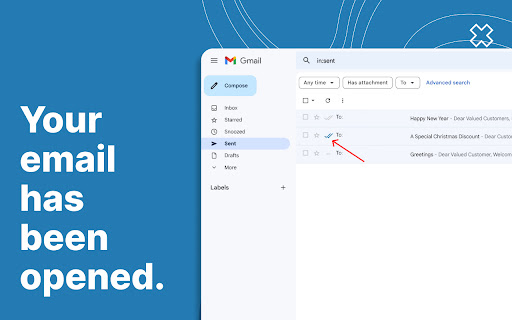
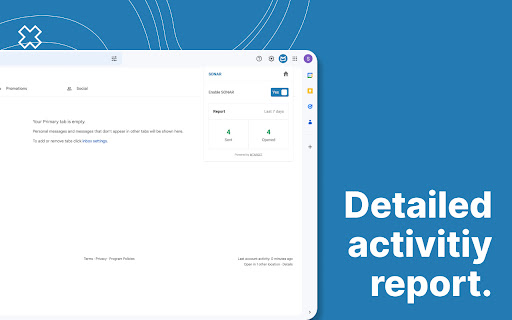
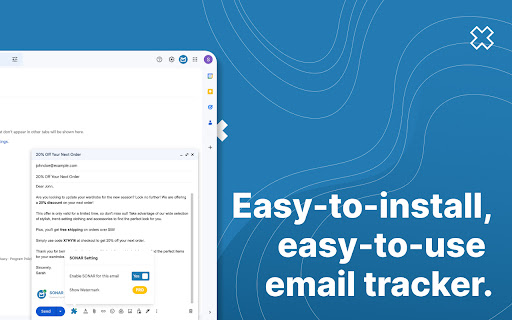
Unlimited and forever free tool to track your emails easily. SONAR Email Tracker is a Chromium-based browser extension for Gmail that makes you able to track your email activities, such as when your email is opened. Other than that, SONAR Email Tracker will give you peace of mind and a hint of what is the next email you should send or the next action you should take after you send an email, know who opened your emails, how many times your emails are opened, and how many times the links are clicked. With SONAR Email Tracker, you can: - Track email activities. Never lose track of your most important emails. - Get real-time notifications when your urgent email is opened. - Have a daily report on every email activity to analyze and improve your strategy. And with SONAR Email Tracker Pro features, you can: - Hide SONAR signature. - Track links in your email. - Get the first open alert via email. - Get reminder for unopened emails. - Track emails for 7 days. - Get a more detailed, in-depth daily email report. - Get an in-depth activity dashboard. Why should you use SONAR Email Tracker? - Easy to install, easy to use. - It has a very low learning curve. - High-powered tool. - Free and unlimited in tracking your email journey. - You can use it as a personal email marketing tool. - Tracking emails has never been this easy. - Boost your email productivity like never before. - Know your next action when the recipients open your email. How to start using SONAR Email Tracker? - Go to Chrome Web Store, hover your mouse to “Search” on the top navigation bar, and type SONAR Email Tracker. - Click and continue with the installation of the SONAR by MTARGET extension for your Google Chrome Extension. - Compose your email as usual, and hit send. SONAR will automatically track your email without you having to do any settings. - You can start email tracking by clicking the “Sent emails” folder. - Grey double-dashed line -- means that the email you sent wasn’t powered by SONAR. - Two grey check marks ✓✓ mean that the recipient hasn’t opened your email. - Two blue check marks ✓✓ mean that the recipient has opened and read your email. Perfect Time to Use SONAR Email Tracker: - Job application: Know when your application has been opened or not by the recruiter. - Marketing or sales activities: Know if your potential clients have already read your emails and engaged with it. - Most important emails: Know when your most important and urgent email is opened to make the right move after it's opened. Enjoy SONAR features forever free: - Tracked first open and notification on Chrome. - Track your email for up to 48 hours. - Tracked email indicator. - Report on a daily basis. SONAR Email Tracker works with: - Google Chrome - Opera - Microsoft Edge - Samsung Internet - Vivaldi - Brave - Epic Privacy, and other chromium-based browsers. SONAR v1.1.0 - Fixed issues with Gmail becoming slow and relatively unuseable when too many emails in the sent folder. - Loading performance improved.

MailTracker: Email tracker for Gmail
Track if your emails are opened & how many times. Be notified when your emails are read with our advanced Email Tracking extension. MailTracker – The Best Gmail Email Tracking Extension Receive real-time alerts and detailed insights whenever your emails are opened, so you can follow up at the perfect moment. With simple, one-click installation, MailTracker seamlessly integrates into your Gmail account to help you stay on top of every outbound email—scheduled or otherwise. • Real-Time Email Tracking Know exactly when and how many times your emails are opened. MailTracker’s invisible tracking pixel notifies you immediately whenever a recipient views your message. • Scheduled Email Tracking MailTracker is one of the only solutions that lets you track emails you’ve scheduled to send later. Stay informed even when your messages go out at a future date. • Multiple Inbox Support Connect all your Gmail accounts for multi-account tracking in one place. Easily switch between inboxes without losing visibility. • Individual Recipient Tracking in Group Emails Track exactly who opens your email when you send to multiple recipients. MailTracker identifies each recipient’s open activity so you can follow up accordingly. • IP Location with Link Tracking See where your recipients click links. Identify IP-based locations to gain extra insights into your email engagement. • CSV Export Export your open and click data for advanced analytics and reporting. Perfect for teams that want in-depth metrics or need to integrate with other tools. • Privacy-Friendly & GDPR-Compliant We never read your emails, store IP addresses, or share data with third parties. MailTracker is fully GDPR-compliant and undergoes Google-audited security checks for a trustworthy experience. • No Branding or Signatures Keep a professional, ad-free look: we don’t add logos or footers to your outgoing emails. • High Deliverability By sending directly through your native Gmail account (not a separate API), MailTracker ensures high deliverability so your emails are less likely to end up in spam. Get real-time alerts via email or Chrome notifications the moment your message is opened. You can also receive reminders if an email remains unopened for 48 hours, ensuring you never miss an opportunity to re-engage. Access a centralized, up-to-date feed of all recently opened emails. Easily spot which messages remain unopened and follow up with a single click. Fully Integrated with Gmail 1. Compose Window: Toggle tracking on/off for each new email (including scheduled ones). 2. Inbox View: Instantly see which messages are read or unread via MailTracker icons. 3. Conversation View: Review the complete open history and details right inside Gmail. • Free Plan: Track up to 20 emails per month with unlimited history, alerts, and notifications. • Premium Plans: Unlock unlimited tracking across multiple Gmail accounts. All premium plans include every feature—choose the plan that fits your team size and workflow. • Timely Follow-Ups: Send a friendly nudge when you see your prospect or client has opened (or not opened) your email. • Job Interviews: Know if a recruiter or hiring manager has viewed your resume or follow-up messages. • Quotes & Invoices: Verify when your clients receive crucial payment information and respond promptly if needed. • Real Estate Agents: Track property listings or contract details you’ve shared, so you can engage clients at the right moment. • Prospecting: Monitor opens and clicks during email outreach campaigns to optimize your sales or lead generation efforts. MailTracker adds an invisible tracking pixel to your email. As soon as your recipient opens it, we detect that event and send you an alert (via email or Chrome notification). When an email is opened, the tracking pixel loads on the recipient’s device. We record the open event, the time, and the device used—without ever accessing the content of your email. • Built by Hunter.io: A leading email-finding platform with over three million users and trusted by companies like Google, IBM, Adobe, and Microsoft. • Simple Setup: Quick Chrome extension—no technical expertise required. • Data Privacy & Security: We never store or read the content of your emails. • Proven Reliability: Over 150,000 active users rely on MailTracker for precise email open tracking and link click insights. MailTracker adds a tiny, invisible image to your outbound emails. When your recipient opens the email, that image loads, allowing us to instantly inform you. We also detect the device type—desktop, mobile, or tablet—for better engagement insights. Ready to Elevate Your Email Outreach? Install MailTracker today and experience a new level of efficiency and clarity in your Gmail. Stay on top of every conversation, know exactly when to follow up, and take full control of your email communication—even for scheduled messages! Make every email count with MailTracker—the easiest, most secure way to see who’s opening your Gmail messages.

Streak Email Tracking for Gmail
Know when your email is viewed. Real-time tracking built into Gmail for sales, support, hiring, and outreach. 👀 KNOW WHEN YOUR EMAILS ARE OPENED - Get real-time notifications when your emails are opened or links are clicked - Track activity from your Gmail inbox—no extra tools or apps needed - Use open data to follow up at the right time and close more deals ✉️ BUILT INTO GMAIL - Recently viewed folder helps you engage with active recipients - See full tracking details, including timestamps and devices - Toggle tracking on or off for individual messages 💁 WHO IT’S FOR - Sales reps who want to follow up when leads are warm - Founders and recruiters doing cold outreach - Anyone who wants to know what happens after hitting send 🤝 WORKS ALONE OR WITH STREAK CRM - Pairs with Streak CRM to track emails across your pipelines - https://chromewebstore.google.com/detail/streak-crm-for-gmail/pnnfemgpilpdaojpnkjdgfgbnnjojfik 📌 Install & Get Started 1. Click “Add to Chrome.” 2. Authorize Streak in your Gmail account. 3. Compose an email and turn email tracking on

Free Email Tracker for Gmail, by Canary Mail
Unlimited email open tracking notifications for your messages. Get instant read receipts to know if your emails are opened or not. The Canary Mail Chrome extension revolutionizes your emailing experience, providing comprehensive insights into your sent emails. Offering a sophisticated Read Receipt feature, this extension ensures you’re informed precisely when your emails are opened by recipients, elevating your communication game to new heights. Key Features and Benefits: • Real-time Insights: Gain comprehensive insights into sent emails. • Read Receipt Feature: Monitor communication with distinctive Read Receipts. Track messages effortlessly. • Enhanced Security: Follows strict privacy guidelines to ensure strong data protection. • Tailor Your Approach: Track individual emails for recipient engagement and tailor your approach accordingly. • Optimal Usage Scenarios: ⁃ Professional Networking: Monitor email engagement during job searches and client interactions. ⁃ Business Transactions: Track proposals, quotes, and invoices for reception and prompt follow-ups. How to use Canary Mail to track Read Receipts: • Enable Canary Mail extension by clicking on the Canary icon at the top-right corner of your Gmail window. • Enable Read Receipts for your mail by clicking on the Canary icon next to the Send button in your Gmail compose window. How to see Read Receipts for your mails: • Go to the ‘Sent’ Folder to see Read Receipts for your mails. • Blue ticks show delivered and read mails. • Grey tick show mails that were not tracked. • A mix of Blue and Grey tick show mails that were delivered and tracked but not read. Privacy and Compliance: Canary Mail complies with rigorous privacy standards, including GDPR regulations, ensuring your data remains secure and protected. Regular audits and stringent privacy policies ensure optimal security for your peace of mind. Canary Mail app on other platforms: Canary Mail app is a multi-platform app available on iOS, macOS, Android and Windows. With a full set of productivity features including Snooze, Pin, Email Prioritisation, Bulk Cleaner, Send Later etc along with AI integration and advanced security features, the email app fulfils all the requirements for efficient email management. Found out more on our website: https://canarymail.io/

Mail Seen - Unlimited Email Tracker for Gmail
Know when your emails are opened! MailSeen - The Ultimate Email Tracker for Chrome for FREE Easy solution to know when your email was seen by the recipient. We will also tell you how many times and exactly when they were viewed. Your email experience will never be the same. 💎 - It's free up to 10 emails per month 🎀 - Probably the best looking UI 🔮 - Advanced tracking 🚀 - Not fast, instant (less than 20 milliseconds) 📊 - Advanced Analytics 🦎 - Enable/Disable tracking 1. Add MailSeen to your Chrome browser 2. Start sending emails (a tracking label will be visible on the Subject line only for you - you don't need to do anything) > See statistics 🛰 - Invisible tracking so the recipient will never know you are tracking 📡 - Unlimited tracked emails Use it for as much as you want for as many emails as you want 🎖 - Unlimited email accounts Use it for all your accounts, personal or private 💫 - Everything is automated You can keep using your email without additional steps to enable tracking 💉 - Precise Know to the second about when the email was opened 🏗 - Iterative Know how many times your email was seen 📊 - Analytics Know who what is your open rate, engagement rate per email, etc. ☂️ - Secure Your emails are stored securely with Google Cloud Discover the future of email communication. Add MailSeen to your browser today and experience email tracking like never before!
