
jdolgjncmhmboklhmacpknglmiibbldg
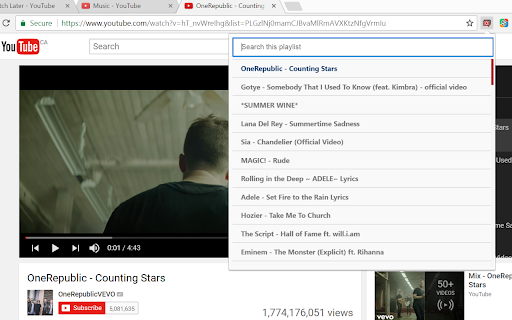

To use, simply click the extension when on a playlist or a video inside a playlist and the extension will list ALL videos inside the playlist. You may then instantly search for and click any video in the list to go to it. This extension requires you to login so that the extension can make authorized API calls to the YouTube™ Data API for all of your playlists. This means that it will work on both public and private playlists.

Tab Playlist for YouTube™
Lets you make a playlist by simply lining up tabs This extensions lets you use tabs to make a temporary video playlist. When active the extension will switch to the tab to the right when a video finishes. When that tab's video finishes it will switch to the next and so on. By using the middle mouse button you can very easily line up videos you want to watch. Note: This extension only works with the HTML5 player, make sure you have it at https://www.youtube.com/html5 . Videos featured in the screenshots and video were made by vlogbrothers (https://www.youtube.com/channel/UCGaVdbSav8xWuFWTadK6loA)

Playlist generator
Turns your unused, youtube bookmarks that are laying around into a playlist loop for hours of entertainment! Do you find yourself bookmarking youtube videos/songs that you like? If you do, this chrome extension is for you. When you install it, the user-friendly interface displays three easy steps for you to follow: locate the folders that hold your youtube bookmarks (my folder names are "Music", "Music 2", and "Music 3"), type in the names of those folders into the extension separated by a comma ("Music,Music 2,Music 3"), and finally, choose whether to listen to the songs in-order or shuffled and you'll begin listening to hours of music. First, disable auto-play on Youtube. Then, after you click the "Shuffle" or "In-order" button in the extension, a small window will appear and you can relax from there on out; the chrome extension will automatically select a new song and play it once the old song is over. v1.0 - Initial release. v1.1 - Fixed bug in v1.1 where songs were still duplicating. v1.2 (01/25/19) - Fixed bug where unavailable/deprecated/removed/country-blocked videos are automatically skipped and banned to assure they never reappear. v1.3 (02/02/20) - Completely refactored code and reduced pause time between song transition. v2.0 (06/01/20) - Reset versioning system to do it properly. Removed scrollbar removal feature and fixed some UI issues. v2.2 (06/02/20) - Added functionality to store a user's 5 most recent playlists. Also added error messages for empty bookmark folders/playlists. v2.3 (11/28/20) - Fixed a few bugs with error messages and button functionality. v3.0 (12/30/21) - Upgraded from Manifest v2 to Manifest v3 v4.0 (05/25/24) - After experiencing multiple issues with Manifest v3 and multiple reverts, all issues have been resolved to avoid the extension being dropped in July 2024 due to the Manifest migration. v4.0.1 (05/25/24) - Fix a bug where users were not able to skip songs seamlessly. v4.1.0 (06/21/24) - Enable functionality to search over Other/All Bookmarks instead of just the Bookmarks Bar. This extension is also available as a Firefox add-on : https://addons.mozilla.org/en-US/firefox/addon/music-playlist-generator/

TubeLister
Generate a YouTube playlist from your opened tabs. TubeLister collects all your open YouTube video tabs into one playlist tab to save memory and hassle! The extension also extracts videos from existing Untitled playlists (that may have been generated before with the extension) and adds them to the list. It also does not add duplicate videos and adds the focused Youtube video as first on the list. This extension is open-source: https://github.com/stelabouras/TubeLister TubeLister Chrome Extension is not affiliated with Google.

Youtube Playlist alphabetical A-Z sorting
Sort your Youtube Playlists alphabetically by default Sorts your Youtube playlists alphabetically (A - Z) to make organizing and navigating Youtube easier. Works on your playlists in the sidebar as well as the playlist popup that show when you click the 'Save to Playlist' button. - Works automatically when Youtube is opened - 'Watch later' still remains at the top of your playlists - Does NOT request permission for any website except Youtube, nor any other invasive permissions Please use the Support tab for feature requests. YouTube is a trademark of Google Inc. Use of this trademark is subject to Google Permissions. This extension is not affiliated with YouTube or an official extension.
