
bfoekbolilhdghaadhnnjfaccgfpggph
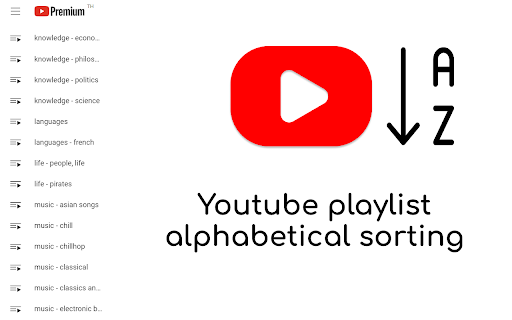
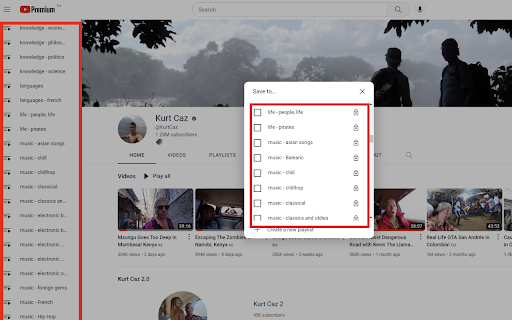
Sort your Youtube Playlists alphabetically by default Sorts your Youtube playlists alphabetically (A - Z) to make organizing and navigating Youtube easier. Works on your playlists in the sidebar as well as the playlist popup that show when you click the 'Save to Playlist' button. - Works automatically when Youtube is opened - 'Watch later' still remains at the top of your playlists - Does NOT request permission for any website except Youtube, nor any other invasive permissions Please use the Support tab for feature requests. YouTube is a trademark of Google Inc. Use of this trademark is subject to Google Permissions. This extension is not affiliated with YouTube or an official extension.

YouTube Playlist Filters
Enhance your YouTube Watch Later and other playlists experience with search and filtering capabilities. Perfect for managing large playlists: - Channel Filtering: Easily filter videos by channel name - Smart Search: Search through video titles with instant results - Duration Filter: Find videos based on their length (short/medium/long) - Watch Status Filter: Filter videos by watched, unwatched, or in-progress status - Playlist Management: Create custom playlists from filtered videos - Privacy-Focused: Works entirely client-side with no data collection - Native Look & Feel: Seamlessly integrates with YouTube's interface - Theme Support: Automatically adapts to YouTube's light/dark mode - Performance: Minimal impact on page load time Patch 1.0.2 - Fixed the display of filters that were hiding the native sort button menu. Update 1.1.0 - New layout for denser playlist browsing, - Added watch status filter (watched / unwatched / in-progress), - Added a shortcut action to quickly open your Watch Later playlist.

Google Chrome Sort YouTube Playlists
For when you want to add a video from YouTube to a Playlist but cannot find one because the list is not sorted!

Youtube Playlist Guru: Search, Sort, Filter & Track Playlist Progress
Calculate playlist duration, search/sort/filter videos, and track your YouTube playlist watching progress—simple and fast. YouTube Playlist Guru - Search • Sort • Filter • Track Progress • Total Duration Supercharge your YouTube playlists with a fast, lightweight, and user-friendly tool designed for creators, learners, and binge-watchers. YouTube Playlist Guru helps you search, sort, filter, and track progress across any playlist, while accurately calculating total duration and remaining time based on your playback speed. Works seamlessly with YouTube’s Light and Dark themes. ❤️Why You’ll Love It 👉 Lightning fast & lightweight: Minimal overhead, smooth scrolling, instant operations. 👉 Clean, intuitive UI/UX: Purpose-built controls that feel native to YouTube. 👉 No sign-in or setup: Install and use directly on playlist pages. 🌟Core Features 🔎 Powerful Search 👉 Search by video title and channel name to quickly locate what you need in large playlists. ↕️ Pro Sorting (Both Ascending & Descending) 👉 By Index: Maintain original order or reverse it. 👉 By Title: A → Z or Z → A. 👉 By Channel Name: Group by creators instantly. 👉 By Video Duration: Shortest → Longest or vice versa. 👉 By Watching Progress: See not-started, in-progress, and completed in your preferred order. 🎯 Precision Filters 👉 By Video Index: Exact matches or ranges. 👉 By Channel: Include only selected creators. 👉 By Duration: >, ,

Playlist Tracker
Keep track of your YouTube playlists Do you maintain playlists on YouTube? Don't you hate it when a video is deleted or made private, and you don't even remember what it was? Sync your playlists with Playlist Tracker, and get notified of any changes since the last sync. Notifications will include whether or not any videos have been added, deleted, renamed, or have changed from public to private (and vice versa). 1. The "Playlist ID" is the part after "list=" in the URL of the playlist. For example, for "youtube.com/playlist?list=PLsUMoyJKBqcn7dk3jC3i1023Ie-BntpgF", the "Playlist ID" is "PLsUMoyJKBqcn7dk3jC3i1023Ie-BntpgF". 2. Works only with public playlists for now. Playlists don't have to be your own, they just have to be public. 3. You may have to re-add your playlists if you clear your browser's cache. 4. If the extension starts behaving weirdly and you have to reset everything, click the clear-all icon on the top-right. 2. Add hover text to the "clear all" icon based on user feedback. 1. Can sync multiple playlists at once now. 2. Notifications now have the playlist name in the title. Shoutout to Grzegorz Ryznar for suggesting these! 🙌 2. Can specify either the playlist ID or the playlist URL now. 1. Support for tracking a much higher number of songs. 2. Separate notifications for songs added, deleted, renamed or made private.
