
aoneihjmjpimlgdbcigpemnjmelhfgnk
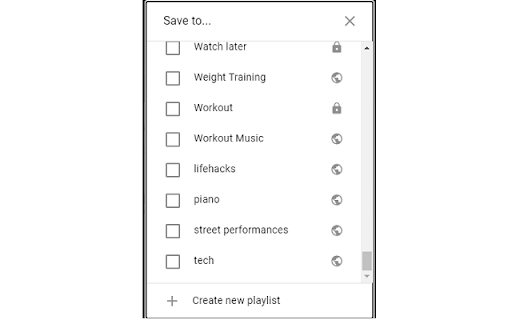
For when you want to add a video from YouTube to a Playlist but cannot find one because the list is not sorted!

YouTube to NotebookLM
Send YouTube to NotebookLM. Save videos, sync YouTube channel to NotebookLM, and manage any NotebookLM video easily 🌐 With this powerful extension, you can easily connect YouTube and NotebookLM to create organized, AI-ready notes and summaries. It supports YouTube videos, playlists, channels, and even search results. The extension transforms your video-watching habits into a productive, research-driven workflow. ✅ Why You Need Youtube to NotebookLM? 1️⃣ Add any Youtube video to NotebookLM instantly 2️⃣ Send an entire Youtube playlist to notebook lm for bulk video research 3️⃣ Extract videos from a Youtube channel to notebooklm seamlessly 4️⃣ Turn your video research into actionable insights 5️⃣ Use Youtube search to notebooklm to batch-import search result videos ⚡ Key Features You’ll Love: 💡 Add single or multiple videos from YouTube to NotebookLM app 💡 One-click to create notebook, or choose notebook from your existing list 💡 Extract summaries, timestamps, and AI highlights using notebooklm video overview 💡 Support for notebooklm video podcast content 💡 Quick access button in the browser for fast action 🎯 Turn your browser tab to notebooklm effortlessly 🎯 Extract ideas, arguments, key points from long-form videos 🎯 Use the extension to send a site tab to notebook lm, not just YouTube 🎯 Works with Notebook LM Plus for advanced AI-powered insights 🎯 Compatible with both light and dark themes 🧠 NotebookLM AI uses your saved videos to: 🔸 Generate contextual summaries 🔸 Create structured Q&A formats 🔸 Offer deeper insights from NotebookLM video overview 🔸 Help you build notebooks with long-term value 🔸 Sync video content across all your learning projects This extension isn’t just a clipper — it's a bridge between video learning and structured knowledge capture using the technology. Perfect for All Types of Learners: 💼 Students organizing lecture content 💼 Podcasters summarizing interview footage 💼 Researchers building video-based citations 💼 Creators looking for inspiration 💼 Anyone using NotebookLM for research videos Just find a video, click, and you’re done — whether it's a single clip or an entire Youtube playlist to notebooklm. 🔹 Choose to Create notebook or just Choose notebook from your list 🔹 Add NotebookLM source for smarter future search 🔹 Built-in support for NotebookLM Reddit 🎯 Looking to turn YouTube videos into actionable notes and summaries? The Youtube to Notebook LM extension is your ultimate tool for research, learning, and content organization. 🎯 In just one click, you can send any YouTube video to NotebookLM, including playlists, channels, and even search result pages! ⚒️ No matter how you learn or work, Notebook LM features ensure your NotebookLM YouTube experience is tailored to your needs. ❓ What is Youtube to NotebookLM? 🧩 It’s a Chrome Extension that sends YouTube content (video, playlist, channel, or search result) to NotebookLM app for AI-powered summarization and note-taking. ❓ Can I use it with playlists and channels? 🧩 Yes! You can send a full Youtube playlist to notebooklm or an entire Youtube channel to notebooklm. ❓ Will NotebookLM summarize the videos? 🧩 Yes! The extension helps you access notebooklm video overview and summaries generated by NotebookLM AI 🧠 ❓ Can I choose where to save my notes? 🧩 You can Create notebook or Choose notebook from your existing list – it’s completely flexible. ❓ What about browser tabs that aren’t YouTube? 🧩 You can send any site tab to notebooklm, not just YouTube. Perfect for additional context and source linking. 🌟 Make your video-watching smarter, faster, and more organized with Youtube to NotebookLM. The perfect solution for anyone serious about content digestion and research. Whether you're dealing with podcasts, lectures, documentaries, or vlogs — NotebookLM for research videos transforms how you think, learn, and remember.

YouTube Time Labels
A Chrome Extension for saving labelled timestamps of YouTube videos Take notes on YouTube easily with YouTube Time Labels. Add labels to different times of a video, and skip a video to that time by simply clicking the recorded timestamp on the extension. Very helpful for long videos where you want to save particular sections (e.g. lecture material, a song from a compilation), or to simply keep track of your favorite videos. For easy access to the extension, make sure to pin the extension. Major Features: - Add and remove videos to the extension, and give videos a custom name. - Record and delete video timestamps to the extension - Add custom labels / notes to timestamps. - Open a video at a particular timestamp from the extension. - Filter videos by title or timestamp label - Export / Import data of your saved videos and timestamps. This is a personal project I made for fun and learning. If you are interested in the source code, please visit the GitHub page: https://github.com/brianlinUM/youtube-timestamps All YouTube browsing data (e.g. saved videos and timestamps) are handled by this extension solely for the functioning of this extension - it can not save notes about timestamps without saving the timestamp after all. This data is only stored locally on your device, and never transmitted elsewhere; I do not collect your data.

YouLoop - Replay your favorite video parts
Chrome extension to loop specific parts of your YouTube videos Easily loop specific parts of your favorite online videos with YouLoop. Introducing YouLoop, a powerful Chrome extension designed to enhance your video watching experience. Whether you're learning a new skill, enjoying music videos, or analyzing specific scenes, YouLoop allows you to loop precise segments of any online video effortlessly. ➤ Custom Loop Points: Set start and end points for looping any part of a video. ➤ Easy to Use: Intuitive interface seamlessly integrates with your video watching experience. ➤ Perfect for Learning: Ideal for practicing musical instruments, language learning, or going over educational content repeatedly. ➤ Entertainment and Analysis: Enjoy your favorite video parts on loop or analyze specific scenes in-depth. With YouLoop, you have the ultimate control over how you watch online videos. Get ready to loop, learn, and enjoy! 📪 Contact us: Any questions or suggestions? Please contact us at 💌 kaitodevstore@gmail.com We value your input and are here to assist you in making the most of our tools.

YouTube No Playlist!
Open YouTube playlist videos without the playlist in a new tab. This extension adds a context menu item specific to YouTube video links that include a playlist ID, that allows you to open the link in a new tab as standalone videos without the (autoplaying) playlist. This is a port of the Firefox extension of the same name created by Klemens Schölhorn.
