
fadenkooahogjaiicjjgpbinafjopeom
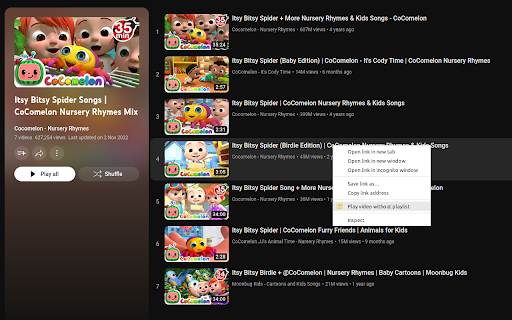
Open YouTube playlist videos without the playlist in a new tab. This extension adds a context menu item specific to YouTube video links that include a playlist ID, that allows you to open the link in a new tab as standalone videos without the (autoplaying) playlist. This is a port of the Firefox extension of the same name created by Klemens Schölhorn.

No Playlist Autoplay For YouTube
When you finish a video in a playlist, the next video won't start unless you click on it. You can toggle this on and off. When a video in a playlist ends, the next video doesn't start until you click on it. Click the extension icon to toggle this behaviour on and off. (No refresh of YouTube is required after toggling.) Alternatively use the shortcut (ctrl+shift+y), which can be changed at chrome://extensions/shortcuts

Playlist Tracker
Keep track of your YouTube playlists Do you maintain playlists on YouTube? Don't you hate it when a video is deleted or made private, and you don't even remember what it was? Sync your playlists with Playlist Tracker, and get notified of any changes since the last sync. Notifications will include whether or not any videos have been added, deleted, renamed, or have changed from public to private (and vice versa). 1. The "Playlist ID" is the part after "list=" in the URL of the playlist. For example, for "youtube.com/playlist?list=PLsUMoyJKBqcn7dk3jC3i1023Ie-BntpgF", the "Playlist ID" is "PLsUMoyJKBqcn7dk3jC3i1023Ie-BntpgF". 2. Works only with public playlists for now. Playlists don't have to be your own, they just have to be public. 3. You may have to re-add your playlists if you clear your browser's cache. 4. If the extension starts behaving weirdly and you have to reset everything, click the clear-all icon on the top-right. 2. Add hover text to the "clear all" icon based on user feedback. 1. Can sync multiple playlists at once now. 2. Notifications now have the playlist name in the title. Shoutout to Grzegorz Ryznar for suggesting these! 🙌 2. Can specify either the playlist ID or the playlist URL now. 1. Support for tracking a much higher number of songs. 2. Separate notifications for songs added, deleted, renamed or made private.

Drag & Drop Playlist Creator for YouTube
Make unlisted YouTube Playlists by dragging thumbnails into the sidebar. ▶️ Create unlisted playlists: Click the extension button while browsing YouTube to open the drag and drop sidebar. Drag YouTube thumbnails into the box and click open playlist.

TubePlus - YouTube Mix & Playlist URL Cleaner
Automatically removes playlist parameters from YouTube URLs and reloads the page This extension automatically removes playlist parameters from YouTube URLs and reloads the page, offering a cleaner and more focused viewing experience. Perfect for a variety of scenarios: 1. YouTube Mix: Converts the annoying Mix playlists to single video so you can enjoy the song in peace 2. Watch Later Videos: Easily remove videos from your Watch Later list as you view them, without disrupting your viewing session. 4. Music Videos: Listen to songs from playlists without automatically advancing to the next track, giving you more control over your listening experience. 5. Tutorial Series: Follow along with multi-part tutorials at your own pace, without worrying about accidental skips to the next video. 6. Sharing Videos: Quickly generate clean, shareable links for specific videos, even if you found them within a playlist. 7. Podcast Episodes: Watch podcast episodes from a channel's playlist without auto-advancing, allowing you to pause and reflect between episodes. 8. Product Reviews: Compare multiple product reviews from a playlist without the distraction of autoplay, helping you make informed decisions. 9. Cooking Recipes: Follow cooking videos step-by-step without worrying about the next recipe in the playlist starting automatically. 10. Workout Routines: Control your exercise video progression manually, ensuring you complete each workout at your own pace. 11. Language Learning: Study language lessons sequentially, with the ability to easily replay videos without playlist interference.
