
gcnopleiakgahapanbdcegkccdifbbae


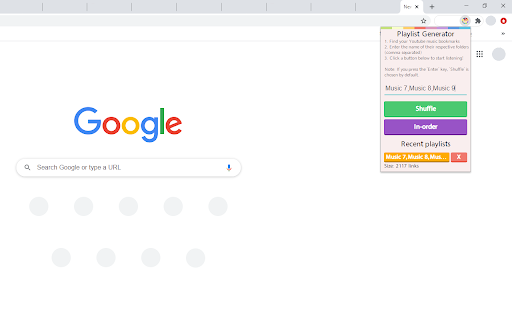
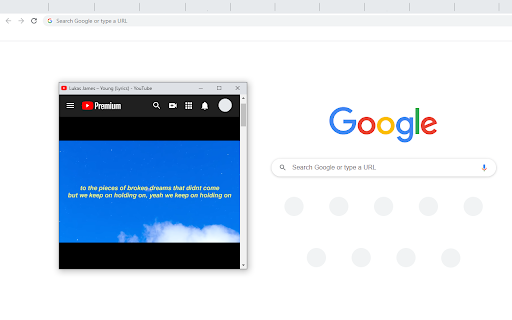
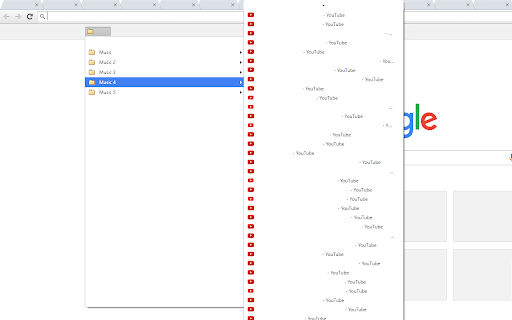
Turns your unused, youtube bookmarks that are laying around into a playlist loop for hours of entertainment! Do you find yourself bookmarking youtube videos/songs that you like? If you do, this chrome extension is for you. When you install it, the user-friendly interface displays three easy steps for you to follow: locate the folders that hold your youtube bookmarks (my folder names are "Music", "Music 2", and "Music 3"), type in the names of those folders into the extension separated by a comma ("Music,Music 2,Music 3"), and finally, choose whether to listen to the songs in-order or shuffled and you'll begin listening to hours of music. First, disable auto-play on Youtube. Then, after you click the "Shuffle" or "In-order" button in the extension, a small window will appear and you can relax from there on out; the chrome extension will automatically select a new song and play it once the old song is over. v1.0 - Initial release. v1.1 - Fixed bug in v1.1 where songs were still duplicating. v1.2 (01/25/19) - Fixed bug where unavailable/deprecated/removed/country-blocked videos are automatically skipped and banned to assure they never reappear. v1.3 (02/02/20) - Completely refactored code and reduced pause time between song transition. v2.0 (06/01/20) - Reset versioning system to do it properly. Removed scrollbar removal feature and fixed some UI issues. v2.2 (06/02/20) - Added functionality to store a user's 5 most recent playlists. Also added error messages for empty bookmark folders/playlists. v2.3 (11/28/20) - Fixed a few bugs with error messages and button functionality. v3.0 (12/30/21) - Upgraded from Manifest v2 to Manifest v3 v4.0 (05/25/24) - After experiencing multiple issues with Manifest v3 and multiple reverts, all issues have been resolved to avoid the extension being dropped in July 2024 due to the Manifest migration. v4.0.1 (05/25/24) - Fix a bug where users were not able to skip songs seamlessly. v4.1.0 (06/21/24) - Enable functionality to search over Other/All Bookmarks instead of just the Bookmarks Bar. This extension is also available as a Firefox add-on : https://addons.mozilla.org/en-US/firefox/addon/music-playlist-generator/

Multiselect for YouTube™
Move, sort, and copy videos in your playlists faster and easier. This extension will save you a lot of time managing your playlists. The operation has been simplified so that you can complete your tasks even faster. Additional features you've been waiting for. ✔️ Supports the new interface Manifest V3 ✔️ The user experience has been redesigned from the ground up ✔️ Same display dark/light as in YouTube™ ✔️ Selected videos are clearly highlighted ✔️ Icon button to toggle multiple selection on/off ✔️ Action bar ✔️ Context menu 🚀 Keyboard navigation 🚀 Copy, cut and paste videos ✨ Find duplicates 🎁 Select videos with title filter

Bookmark Manager per Domain and Page
A Bookmark Manager to list all bookmarks for the domain or page of the current URL as hyperlinks. This Bookmark Manager is special, it displays only bookmarks belonging to the current domain. ie. https://gist.github.com or https://docs.github.com/en will be displayed if you have it as a bookmark and navigate to https://www.github.com Open any URLs from Domains that you have saved within *.domain.com* We will show you only the ones from that domain. The extension does not work across domains from the same brand, such as pinterest.de or pinterest.at, etc. we might add this functionality in a near future update if there is demand. So if you are looking for that best next app to open pages in a new tab, while simply organizing your url in this awesome quick software, with our bookmark manager you will not need more bookmarking apps on your sidebar, forget all the other addons. Save webpages that you find popular, then navigate there with speed, have a look at your bookmarklet and use our free extension to view your custom starred urls, search through them with ease. Updates / Change log: 22.06.2024 / V 1.0.7 - Responsive pop-up added, Extension Icons added, fixed folder view, deleting and editing the URL 25.05.2024 / V 1.0.6 - Updated Manifest to v3 19.07.2021 / V 1.0.5 - Removed "Storage" permission, not needed. 22.12.2020 / V 1.0.4 - Added FOLDER view buttons 14.12.2020 / V 1.0.3 - We added DELETE and EDIT buttons

Highlights for YouTube
View highlights on the video player, that are generated from timestamps found in the description and top comments. ✨ UPDATE: Added controls for navigating between highlights. 🎬 See chapters or interesting moments without the need to scroll to the comment/description section. You can toggle the highlights directly from the video player options. ⚠️ Not all videos will have highlights on them since they are generated from timestamps. 🔗 Open Source: View code and report issues on GitHub: https://github.com/Ermag/yt-highlights-chrome 💭 Feedback is greatly appreciated!

Nice Playlist Generator
Makes Spotify playlists from rateyourmusic.com and sonemic.com charts or lists If you like this add-on, spread the word. Help us by liking or sharing our Facebook page. Do you want to find new music? Are you interested in this year's releases, are you trying to get into a new genre or get to know 1993's field recordings of melting ice? Would you like to do this without the tediousness of searching single songs and making playlists of them? Do you like simple and functional things? If so, Nice Playlist Generator might be just what you want. Useful data gathered by rateyourmusic.com users in the form of charts and lists can be turned into Spotify playlists in a few easy steps. In your browser, navigate to a rateyourmusic.com's chart or an user submitted list. Click the Nice Playlist Generator icon in your address bar. If the add-on finds at least one item representing an album (or other kind of release) on the current page, the "Get spotify links" button activates. After you click it, the search on Spotify is started. You are informed about the amount of releases successfully found on Spotify and about the ones that could not be found. After the search finishes the "Copy playlist to clipboard" button activates. When you click it, you can go to the Spotify desktop application and choose a newly made or existing playlist you want to add the new tracks into. Click into the content pane of the playlist and paste the tracks found by Nice Playlist Generator into it by pressing Ctrl + V
