
jdbgjlehkajddoapdgpdjmlpdalfnenf
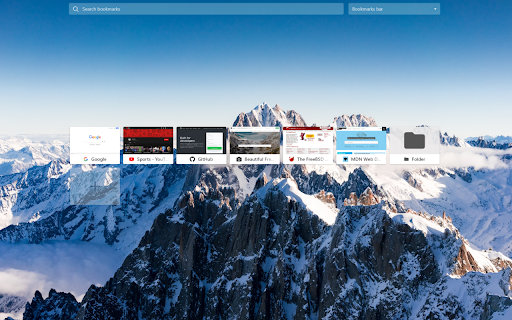


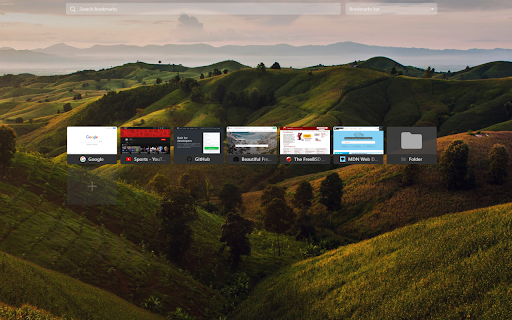
Simple speed dial bookmarks page, including search, add, edit, delete and dragging bookmarks. The visual bookmarks page replaces the default new tab. Bookmarks page, includes searching, adding, editing, deleting and dragging bookmarks. The ability to generate thumbnails and use your own background image. Great possibility of customization and using your own styles. Ideas, questions and suggestions https://github.com/k-ivan/visual-bookmarks-chrome/discussions Bugs and future requests https://github.com/k-ivan/visual-bookmarks-chrome/issues

Yay! Another Speed dial!
A cool and highly customizable Speed Dial focused on style and simplicity. Your new tab, your way — Yay! Another Speed Dial! gives you a beautiful, lightning-fast start page you'll actually love opening. Organize bookmarks into tabs, customize every pixel with a powerful theme editor, and browse stunning backgrounds from Pexels — all while keeping your data 100% local and private. No account needed, no data collection, ever. Why users love it: • Theme Gallery & Editor: Pick from ready-made themes or build your own — adjust colors, transparency, blur, and background images. • Tab Organization: Group your favorite sites into tabs for clutter-free browsing. • Drag & Drop: Rearrange dials and tabs effortlessly. • Built-in Web Search: Search the web directly from your new tab. • Quick Add: Right-click any page to save it as a dial instantly. • Pexels Integration: Millions of free HD photos at your fingertips for backgrounds. • Auto Thumbnails: Crisp previews generated automatically for every bookmark. • Import & Export: Back up your setup and restore it anytime. • Multi-Language: Available in English, French, German, Spanish, Italian, Polish, Portuguese (BR), Japanese, Russian, Ukrainian, Chinese, and Hungarian. Privacy first: All your data stays on your device. No tracking, no accounts, no servers. Fast & lightweight: Built with performance in mind — your new tab loads instantly.

Group Speed Dial
Speed Dial [Group Speed Dial] is the most advanced start page! It's like a visual bookmarks, plus many more tools for professionals! Speed dial ⏹️ will upgrade your "New Tab" page with quick access to your favorite pages organized into groups / folders. 🔒 Privacy-friendly - no ads, no tracking, instead you get E2E encryption! (E2EE) 🚧 Actively developed since 2016 by me - Juraj Mäsiar: https://www.linkedin.com/in/juraj-masiar/ ⭐ TOP FEATURES: 🔸 Cloud synchronization - synchronize your data between devices and browsers - for free and with E2EE (End-to-End encryption) 🔸 Cloud speed dials - access your links in any browser, even in your phone! 🔸 Search engines - easy access to your favorite search providers! 🔸 Timer - stopwatch / countdown / alarm 🔸 Top-sites - fast access to your most visited pages 🔸 Recently closed tabs list 🔸 Text notes - for your todo list 🔸 Import from other popular extensions (FVD and other speed dials and bookmark managers) 🔸 Share your speed dials groups with your friends (supports E2E encryption) 🔥 Need more features? Upgrade to PRO to get: 🔸 Live dials - a full live interact-able pages 🔸 Folders - organize your groups into folders 🔸 Grid layout - resize each dial individually 🔸 Multi-page dials - multiple links in a list 🔸 Weather forecast - for any location for 5 days 🔸 Automatic Productivity mode 🔸 and many more: https://github.com/fastaddons/GroupSpeedDial/wiki/PRO-version-features

Visual Online Bookmarks for Chrome
Access to bookmarks from anywhere. Expanding the capabilities of the Onlinezakladki.ru service. For Google Chrome browser. Note! 1. The proposed browser extension replaces the default new tab. 2. Technical support only at this address - service.onlinezakladki.ru/support.html Service of visual bookmarks Onlinezakladki.ru was created for convenient and reliable storage of your bookmarks in unlimited quantities. The Visual Bookmarking website provides the following basic features: 1. Use without authorization. 2. Select the number of bookmarks and desktops you need. 3. Customizable color scheme. 4. Folders, Themes. 5. Plugins to expand the capabilities of the Service. After authorization, you will receive Additional features: 1. Synchronization of bookmarks with any computer or device. 2. Personalization of positions individually for each of the connected devices. The proposed browser extension will help to make everyday use of the service as convenient as possible, with the help of its settings you can: 1. Open the Service in a new tab 2. Open local links from Visual bookmarks 3. Save added sites in the background 4. Create screenshots of sites using the add-on 5. Create backups of bookmarks using the add-on All settings are selectable. Use only what you really need!

Tabsbook закладки и экспресс панель
Удобные закладки и экспресс панель в облаке Теперь у Вас в Chrome появится экcпресс панель (speed dial), куда Вы можете добавить страницы, которые не хотите забыть, или часто используемые сайты. Tabsbook - это так же удобные древовидные закладки с визуальным отображением. Закладки и папки можно легко передвигать мышкой. Экспресс панель и закладки хранятся в облаке. Просто зайдите под своим именем в любом браузере и у вас откроется ваша панель с закладками. В несколько кликов импортируйте Ваши браузерные закладки в Tabsbook. Ищите закладки и страницы на экспресс панели через мгновенный поиск по первым буквам. Просматривайте свою коллекцию с помощью визуальных закладок. Визуальные закладки наиболее наглядный и комфортный метод просмотра. С Tabsbook Вам не придется держать много вкладок открытыми, например, при поиске автомобиля или выбора места для отдыха. Вместо этого сохраните все интересующие вас страницы на экспресс панель. У вас будет мгновенный доступ к нужным страницам и не придется захламлять Ваши закладки. Speed dial - это название экспресс панели на английском. Данные о вашей текущей открытой вкладке отправляются в наш сервис, чтобы проверить наличие текущей страницы в сохраненных закладках или на экспресс панели сервиса. Соответствующий статус отображается в виде определенной иконки на кнопке расширения в верхней панели Хром. Это удобная функция, чтобы определить сохраняли ли вы уже текущую страницу.
