
djnpgdfhpekkfndopcchdppehjimibae

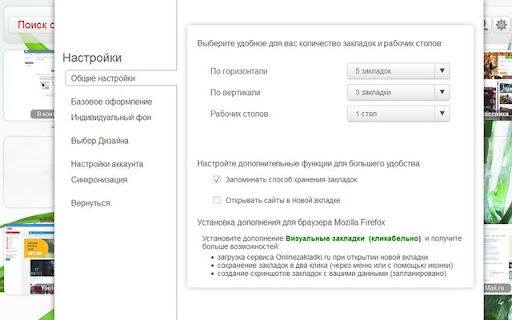
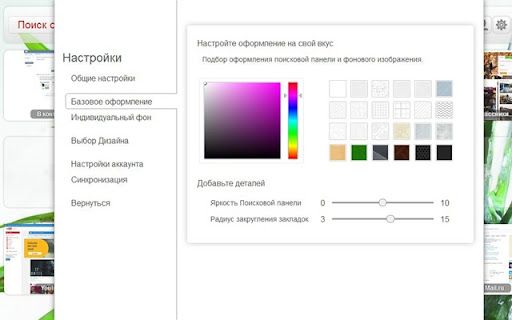
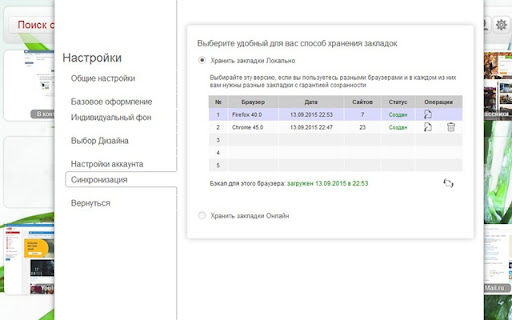
Access to bookmarks from anywhere. Expanding the capabilities of the Onlinezakladki.ru service. For Google Chrome browser. Note! 1. The proposed browser extension replaces the default new tab. 2. Technical support only at this address - service.onlinezakladki.ru/support.html Service of visual bookmarks Onlinezakladki.ru was created for convenient and reliable storage of your bookmarks in unlimited quantities. The Visual Bookmarking website provides the following basic features: 1. Use without authorization. 2. Select the number of bookmarks and desktops you need. 3. Customizable color scheme. 4. Folders, Themes. 5. Plugins to expand the capabilities of the Service. After authorization, you will receive Additional features: 1. Synchronization of bookmarks with any computer or device. 2. Personalization of positions individually for each of the connected devices. The proposed browser extension will help to make everyday use of the service as convenient as possible, with the help of its settings you can: 1. Open the Service in a new tab 2. Open local links from Visual bookmarks 3. Save added sites in the background 4. Create screenshots of sites using the add-on 5. Create backups of bookmarks using the add-on All settings are selectable. Use only what you really need!

Free Adblocker for Chrome by Open Adblocker
Free Adblocker for Chrome by Open Adblocker Block ads across the web with Open Adblocker, the best free open source adblocker for Chrome. We keep our goal simple: Blocking all types of ads on all pages in one click for enjoy an easy, clean ad free browsing experience. 🍪Automatically block annoying cookie consent pop-ups across the internet for a smoother browsing experience. ⚙️A completely redesigned settings page with quick access to filters, feedback, and bug reporting. Add Open Adblocker to your browser access these features: 🧩Lightweight, memory efficient adblocker extension for Chrome - Easily block banners, popup, pop under and video ads. 🎥 Block YouTube Ads - Skip distractions and enjoy uninterrupted viewing experience. 🌐 Choose the domains you want to block - Control which sites have ad blocking on or off. 🧱 Block malware and adware - Stop unwanted and misleading content across the web. 📊 Tracking protection filters – Block trackers, analytics scripts, and tracking parameters in URLs. ⚙️ Transparent and Open Source - Our entire codebase is open source and available on GitHub. 🍪 Hide and block Cookie banners - Automatically remove cookie pop up banners across the internet. 🔌 Social media filters – Remove Like/Share widgets and embedded social elements. 🆕 The ability to report a bug - Report issues directly from the settings page to help improve Open Adblocker. Why Open Adblocker? - Lightweight hustle free experience, just one click and you are set. - Built in free cookie consent popup blocker - Optimized memory consumption. - True open source transparency. - Block cookie banners. How to get started? 1. Click “Add to Chrome” and confirm installation. 2. Pin it to your taskbar for quicker access. 3. Open the open adblocker extension and turn Ad blocking on or off. What’s New 🛡️ Advanced security filters enhancement – Block malicious sites, phishing URLs, scams, malware, badware risks, and extensive anti-malware lists. 🔌 Social media filters – Remove Like/Share widgets and embedded social elements.

Shortcuts for Chrome
Navigation menu of Chrome URLs: internal pages of the Google Chrome browser. Chrome browser navigation is optimized for non-technical users. For users who want to inspect what is happening with indexedDB, service workers, or Bluetooth devices etc., this menu brings shortcuts to those hard-to-find, internal browser pages. This menu lists all Chrome URLs in a single, flat list, configurable menu. This application is free and open-source software, built by Chrome users for Chrome users. ✔️ Pin your favorites on top for fast access ✔️ Drag and drop pinned links to change their order ✔️ Discover hidden browser features you never knew existed ✔️ Automatically matches dark/light mode based on browser setting

Web Filter for Chrome
Web Filter for Chrome extension enables safe web filtering and Google safe search in Chrome. Block Adult Content & Enforce Safe Search Powerful web filtering extension for families, schools, and organizations. Automatically blocks pornography, adult content, and inappropriate websites while enforcing SafeSearch across all major search engines. Overview SPIN Safe Browser's Web Filter for Chrome provides instant protection against inappropriate online content. Designed for parents, educators, and professionals, this extension automatically blocks adult websites, enforces Google SafeSearch and YouTube Restricted Mode, and filters content even in Incognito Mode—delivering comprehensive internet safety without complex setup. Key Features Automatic Protection (Free Version) ✔ Instant Web Filtering – Blocks pornography, nudity, and adult content immediately upon installation ✔ Universal SafeSearch Enforcement – Automatically enables strict SafeSearch on Google, Bing, DuckDuckGo, and other popular search engines ✔ YouTube Restricted Mode – Filters out age-inappropriate videos for family-friendly viewing ✔ Incognito Mode Filtering – Maintains protection even in private browsing sessions ✔ No Extra Software Required – Works seamlessly within Chrome and Chromebooks with zero configuration Premium Features (Monthly and Yearly Subscription options available) Upgrade to SPIN Safe Browser Premium for advanced control: ✅ Unlimited Domain Allow list – Whitelist any number of trusted websites ✅ Unlimited Domain Block list – Add specific sites to your custom block list ✅ Allow-Only list Mode – Restrict browsing to only approved websites ✅ Custom Content Categories – Fine-tune filtering beyond default categories ✅ Passcode Protection – Prevent unauthorized changes to settings Parents & Families Protect children from accidental or intentional exposure to inappropriate material while browsing at home. Create a safer digital environment for all family members. Educators & Schools Perfect for Chromebook deployments in K-12 classrooms. Keeps students focused on educational content and away from distracting or harmful websites during school hours. Organizations & Workplaces Enforce company browsing policies, maintain productivity, and reduce liability by limiting access to non-work-related or inappropriate websites. Individuals Anyone seeking self-accountability or looking to maintain a distraction-free, content-safe browsing experience for personal development. Why Choose SPIN Safe Browser for Chrome? Immediate Protection – No waiting period or configuration required. Protection begins the moment you install. Comprehensive Coverage – Works across all search engines and video platforms, including enforced filtering in private browsing mode. Enterprise-Ready – Administrators in managed environments (schools, businesses) can deploy policies preventing extension removal, ensuring consistent protection across all devices. Trusted Solution – Part of the SPIN Safe Browser family, which includes mobile apps for Android and iOS, providing cross-platform protection. Installation & Setup 1. Install the extension from the Chrome Web Store 2. Automatic protection activates immediately 3. Recommended: Upgrade to Premium for advanced features 4. Optional: Set a passcode to lock your settings (Premium) Cross-Platform Protection Extend your web safety beyond desktop with SPIN Safe Browser for Android and iOS devices. Resources Support Portal: community.useboomerang.com/hc/en-us/sections/360000687332-SPIN-Safe-Browser-and-Manage-SPIN Privacy Policy: https://spinsafebrowser.com/spinprivacypolicy Feedback & Support: spinforchrome@nationaledtech.com

Google Translate Open SideBar in Chrome
Google Translate Extensions For Chrome. Google Translate Open SideBar in Chrome The only site and application that comes to mind for translation is Google Translate. Google Translate has made a difference in translation. Google Translate Extensions For Chrome. Google Translate Open SideBar in Chrome
