
jchaghdgaejkeifjjahamifdcddkcpoe
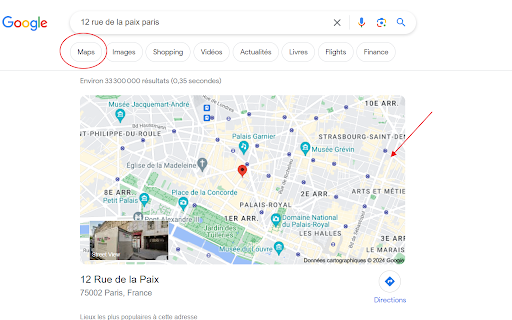
Bring back the Maps feature into Google Search for a fast and convenient navigation. This extension provides a simple and effective solution for those who have noticed the disappearance of the Maps button in Google search results. This change stems from European legislation aimed at limiting the promotion of Google's own products within the European Union, in order to maintain fair competition among various services. As a result, the direct and convenient access to maps and routes from the search page was lost for many users. With Restore Google Maps, we offer a straightforward way to bring this key functionality back. Technically, this extension changes the search region to being in Andorre (a country therefore outside the European Union, but using Euro currency). This may have a very low impact on your searches results, but in case this happens, please feel free to report any issue encountered. Once this extension is installed, the Maps button reappears in your Google search results, allowing you to access Maps with just one click. Whether you're planning your daily commute or exploring new destinations, this extension makes navigation faster and more convenient, without any complications or detours. This extension is open source, and has been designed to be as simple and unobtrusive as possible. There are no complex configurations or options to adjust; simply install it and see the Maps button reappear. Our goal is to make your online search experience more efficient and provide you with the tools to easily navigate the world, despite regulatory changes. Quick access to Maps from Google search results is more than a convenience; it's an essential part of how we interact with information in our daily lives. This extension is here to ensure that this interaction remains effortless and intuitive. Source code: https://github.com/StephanMc/extension-restore-google-maps

Google Sheets Tabs on top
Move Google Sheets tabs to the top for more intuitive navigation. After installation, please refresh the Google Sheets page. This extension moves Google Sheets tabs from the bottom to the top of the interface, enabling more intuitive navigation and smoother operation. 🛠️ Features: - Repositions sheet tabs from bottom to top for better usability - Provides a more intuitive tab interface similar to browser tabs - Works in both editable and preview modes of Google Sheets - Simple implementation with no performance impact - Supports all Google Sheets functionality 🚀 How to Use: 1. Install the extension 2. Refresh your Google Sheets page 3. The tabs will automatically appear at the top of the interface 4. Enjoy a more intuitive spreadsheet experience! ⚠️ Note: This is an unofficial extension and is not affiliated with Google. It simply enhances the Google Sheets interface by repositioning the tabs for better usability. 🔒 Privacy: - No data collection - No tracking - No authentication required - Your spreadsheet data is never sent to the developer or third parties - Only requires access to Google Sheets pages to reposition tabs 💻 The source code is also available, and you can build and install it yourself. For more details, please visit: https://github.com/yamadashy/google-sheets-tabs-on-top

Maps Hub Search
Get accurate maps & directions while ensuring web searches lead you there with geo-optimized Yahoo as your default search. Maps Hub Search’s singular focus is preparing you for your journey. Never get lost again. Never arrive late. And never run out of gas! Join the thousands of delighted Maps Hub Search users. All the top search tools are together in one place—always for free. Get accurate, easy-to-understand maps and directions with Maps Hub Search. And ensure that all of your web searches take you there with geo-optimized Yahoo default search. As your trusted travel-planning companion, Maps Hub Search sets your new tab page to Maps Hub Search and your default search engine to Yahoo. Unified and harmonious: - Get directions from your location to a preferred destination quickly - Quick links for easy access to commonly used maps and navigation apps - Optimized searches for locations and much more Thanks for using this extension! Get in touch with us any time at https://www.newtabtools.com/contact-us

Meters to Yards for Google Maps
The Google Maps "Measure distance" tool is great, and this extension makes it even better. Made especially for golfers that don't rely on meters, you'll now be able to see distances in yards. How to Use the Extension: 1. Open Google Maps. 2. Right-click anywhere on the map and select “Measure distance.” 3. Click on the map at least twice to plot your points. 4. Continue adding points along the golf hole — the white distance box at the bottom will automatically display the converted distance in yards. Note: The extension only converts line distances (not area). It won’t display conversions for closed loops (when the first and last point overlap). Distances equal to or greater than 1 km won’t be converted. Need help? Watch the tutorial here: https://youtu.be/wa0DmiOIH60 If you're having problems with the extension, please email me at meterstoyards@gmail.com.

Google Search Quick Open
🧩 Extension Description Too lazy to click through every Google search result? This extension does it for you — instantly open search result links in new tabs with one click or shortcut. 🚀 How it works: Search anything on Google On the results page, click the extension icon or press ⌥ + A / Alt + A All visible search result links will open in new background tabs 💡 Smart filtering: Only the links currently visible on your screen (in the viewport) will be opened. This keeps things relevant and avoids opening too many unnecessary tabs.
