
jcfhononaafeamhcmcopgadicmjlmnio
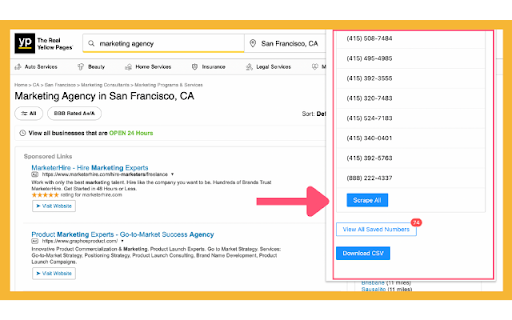
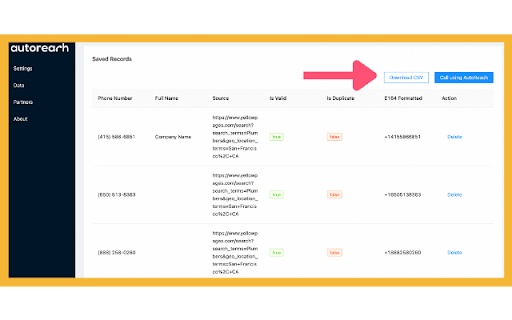
The fastest way to find phone numbers for all your outbound needs. The AutoReach Chrome extension is the fastest way to capture numbers on any webpage, download as a CSV, and start calling. Save yourself the pain of copy and pasting, editing spreadsheets, and validating numbers. How it works 1: Visit any website and the chrome extension will automatically identify all phone numbers on that page 2: Capture all the phone numbers with one click 3: Download as a CSV 4: Upload to the AutoReach outbound dialer and start making calls

Free Phone Number Finder
Free Phone Number finder is a tool that save time and efforts. It collects Phone Numbers as you browse websites. *Update 1.4* With this update extension will fetch almost all type of phone numbers. The Free Phone Number Finder extension is a powerful tool that enables you to effortlessly discover phone numbers of individuals and businesses while you browse the web. Whether you're a sales representative reaching out to potential customers, a marketer searching for leads, or simply someone in need of contact phone numbers, the Free Phone Number Finder extension can expedite your search process with ease. Once installed, the Phone Number Finder extension seamlessly scans web pages for phone numbers and presents them in a user-friendly format. As you navigate the web, the extension automatically detects phone numbers and displays them in a convenient popup window. With a simple click, you can effortlessly copy the phone numbers to your clipboard. 1. Easy installation and setup for immediate use. 2. Background operation that seamlessly integrates with your browsing experience. 3. Instant display of identified phone numbers in a popup window. 4. Works effectively with both individual and business phone numbers. 5. Copy phone numbers to your clipboard with a single click. 6. Lightweight and fast, ensuring minimal impact on your browsing speed. 7. No additional software or plugins required. -Save time and effort by easily finding phone numbers while browsing the web. -Enhance productivity by streamlining the process of identifying and contacting potential leads. -Improve sales and marketing efforts by promptly reaching out to the right individuals and businesses. -Reduce the risk of dialing incorrect or outdated phone numbers. -Enhance the accuracy of your outreach campaigns by ensuring your calls reach the intended recipients. -Elevate your overall browsing experience with this efficient and reliable phone number finder tool. The Free Phone Number Finder extension is an indispensable tool for anyone seeking a convenient and efficient way to discover phone numbers. With its seamless integration into your browsing experience and its powerful features, this extension will optimize your workflow, increase productivity, and enhance your sales and marketing endeavors. Install the Phone Number Finder extension today and elevate your phone-based communication to new heights!

JustCall - Click To Call for CRM Tools
Click to call phone numbers available on any web page. Make & receive more sales calls, track all calls. TERMS and PRIVACY POLICY By using this Chrome Extension, you agree to the JustCall Terms & Conditions available at https://justcall.io/terms and Privacy Policy available at https://justcall.io/privacy In addition to data use information mentioned in our privacy policy, this extension reads your JustCall cookies to ensure that you logged in your JustCall account. If you are logged in, we use this information to fetch your phone numbers to allow you to make and receive phone calls and texts from any Chrome tab. CHROME PERMISSION USAGE DISCLOSURE: This chrome extension requires following permissions from your Chrome browser: 1. contextMenus: Used to give you an open to right click and select any phone number to make calls and send sms. 2. storage: Used to save your cookie in local storage so that we don't request cookies every time. Also, to store you audio device settings to ensure that you are using the right Input and Output Audio Device while answering your phone calls. 3. cookies: Used to read your JustCall cookies to ensure that you are logged in to use your JustCall account (as mentioned in Data Use Disclosure) 4. notifications: Used to send you notification for incoming phone call and sms 5. activeTab: The activeTab permission is required for the extension to interact with the currently active tab, allowing it to access or modify the web page when the user initiates an action. This enables the extension to execute scripts on the active tab and open new tabs adjacent to the current one when user opens new tab by clicking on buttons. 6. offscreen: The offscreen permission allows the extension to create an offscreen document for tasks such as establishing WebRTC connections, playing audio, or accessing user media. This offscreen page is essential for managing calling functionalities using an SDK that requires making XMLHttpRequests. 7. scripting: The scripting permission is necessary to inject JavaScript into web pages, enabling features like displaying click to call and click to text icons. This is used to add icons elements to websites. 8. tabs: The tabs permission enables the extension to interact with the user's browsing activity, including querying, creating, and modifying tabs. This is important for actions such as opening new tabs and communicating with both the active tab and other browser tabs. DISCLAIMER: This extension uses Google Analytics to collect extension usage statistics to help improve user experience. If you want to opt-out of Google Analytics tracking, please visit http://tools.google.com/dlpage/gaoptout or you can set up a filter in Adblock Plus or similar ad blocker tools like AdBlock, uBlock or Adblock Pro. ABOUT THIS EXTENSION JustCall Chrome Extension works with your JustCall.io account. It allows you to add click to call and click to text buttons beside valid phone numbers in your CRM (that JustCall integrates with). It also notifies you when there is an incoming phone call on your JustCall phone number. You can answer incoming calls directly from your Chrome browser. Requirement: This extension requires JustCall.io paid account. Pricing starts at $25/user/month. ================================================ CHANGE LOG: v11.4.5 1. Fixed c2c and c2t icons in Hubspot tabular view of contacts/companies 2. Fixed c2c and c2t icons in Keap/Infusionsoft's contact list view v11.4.2 1. Fixes c2c and c2t icons in OnePageCRM 2. Fixes an issue with number formatting in ActiveCampaign CRM 3. Adds availability toggle in popup window v11.4.0 - Fixes an issue in C2C and C2T icons in Intercom v11.3.9 1. Adds click to call and text icons in Zoho CRM Plus 2. Fix Auto Dialer button disappearing in Zoho CRM Plus at times v11.3.8 - persistant notification for incoming calls v11.3.5 - Fixes calls and text icons in Zoho Recruit - Fixes calls and text icons in Nimble CRM - Redesigned settings page v11.3.4 -Fixed click to call and text icons in Freshsales -Fixed click to call and text icons in Outreach v11.3.3 -Fixed click to call and text icons in ActiveCampaign -Fixed click to call and text icons in Pipedrive v11.3.2 -Fixed click to call and text icons on deals page in ActiveCampaign v11.3.1 - CRM icons on call screens to open contacts directly in CRMs. - Host Permissions to Keap CRM - Fixed - Focussing on the already opened browser window instead of creating another window, when open Dialer button is clicked. - Autodialer button in Zoho CRM v11.3 - completely revamped version of the extension - get notified about the phone calls through ext icon in the ext bar beside address bar - get more information like previous calls etc from the extension itself - reduced permissions - extension URL permissions restricted to only the CRM that we integrate with v11.2.19 - Fixed Click to call and text icons for Intercom, Zoho CRM, Zoho Desk and LessAnnoying CRM - Added Icons next to custom phone fields in Ontraport v11.2.18 - Minor changes and code clean up v11.2.14 - completely dropped permission requirements "management" and "all urls" - added data & cookie usage and permission usage disclosure in the description - added links to Terms and Privacy on dialer as well v11.2.13 1. Fixed an issue where click to call icons were not displaying in Front, FreshDesk and Hubspot CRM. 2. Fixed an issue where click to call icon opened a new tab instead of a new browser window 3. Fixed an issue where Extension Button in browser was picking up wrong number and feeding to our dialer. 4. Added Click to Call icons in Propertyware CRM 5. Added same page login in Sales force v11.2.11 - updated Twilio SDK for improved performance v11.2.2 - easier way to reload extension upon update - HubSpot click to call issue resolved v11.1.6 - Support for lower internet speeds - Better call quality & call connection speed v11.1.3 - Better integration with your audio devices. Get option to set audio devices for ringtone, for answering call etc - Improves call quality by routing audio via right device v10.1.20 - Click To Call and Text Buttons For Groove 2.0 - Click to call and text support for Copper v10.0.2-10.0.8 - Better CRM Integration and Call Logging v10.0.1 - Speed improvements - Click to call and click to text for Freshsales v8.7 - Call merge and transfer to external numbers - Click to call and text for Freshsales v8.2-8.5: - Improvements in Click To Call Integrations with different CRMs - Small bug fixes v7.5 - Pipedrive same page activtiy logging - Fixes multiple context menu bug v7.2 - Fixes for different cases that may cause issues with receiving incoming calls v4.6 - Minimize your incoming call window while on a call v4.1 & 4.2 - Disposition codes for integrations - Hold & Hold music for inbound and outgoing calls v4.0 - Better In-call UI - Get more information about caller during the call - Take notes while taking incoming calls - Improved call quality v3.8 - Read call notes right from your CRM dashboard v3.7 - Syncroteam Click to call and click to text buttons v3.6 - Click to call implemented for Zoho users v3.3-3.5 - Basic changes and click to call improvements v3.2 - Integrates with Synchroteam - make and receive calls v2.7 - Added Infusionsoft integration. Automatically log your call activities and SMS in your Infusionsoft CRM v2.0 - Send SMS directly from Pipedrive, Freshdesk, Helpscout, Front and other CRM and Helpdesks - Better handling of incoming calls when multiple chrome tabs are open - Bug fixes V1.9: - Added Click To Call Support for Pipedrive, Freshdesk V 1.6: Receive phone calls from any tab. Get incoming call notification wherever you are on Chrome. V 1.5: 1. Click-to-call customer phone numbers in Freshdesk. 2. Select any phone number, right click and call with JustCall V 1.4: Faster number search on any web page. V 1.3: Added phone number count on JustCall icon. If extension finds clickable phone numbers on the web page, it shows the count.

Kixie PowerCall
Kixie PowerCall enhances your Kixie experience by enabling click-to-call, immediate CRM data access and simple activity scheduling. What is Kixie? Kixie is a cutting-edge AI-powered calling and texting platform designed to supercharge revenue teams. Whether in Marketing, Sales, Customer Success or RevOps, Kixie’s automation and AI-driven features streamline outreach, boost efficiency, and maximize conversions. Kixie automatically recognizes phone numbers across any web page you visit in Chrome, and places click-to-call and click-to-text buttons next to each number for one-click dialing and texting. Seamless CRM Integration Kixie integrates instantly with all major CRMs, making setup a breeze. With its intuitive design and robust features, teams can accelerate outreach, enhance productivity, and close deals faster—all without switching platforms. Business Development & Outbound Sales Kixie helps outbound sales teams connect with more leads, faster. Boost connection rates by up to 400% with: ✅ AI-powered multi-line PowerDialer with Human Voice Detect ✅ Local presence dialing to increase answer rates ✅ Spam risk mitigation to ensure calls reach real prospects More calls, more conversations, more closed deals. Marketing Teams Speed matters. Kixie empowers marketing teams with instant speed-to-lead, structured outreach, and automated lead nurturing. ✔ Automated calling & texting for seamless follow-ups ✔ Personalized, scalable communication without added manual work Engage, convert, and scale—without missing a beat. Inbound Sales & Customer Success Handling high inbound call volumes? Kixie keeps teams organized and responsive with: 📞 CRM-based call routing for faster connections 📩 Group SMS inboxes & automated responses for seamless engagement 🔄 Call queues & smart automation to streamline workflows Boost efficiency and customer satisfaction—all in one platform. Revenue Operations & Analytics Kixie isn’t just for front-line teams—it’s a RevOps powerhouse too. Leverage: 📊 Advanced analytics & custom reporting 🗣 Conversation Intelligence insights for coaching & optimization 🔍 Data-driven performance tracking to maximize revenue With enterprise-grade reporting and automation, Kixie fuels data-backed decisions and peak performance. Elevate Your Revenue Teams with Kixie From outbound sales to inbound support, Kixie transforms the way teams communicate. Seamless CRM integration, AI-powered automation, and industry-leading analytics—all in one powerful platform. Try Kixie today and experience smarter sales engagement and higher customer satisfaction. 🚀

Aloware Click-To-Call
Enables Click-To-Call functionality for phone numbers found in web pages. Aloware's Chrome extension allows calling & texting phone numbers found on a webpage. This extension opens the Aloware desktop app (or web app), so you can get in touch with your customers in no time! Also, we can import all numbers you see on the page to our power dialer for faster-than-ever connectivity.
