
ahiickjmnblnnhjcomiegpdikaboegda

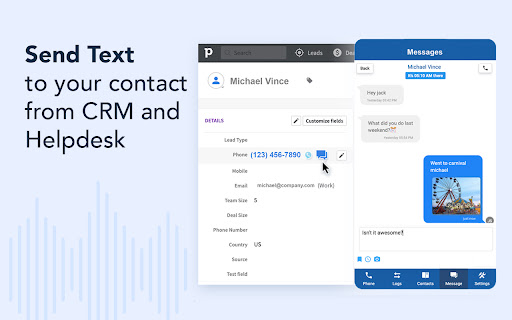

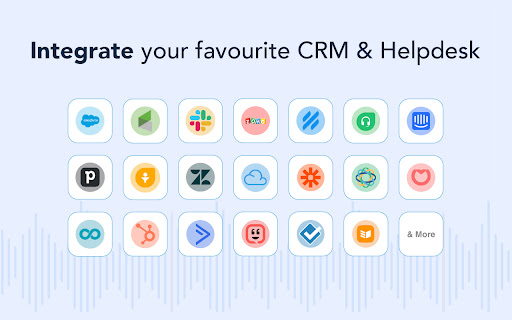
Click to call phone numbers available on any web page. Make & receive more sales calls, track all calls. TERMS and PRIVACY POLICY By using this Chrome Extension, you agree to the JustCall Terms & Conditions available at https://justcall.io/terms and Privacy Policy available at https://justcall.io/privacy In addition to data use information mentioned in our privacy policy, this extension reads your JustCall cookies to ensure that you logged in your JustCall account. If you are logged in, we use this information to fetch your phone numbers to allow you to make and receive phone calls and texts from any Chrome tab. CHROME PERMISSION USAGE DISCLOSURE: This chrome extension requires following permissions from your Chrome browser: 1. contextMenus: Used to give you an open to right click and select any phone number to make calls and send sms. 2. storage: Used to save your cookie in local storage so that we don't request cookies every time. Also, to store you audio device settings to ensure that you are using the right Input and Output Audio Device while answering your phone calls. 3. cookies: Used to read your JustCall cookies to ensure that you are logged in to use your JustCall account (as mentioned in Data Use Disclosure) 4. notifications: Used to send you notification for incoming phone call and sms 5. activeTab: The activeTab permission is required for the extension to interact with the currently active tab, allowing it to access or modify the web page when the user initiates an action. This enables the extension to execute scripts on the active tab and open new tabs adjacent to the current one when user opens new tab by clicking on buttons. 6. offscreen: The offscreen permission allows the extension to create an offscreen document for tasks such as establishing WebRTC connections, playing audio, or accessing user media. This offscreen page is essential for managing calling functionalities using an SDK that requires making XMLHttpRequests. 7. scripting: The scripting permission is necessary to inject JavaScript into web pages, enabling features like displaying click to call and click to text icons. This is used to add icons elements to websites. 8. tabs: The tabs permission enables the extension to interact with the user's browsing activity, including querying, creating, and modifying tabs. This is important for actions such as opening new tabs and communicating with both the active tab and other browser tabs. DISCLAIMER: This extension uses Google Analytics to collect extension usage statistics to help improve user experience. If you want to opt-out of Google Analytics tracking, please visit http://tools.google.com/dlpage/gaoptout or you can set up a filter in Adblock Plus or similar ad blocker tools like AdBlock, uBlock or Adblock Pro. ABOUT THIS EXTENSION JustCall Chrome Extension works with your JustCall.io account. It allows you to add click to call and click to text buttons beside valid phone numbers in your CRM (that JustCall integrates with). It also notifies you when there is an incoming phone call on your JustCall phone number. You can answer incoming calls directly from your Chrome browser. Requirement: This extension requires JustCall.io paid account. Pricing starts at $25/user/month. ================================================ CHANGE LOG: v11.4.5 1. Fixed c2c and c2t icons in Hubspot tabular view of contacts/companies 2. Fixed c2c and c2t icons in Keap/Infusionsoft's contact list view v11.4.2 1. Fixes c2c and c2t icons in OnePageCRM 2. Fixes an issue with number formatting in ActiveCampaign CRM 3. Adds availability toggle in popup window v11.4.0 - Fixes an issue in C2C and C2T icons in Intercom v11.3.9 1. Adds click to call and text icons in Zoho CRM Plus 2. Fix Auto Dialer button disappearing in Zoho CRM Plus at times v11.3.8 - persistant notification for incoming calls v11.3.5 - Fixes calls and text icons in Zoho Recruit - Fixes calls and text icons in Nimble CRM - Redesigned settings page v11.3.4 -Fixed click to call and text icons in Freshsales -Fixed click to call and text icons in Outreach v11.3.3 -Fixed click to call and text icons in ActiveCampaign -Fixed click to call and text icons in Pipedrive v11.3.2 -Fixed click to call and text icons on deals page in ActiveCampaign v11.3.1 - CRM icons on call screens to open contacts directly in CRMs. - Host Permissions to Keap CRM - Fixed - Focussing on the already opened browser window instead of creating another window, when open Dialer button is clicked. - Autodialer button in Zoho CRM v11.3 - completely revamped version of the extension - get notified about the phone calls through ext icon in the ext bar beside address bar - get more information like previous calls etc from the extension itself - reduced permissions - extension URL permissions restricted to only the CRM that we integrate with v11.2.19 - Fixed Click to call and text icons for Intercom, Zoho CRM, Zoho Desk and LessAnnoying CRM - Added Icons next to custom phone fields in Ontraport v11.2.18 - Minor changes and code clean up v11.2.14 - completely dropped permission requirements "management" and "all urls" - added data & cookie usage and permission usage disclosure in the description - added links to Terms and Privacy on dialer as well v11.2.13 1. Fixed an issue where click to call icons were not displaying in Front, FreshDesk and Hubspot CRM. 2. Fixed an issue where click to call icon opened a new tab instead of a new browser window 3. Fixed an issue where Extension Button in browser was picking up wrong number and feeding to our dialer. 4. Added Click to Call icons in Propertyware CRM 5. Added same page login in Sales force v11.2.11 - updated Twilio SDK for improved performance v11.2.2 - easier way to reload extension upon update - HubSpot click to call issue resolved v11.1.6 - Support for lower internet speeds - Better call quality & call connection speed v11.1.3 - Better integration with your audio devices. Get option to set audio devices for ringtone, for answering call etc - Improves call quality by routing audio via right device v10.1.20 - Click To Call and Text Buttons For Groove 2.0 - Click to call and text support for Copper v10.0.2-10.0.8 - Better CRM Integration and Call Logging v10.0.1 - Speed improvements - Click to call and click to text for Freshsales v8.7 - Call merge and transfer to external numbers - Click to call and text for Freshsales v8.2-8.5: - Improvements in Click To Call Integrations with different CRMs - Small bug fixes v7.5 - Pipedrive same page activtiy logging - Fixes multiple context menu bug v7.2 - Fixes for different cases that may cause issues with receiving incoming calls v4.6 - Minimize your incoming call window while on a call v4.1 & 4.2 - Disposition codes for integrations - Hold & Hold music for inbound and outgoing calls v4.0 - Better In-call UI - Get more information about caller during the call - Take notes while taking incoming calls - Improved call quality v3.8 - Read call notes right from your CRM dashboard v3.7 - Syncroteam Click to call and click to text buttons v3.6 - Click to call implemented for Zoho users v3.3-3.5 - Basic changes and click to call improvements v3.2 - Integrates with Synchroteam - make and receive calls v2.7 - Added Infusionsoft integration. Automatically log your call activities and SMS in your Infusionsoft CRM v2.0 - Send SMS directly from Pipedrive, Freshdesk, Helpscout, Front and other CRM and Helpdesks - Better handling of incoming calls when multiple chrome tabs are open - Bug fixes V1.9: - Added Click To Call Support for Pipedrive, Freshdesk V 1.6: Receive phone calls from any tab. Get incoming call notification wherever you are on Chrome. V 1.5: 1. Click-to-call customer phone numbers in Freshdesk. 2. Select any phone number, right click and call with JustCall V 1.4: Faster number search on any web page. V 1.3: Added phone number count on JustCall icon. If extension finds clickable phone numbers on the web page, it shows the count.

Channels Click to Call
Channels automatically highlights phone numbers on websites and allows you to call them with just a click! Turn phone calls into your main advantage with Channels Click-to-Call widget. From handling calls with maximum flexibility to providing excellent customer service, Channels makes it easy to turn phone calls into your main advantage. ANSWER ON-THE-SPOT CUSTOMER CALLS Our Click-to-Call widget comes with a powerful link under which you’ll find all crucial customer details that will help you lead the call even when you’re unprepared. eCOMMERCE INTEGRATIONS Channels integrates with your favorite eCommerce platforms such as Shopify and Magento and pulls customer data from them to show you it right when your customers are calling. With details such as their Full name, company, role, phone number, and latest orders, you won’t have to ask endless questions to identify your customer and their issue and you’ll be able to get straight to the point of the conversation. MAKE ONE-CLICK CALLS FROM ANY WEBPAGE YOU WANT Channels gives you an option to turn on auto-highlighting for phone numbers. This allows you to make phone calls simply by clicking on the phone numbers you see on any webpage you are. It can save you tons of time and come in handy especially when you’re using tools like Pipedrive (that Channels integrates with!) where you store your clients’ details along with their phone numbers. This way, you don’t have to switch between various software and you can make calls in the most flexible way. MAKE YOU LIVECHAT MORE VERSATILE Channels integrates with LiveChat to make it an even better solution. Namely, we all know that chat has its limitations and not every issue can be resolved through text. Thus, whenever you get stuck during a conversation and want to move the talk over the phone or get back to your customer by calling, you can simply send them a Callback request and collect their phone number, directly in Channels. This will help you keep everything organized and will make it easier for you to call them back. WORK ON CUSTOMER HAPPINESS WITH IVR Channels comes with an IVR. IVR is a piece of software that lets your customers make calls accordingly to their issue by choosing a tone on a keypad. Therefore, using an IVR, you can connect your customers directly to the right customer service rep and limit the number of times when you have to redirect your customers or, even worse, put them on hold. Keep them happy by making it easy to resolve their issues and don’t make them spend too much time on pointless waiting. HANDLE PHONE CALLS WHEREVER YOU ARE Besides Channels Click-to-Call widget that is available in the Chrome Web Store, you can also get Channels Mobile app (on Android and iOS) that lets you take business phone calls no matter where you. This way, your office won’t be the only place where you’re ready to assist your customers and no case will turn out to be unreachable. GO GLOBAL, CALL GLOBAL Channels makes it easy for you to connect with your worldwide customers. That’s because we offer international phone numbers from more than 60 countries. Using them, you can appeal to customers from all over the world and make it easy for them to contact your company. If you combine it with the Toll-free numbers that we offer, you’ll make it a no-brainer for your customers to call your support center in case of an issue. On top of that, Channels remembers that - especially - a customer support center should save your business some money and not make it spend more. Thus, you’ll find only affordable call rates, so in case you want to make outbound calls, it won’t ever hurt your budget. LOOSE NO IMPORTANT DETAIL In Channels, you’ll find an option to record every call you make. This way, you can rewind any important conversation you had and recall important information. Plus, we store your call recordings even up to 365 days, so you don’t have to worry whether you’ll “have them for long enough”. MONITOR CALLS LIVE Sometimes you want to have access to an ongoing call without being a part of it. It comes in handy when you have to onboard new representatives or coach them. In such a case, you can make use of live-listing which allows you to monitor every call live without actually being present during the call. START NOW WITH A 7-DAY FREE TRIAL Channels comes in two, simple pricing plans which you can check at channels.app/pricing. Yet, to make it easier for you to start, you can signup for a 7-day trial and use Channels for free with no limitation for 7 days. We don’t require a credit card upfront so there’s really no reason why you shouldn’t try it out yourself!

CallHippo-Virtual Phone System
CallHippo - Cloud based Virtual Phone Systems for Small Business | make a call from anywhere Make calls to any phone number across the globe at a single click with the CallHippo virtual phone system. CallHippo is a cloud-based VoIP (Voice over Internet Protocol) system for businesses of all sizes. CallHippo uses cloud computing to deploy a flexible telephony network over the internet. With CallHippo, you won’t have to invest in expensive equipment. All you need is an internet connection, a computer / mobile, and a headset. Started in Jan 2017, CallHippo has customers across the globe and offers virtual numbers for more than 50+ countries. It’s easy to use interface and robust architecture help businesses set up their call center in less than 3 minutes. What is CallHippo Chrome Extension? CallHippo Chrome extension detects phone numbers on any website you visit and allows click-to-call seamlessly. With click-to-call feature as soon as you click on the hyperlinked number, a call will be placed automatically through CallHippo’s virtual phone system. You can also install CallHippo’s mobile app (Android and iOS) to use our VoIP system in your mobile. Key Features of CallHippo VoIP System ● One-click call ● Call analytics (caller details, call status, and time duration) ● Call recordings ● Get new numbers for different countries ● Set timezone based on your location ● Customize working hours according to your availability ● Power dialer ● Smart switch ● Real-time report about call status history ● Smart call forwarding ● Call conference ● Get unique numbers for different departments ● Call barging ● Call queuing ● On hold music ● Voice mail ● Automatic call logging ● Incoming screen pop-up ● Add phone numbers to your CRM ● Take notes ● Quick access to missed calls and calls not logged How CallHippo Benefits Your Business? In sales and call centers, every second matter. CallHippo scans your system and adds a link to every number. This way, you can dial phone numbers with one click, thereby saving lots of your time every day. The best part about CallHippo? It enables you to integrate seamlessly across various channels, including voice, mobile, social, chat, email, and SMS. This way, CallHippo provides insights about your operations and customers in one place, enabling you to deliver personalized experiences. Here are some more ways CallHippo benefits your business: ● Allow unsatisfied customers to raise support tickets so your agents can follow up and solve their problems ● Maintain an extensive customer database ● Provides detail information about each customer ● Find and filter agents quickly ● Know how your agents interact with customers via call recordings and improve their performance Integrate With 85+ Apps CallHippo works with almost every critical sales, CRM, ecommerce, productivity, data and reporting, marketing, ERP, and helpdesk software.

Toky Click to Call
Click to call extension for your CRMs and Tools This extension enables the Click-to-Call feature inside the integrations that Toky supports. For more information about the supported integrations, please check https://toky.co/en/integrations.

Auto Dialer for Twilio Platform
Online phone call and SMS from chrome browser. 50+ useful features. Free 14 day trial with full functionality. No credit card required. Download now, link with your Twilio account and start making calls in a minute. App developed by the creators of the very popular Twiliod (over 20,000 users). This product is showcased by Twilio in their web-site with gold status. Supports three modes * Simple dialer. Dial or type numbers to make calls. * Highlight numbers in any web-page for click to dial * CRM integration. Click to dial and automatically open CRM records on incoming calls. Key benefits of the plug-in are: a) Save on calling charges. Link to your Twilio account, and make use of the Twilio wholesale rates. b) Save time. Enables click-to-call, where the phone numbers within your web-page are highlighted. Click and make calls. c) Understand the customer. When you receive the call, screen-pop automatically opens up your lead's page. (You should create a simple script). d) Easy setup and no hardware. Take your phone with you on the Browser wherever you go. e) Send and receive SMS f) Click to SMS g) Auto complete for SMS. Saves time typing messages. h) Voicemail for incoming calls on no answer i) Voicemail drop feature to leave voicemails on outbound calls j) Auto dialing. Click on multiple phone numbers to make calls automatically one after the other. k) Add many numbers and dial numbers automatically one after the other. l) Keyboard Shortcuts to make outbound calls based on your custom Twimlet m) Call forwarding for incoming calls on no answer n) Call transfer and add conference This app has a limited trial period of 15 days. For usage After this, you will be paying a low monthly charge of $4.99. Twilio charges are additional. Please ensure that you have a paid Twilio account and there is at least one number in your Twilio account Make use of your CRM, if needed for automatic screen pop by entering the url of the API in the extension's "settings" page. Please find the details in help. Enable click to call functionality by providing the domain address in the "settings" page. Supports Salesforce, Zoho, Insightly, Hubspot and Zendesk etc., out of the box. Support to other CRMs can easily be added via a custom script.For more details visit:http://www.nethram.com/main-page/ Usage: Install the extension. Sign to chrome with your google account. Login with your Twilio SID and AUTH TOKEN and provide a unique client name. Set your default number. Optionally set your CRM details. Optionally enable SMS and voicemail. Your app is now ready Key features: - Purchase Twilio numbers for many countries. - Make calls to and from any number in the world. - Make calls between extensions by using the client name of the extensions. - Make use of Your CRM API to fetch contact details for each calls. - Click to call functionality for your CRM pages. - View recent log for upto 20 recent calls. - Send and receive SMS - Call history If you need support or need this app be to customized for your call center, please contact us at twiliodialer@nethram.com.
