
jcbljdgnpcckiamdgmnfhijgkkaogmgg
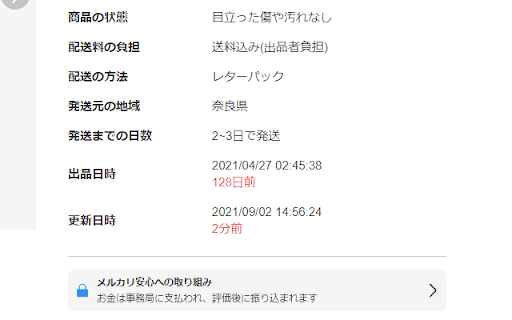
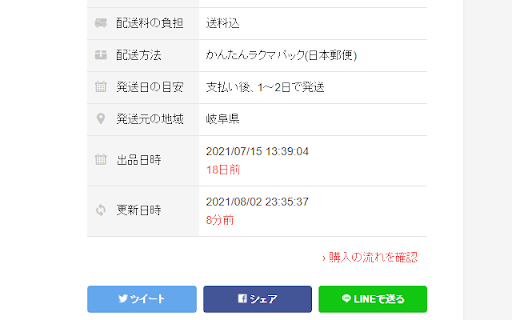
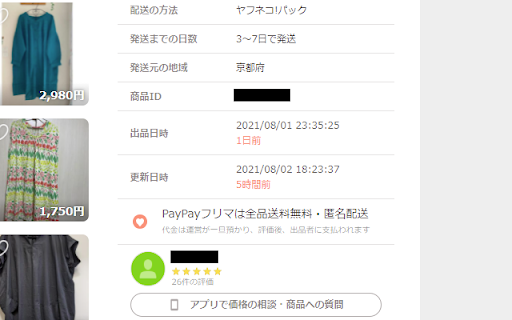
フリマアプリのWeb版に便利な機能を追加する拡張機能です。 【メルカリWeb版】 ・商品ページに「出品日時」と「更新日時」を表示 ・商品ページのコメントに「投稿日時」を表示 ・キーワード検索結果ページに「外部リンクボタン」を表示 ・コメント、メッセージの定型文機能 【ラクマWeb版】 ・商品ページに「出品日時」と「更新日時」を表示 ・商品ページの出品者情報に「評価数」を表示 ・商品ページの出品者のコメントに「出品者マーク」を表示 ・キーワード検索結果ページに「外部リンクボタン」を表示 ・コメント、メッセージの定型文機能 【PayPayフリマWeb版】 ・商品ページに「出品日時」と「更新日時」を表示 ・キーワード検索結果ページに「外部リンクボタン」を表示

Web Automa - Web page automation tool
A chrome extension that helps to automate actions in a web page It allows the users to automate the actions in a web page like filling forms, click a button, focus on an element etc... It can help to automate the repeated tasks in your work.

Finsweet Extension for Webflow
A suite of F'in sweet tools to improve your Webflow development experience. Important: Finsweet Extension has changed! Most features are now in our new native Webflow App. Only site settings remain in this Chrome Extension due to Webflow API limits. Unlock new and powerful tools and functionalities within Webflow's Dashboard, Editor and Designer. Functionalities include: - Bulk 301 redirects upload. - CSS styles sorting, editing and removal. - Interactions, Symbols and Color swatches reordering. - Breakpoints highlighting and removal. - Components marketplace to copy and paste directly in your project. - Direct integration with our Finsweet libraries like Cookie Consent or Attributes. - Vertical Canvas Resizing. - And much more!

VeloViewer Strava Plugin
Additions to Strava website to provide helpful links and features for VeloViewer. Add direct links from within Strava to VeloViewer along with other, VeloViewer specific additions. - Top level VeloViewer menu providing direct links to your key pages on VeloViewer. - Direct links to VeloViewer segment details page throughout the Strava site. - Direct links to Activities. - Direct links to Routes. - Direct links to Club yearly leaderboards. - VeloViewer Explorer tiles highlighted in Strava Route Builder including completed tiles, max square(s) and max cluster. - Chronological ordering on your dashboard feeds. 1.49 - Map Switcher bug fixed. 1.48 - Update to handle new Strava Route Builder map. Explorer Tile overlay will no longer work in 3D map mode so logic introduced to switch to 2D when Tile shown. 1.47 - Bug fix to handle update to Strava. 1.46 - Bug fix to last version. 1.45 - Technical update to change the way JS file is loaded. 1.44 - Bug fix to show newly ticked tiles for planned route in updated Strava Route Builder. 1.43 - Update to handle new Strava Route Builder changes for showing Explorer Tiles. 1.42 - Some minor bug fixes to handle some rare exceptions. 1.41 - Change in default Chrome security settings has blocked the way to automatically get your ticked Explorer Tiles from VeloViewer. Functionality added to allow you to copy a user-specific code from VeloViewer Summary page which can be pasted into the Strava Route Builder page which allows a secure connection to get your ticked tile data. 1.40 - Explorer error message wasn't being displayed on Route Builder page if not logged in. Also tidied up code that generates Explorer tile option. 1.39 - Another fix to route builder page to handle slight change in Strava's HTML structure. 1.38 - Fix to route builder page to handle slight change in Strava's HTML structure. 1.37 - Previous fix failed when Strava site viewed in language other than English. Hopefully now fixed for other languages too. 1.36 - Fix on Route Builder to when incorrect text showing on Explorer tile toggle. Also tweak to the main menu layout. 1.34/1.35 - Fix to handle change in React code on Route Builder. 1.33 - Changes to support FireFox. 1.31 - Update to Route Builder Explorer Tiles to handle no structure of menus. Link to VeloViewer corrected on the Segment Details page. 1.30 - A small change to the Route Builder Explorer tiles overlay to work more smoothly with other map-switcher extensions. 1.29 - Hopefully the final bug fix around tiles being shown as newly ticked tiles when already ticked! 1.28 - Another bug fix around tiles being shown as newly ticked tiles when already ticked. 1.27 - Explorer tile lines added to map (only shown when map zoom > 10). Bug fixed around false newly ticked tiles being shown. 1.26 - Tweaks to Route Builder code to handle expected className changes when Strava rolls out updates. Ticking of previously missed new tiles between route points included. Slight difference in opacity of clustered tiles that aren't part of max cluster. 1.25 - Rework for Explorer Tiles to work with new Strava Route Builder. New tiles ticked by route now highlighted. Configure tile colours in map settings on Activities page in VeloViewer. I'll try and get Personal Heatmaps showing again next. 1.24 - Turns out it is nothing to do with "SameSite" mode. Explorer tiles not loading due to "Block third-party cookies" setting being enabled. Added code to catch the situation and redirect to blog post with instructions to add "veloviewer.com" to "Allowed" list on chrome://settings/content/cookies 1.23 - Hopefully fixing an issue for users with "SameSite" mode enabled on Chrome for showing completed Explorer tiles in Route Builder. 1.22 - Moved the text (informing the user to log into VeloViewer in order to see their Explorer tiles in the Route Builder) to the top of the menu to hopefully make it more obvious. 1.21 - Completed explorer tile info now retrieved in a more secure way. Also a slight UI change to stop menus wrapping on a smaller screen. 1.20 - A strange issue with Chrome caching the Explorer Tiles file with the origin set to VeloViewer or Strava resulting in it not being able to be loaded in the other site. Worked around the issue in the extension to get the data in a different way. 1.19 - Update to unexplored tile KML download to fix bug caused by new version of Chrome. 1.18 - VeloViewer link from Activity Details updated to work with new Strava page structure. 1.17 - Personal Heatmaps option added to Route Builder. Works with Ride and Run All-Time heatmaps (Summit users only). 1.16 - Athlete Id added to Activities links to enable the deep link to Activity Details to work post GDPR. 1.15 - Club yearly leaderboard links added. 1.14 - Changed the "Chronological" button to now offer two options, either by sort by activity start date/time or by activity upload date/time. Activity end time isn't easily doable I'm afraid. 1.13 - "Chronological" button added to Dashboard to allow the sorting of activities by start date/time. 1.12 - Correction to KML export: colour changed to aabbggrr (eh?!) 1.11 - KML download for unvisited tiles for current area in the Route editor. 1.10 - Explorer Clump added to Route Builder. Custom colours for Explorer tiles brought in from configuration on user's Activities List page in VeloViewer. 1.9 - Minor tweak to test something out. No new functionality though. 1.8 - Fixed (hopefully) a browser zoom issue that wasn't quite fixed in 1.7. 1.7 - Update to handle browser zoom with explorer tiles. Also remembers whether explorer option was on or off between sessions. 1.6 - Explorer tile logic updated to handle Leaflet map (which looks to be replacing the Google Map on the Route Builder); Explorer tile borders/background set to white when using satellite view for better contrast. 1.5 - Large performance improvement on initial load of route builder if you have a lot of explorer tiles ticked off. 1.4 - Max explorer square(s) now shown. All links to VeloViewer are now https. 1.3 - Route builder now shows explorer tiles at all most zoom levels and on all map types. Completed tiles are now shaded 1.2 - Explorer tile outlines now work on retina displays 1.1 - Tweaked to work alongside Stravaistix 1.0 - Initial version

Dreaming Spanish Toolkit
A chrome extension to interact with the Dreaming Languages website, enabling new functionalities. Dreaming Spanish Toolkit enables the following functionality for the Dreaming Spanish website, enriching your user experience: - Monthly statistics card, which reflects site display mode - More to come (eventually) Made as a hobby, if you like the extension please consider leaving a review. 0.2.0 - Removed the site-wide dark mode functionality, as this has now been implemented by Dreaming Spanish. Kept only dark mode functionality for the stats card, as this is injected by the extension and thus needs to be styled by it. 0.1.8 - Updated to work with the new URL, made minor changes to the dark mode to account for new elements and the dark mode formatting of the existing website. 0.1.7 - Dark mode now updated for the website including comments (thanks to kaStinju on github for this) 0.1.6 - Got rid of the dark mode option because I couldn't maintain it anymore and it wasn't working, added a reccomendation to use a different extension to enable dark mode 0.1.5 - Update the dark mode so that it works with changes in the site's UI - For some reason I had trouble applying the CSS to the comments section, so I'll try to come back and fix this later 0.1.4 - Minor change to dark mode to improve the look of the monthly progress calendar 0.1.3: - Updated the dark mode for the new changes to the site HTML 0.1.2: - Updated the dark mode display to apply to the new dreaming spanish video difficulty feature 0.1.1: - Fixed some display errors in dark mode - Moved the monthly stats calculation from the extension to the progress page for ease of use - Changed the monthly average calculation so that in the current month, a more accurate average is provided. (This could still be a day off depending on what time it is, as the extension uses the local time on your device, which may differ from the DS time by a couple of hours)
