
jboecmpdefmkkhdbhlkgjpfliegpgcae
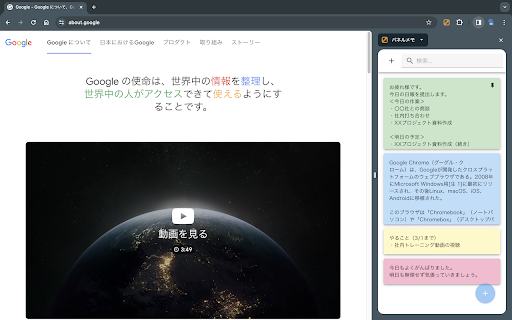
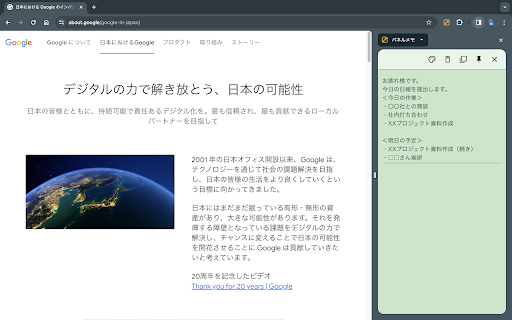
サイドパネルで編集できるメモ帳 ・メモを読み書きするのに、その都度アプリケーションやタブを切り替えるのは面倒くさい ・Chromeでメモを管理したい ・シンプルなメモ帳を使いたい そう思っているあなたへ(私も思っていました) この拡張機能は、上記全てを解決します。 ・メモ帳として必要最低限の機能を提供 ・サイドパネル上にあるので、ブラウザでの作業を中断する必要なし ・メモをGoogleアカウントで同期するか、デバイスごとに別々に管理するか選択可能 ※同期する:同じGoogleアカウントであれば、どのマシンからも同じメモにアクセス可能(容量に制限あり) ※同期しない:ほぼ無制限にメモを保存可能 使ってみればわかると思います。 意外と有能です。

Split Screen for Google Chrome
You can easily split and separate tabs, split interface layout, and resize tabs by columns and rows. Multi-monitor support This extension splits your browser windows into two with just 2 clicks. The ratio of the windows can be adjusted according to your needs. This extension is great for presenters who need to use Google Meet/Zoom and need to split their screen so that they can see their presentation & also see the faces of their students/attendees of the Google Meet call. Most of our users are on hangouts meet and want to see the faces of the attendees while they are doing screen sharing. This extension/feature is great for teachers who are teaching online classes at the moment. You can monitor your students via "Grid Mode in Google Meet" on one tab and do "screen sharing" in another Chrome tab which contains your teaching materials. Split the current browser window into a pair so it acts like a dual monitor setup. Try dualless mode today using this extension. Our software works well with google hangouts meet Permissions Required - Please note we do NOT read your browsing data, the only reason we use the browsing tabs permission is to allow the software extension to split your current Chrome Browser Windows into 2+ windows. This extension is useful for users who do not have dual monitors and want to split their browser windows into different sections, mainly when you're on a call using google meet app To begin using the software, simply do the following 1) Install our software extension 2) Click on the extension icon 3) Choose the layout ratio you wish to use for this split screen extension 4) Our software will split screen and display the browser into the split screen ratio you selected If you have any feedback for us for our extension which is meant to work with google video conference, please contact us. Disclaimer: Please note this extension is NOT made by Google and is made by an independent development team. All copyrights belong to their respective owners. Google doesn’t endorse or sponsor this Chrome extension. Split Screen is not owned by, it is not licensed by and is not a subsidiary of Google Inc.

TinaMind - The most powerful AI Assistant!
Your AI Assistant powered by AI models. Chat, YouTube summary, search, write, TTS, OCR and more. Your AI assistant, powered by GPT-4, Gemini Pro, and Sonnet, can chat, search, write, translate, perform TTS and OCR, manage personal prompt words, process selected text with one click, translate and summarize YouTube videos, and more. 🎉 Features: 💡 Search: Based on your query, we use various keywords to conduct comprehensive searches and analyses, provide precise answers, and enhance search results through responses from ChatGPT and renowned search engines like Google and New Bing. 💡 Chatbot: Open the sidebar to chat with TinaMind, gain inspiration and knowledge, just like having an intelligent assistant by your side. 💡 Writing: Efficiently write papers, reports, or emails, manage length, format, and tone. Simply provide the original text and a brief summary of your reply, and it will automatically generate the desired response. 💡 Translation: Beyond basic translation, you can manage the length, format, and tone of the translation, and it will automatically help you detect and correct subtle grammatical errors. 💡 Shortcuts: With one click, you can process selected text from web pages, PDFs, and more, including translation, rewriting, and optimization tasks. You can also customize tasks to greatly improve work efficiency. 💡 Personal Prompt Word Manager: Manage personal prompt words and access over 800 high-quality public prompt words. Quickly access the prompt word panel in chat input boxes on platforms like ChatGPT, Gemini, Claude, Bing, and more. 💡 YouTube Videos: Translate and summarize YouTube videos. 💰 Is it free? You can get 30 free queries per day and all advanced features are available. If you seek higher performance and faster response times, you can subscribe to our service.

VisiOS - Tab / Bookmark Manager OS
The Legendary Tab/Bookmark Manager OS 🚀 VisiOS offers two main features: 🚀 A tab manager of epic proportions and an OS that legends are made of. 🟢 Main functions of the tab manager: ✅ Sort tabs and tab groups ✅ Search tab titles and copy tab links ✅ Directly restore 404 tabs with Internet Archive ✅ YouTube top mode 🟢 Main functions of the OS ✅ 20+ languages available ✅ 9 desktops (toggle between 2D and 3D modes) ✅ Save bookmarks from the tab list, toolbar, and HTML files ✅ Generate bookmark HTML files for all browsers ✅ Sync, add, and merge bookmarks to your browser ✅ Create folders that maintain the hierarchy of all currently open tabs or all bookmarks ✅ Password-lock desktops and folders ✅ Built-in video player (37 video sites supported, including YouTube, TED, and Spotify) ✅ Create video playlists (supports YouTube playlist URLs) ✅ Playlist lets YouTube work like an iPod, with shuffle support ✅ Free App Store (download various apps to your OS for free) ✅ Draw on desktops, apps, and folders with 2D painting functionality ✅ Code editor for developing your own apps on the OS ✅ Quicklook like on MacOS ✅ Hypersearch (search across all 9 desktops at once) ✅ Robo-sort (sort folder hierarchies all at once) ✅ Word processor (supports LaTeX for advanced formula editing) ✅ Fully customizable fonts and icons ✅ Wide range of backup and reset options ✅ Add texts and lists anywhere on your desktops and folders ✅ Infinite scrolling (desktops behave almost like Google Maps) ✅ ChatGPT and various AIs will be more easier to use ✅ Warp points (navigate directly to specific coordinates across all desktops) ✅ Sidebar OS You can save bookmarks anywhere on the 9 desktops. It's really easy to import, export, sync, and merge bookmarks. You can also install various VisiOS apps for free, including games, utilities, language learning apps, cryptocurrency tools, and more. When you first install the extension, click on the extension icon, and then select "Launch VisiOS" in the pop-up menu. (NOTE: Recommended to pin the VisiOS extension) 🚀 How to change your preferred language: 🚀 Right-click anywhere on any desktop and select “Settings” to change your preferred language.

ネットショップまとめ検索
Amazonの商品ページにネットショップまとめ検索のリンク、又はネットショップまとめ検索ページを追加します。 複数のネットショプ・オークション・フリマサイトを一度にまとめて検索が可能です。 開催中のセール情報もまとめて表示します。 リンク表示、検索結果の自動表示などは全て設定でカスタマイズが可能です。 インストールすることにより、利用規約に同意いただいたものとみなします。 https://matome-search.com/privacy-policy/
