
dnollkdkikklpdganoecjcmmlddbennb
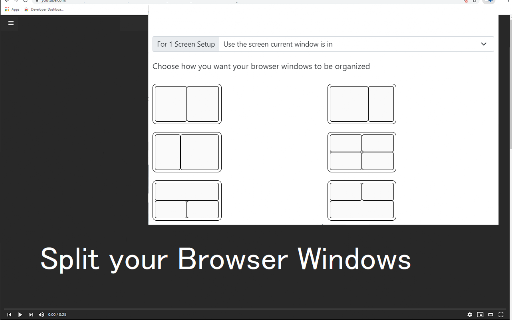


You can easily split and separate tabs, split interface layout, and resize tabs by columns and rows. Multi-monitor support This extension splits your browser windows into two with just 2 clicks. The ratio of the windows can be adjusted according to your needs. This extension is great for presenters who need to use Google Meet/Zoom and need to split their screen so that they can see their presentation & also see the faces of their students/attendees of the Google Meet call. Most of our users are on hangouts meet and want to see the faces of the attendees while they are doing screen sharing. This extension/feature is great for teachers who are teaching online classes at the moment. You can monitor your students via "Grid Mode in Google Meet" on one tab and do "screen sharing" in another Chrome tab which contains your teaching materials. Split the current browser window into a pair so it acts like a dual monitor setup. Try dualless mode today using this extension. Our software works well with google hangouts meet Permissions Required - Please note we do NOT read your browsing data, the only reason we use the browsing tabs permission is to allow the software extension to split your current Chrome Browser Windows into 2+ windows. This extension is useful for users who do not have dual monitors and want to split their browser windows into different sections, mainly when you're on a call using google meet app To begin using the software, simply do the following 1) Install our software extension 2) Click on the extension icon 3) Choose the layout ratio you wish to use for this split screen extension 4) Our software will split screen and display the browser into the split screen ratio you selected If you have any feedback for us for our extension which is meant to work with google video conference, please contact us. Disclaimer: Please note this extension is NOT made by Google and is made by an independent development team. All copyrights belong to their respective owners. Google doesn’t endorse or sponsor this Chrome extension. Split Screen is not owned by, it is not licensed by and is not a subsidiary of Google Inc.

Split Screen in Tab - TradingView
Split View in One Tab! Multitask with TradingView! Features 🌟 Side Panel: Open ChatGPT for a seamless AI experience (writing, email replies, image generation, etc.). 🌟 Layout: Horizontal, Vertical, and Custom Drag & Resize layouts. 🌟 Group: Store websites and open them quickly in a tab, like for multiple social media postings. 🌟 Context Menu: Right-click to open the Side Panel, Group, or Template. 🌟 Shortcut: "Ctrl+Shift+S" to open the Side Panel. (Changeable in FAQs.) 🌟 Import Tabs: Quickly import opened tabs 🌟 Open link in Side Panel: right click the link and select the context menu. 🌟 Auto Refresh: Set the time to auto refresh (etc, stock group). FAQs 🤔Is It Free? -- Free Tier already Covers Most Needs.😊💖 -- Upgrade to Pro for more Custom Groups. Go Pro and help us build even more features!💪✨ 🤔Change Shortcut⌨️ -- Use the shortcut button on the top toolbar to manage more. -- Mac shortcut: Command+Shift+S 🤔Security Testing🛡️ -- Here is a link to test that iframe won't be globally cross-origin when using this extension: https://tools.wow2fun.com/splitScreen Normally, you will see 'chatgpt.com' refuse to connect, which indicates enhanced security enforced by the browser. 🤔Need More Help? -- Click the "Visit support hub" below or email me. 📝If you’re happy with our service, please consider leaving us a review below!⭐ Your feedback helps us improve and supports our growth🌱. Thank you!🤝

Tab Split
Forces each browser start page to open in a new browser window across multiple monitors. OVERVIEW Tab Split is a Chrome extension that makes your homepage tabs open in different windows and across multiple screens. How it is different from other extensions is that you are not required to click a button, instead this extension runs when the browser is started which helps with automated startups for monitoring through websites. SHOULD YOU USE THIS EXTENSION If you are not setting up dashboards for monitoring then this extension is probably not for you! PREREQUISITES Before Tab Split will work you must first setup some websites to open when you start Chrome browser. To do this go to settings, choose the "On Startup" tab on the left, the choose "Open a specific page or set of pages". Add a new page for each page you would like to open when Chrome starts. These are the websites that will be spread out across your screens as Chrome windows when Chrome first starts. NOTE: pressing the reload button in the extensions section will not make Tab Split trigger, it will only trigger when the browser is first opened, to test please close all your browser windows and reopen the browser. OPERATION When Chrome Browser opens it will cause each startup tab to move to a new window. Each window is moved to the next display. This is useful for setting up automated monitoring in multi-headed environments. It will trigger each time Chrome is opened. This allows you to keep the ability to open new tabs without them being moved to a new window when you open them if you need to open tabs temporarily. FEATURES The extension now has the ability to choose between maximized screen and fullscreen, simply click the extension icon and choose which you would like and choose save. This will be your new default, change the option anytime you want. LIMITATIONS: The extension opens windows horizontally and will not open in a vertical manner, meaning monitors must be setup in a horizontal fashion to display correctly. It will work with monitors of different sizes though. SUPPORT: For best support please raise issues or questions on the Github page at https://github.com/Acetolyne/TabSplit/issues Chrome store will not send an email when you raise an issue or question on the Chrome Webstore so I may not see your issue or questions right away if you post there. ADDITIONAL INFO: The extension will open as many windows as you have tabs on startup. This setting is found under Chrome settings >> On Startup. Choose "open specific pages when Chrome starts" then specify the pages you want to open automatically when Chrome browser is started. For typical dashboard setups you can then set Chrome to start with the computer, Chrome will open and the websites defined in the "On Startup" section of the settings page will then be spread across your multiple monitors. To change which screen the tab opens on, change the order of homepages on the Chrome settings page. If you have more tabs set to open than you have screens then the extra tabs will open on the last monitor all in the same window. If you use this extension I would appreciate if you would take a minute to leave a review on the Chrome Webstore so other users can have valid feedback.

Split Screen
Best for Traders and Multitaskers Effortlessly manage your workflow with Split Screen, the ultimate tool for traders, multitaskers, and productivity enthusiasts. Split your browser windows into 2, 4, or 6 perfectly arranged screens with just a click. Seamlessly work across multiple tabs, monitor charts, or manage tasks in parallel – all from a single interface. Smart Window Management: Automatically organize and split your screen across multiple monitors. Multi-Monitor Support: Fully compatible with dual and multi-monitor setups. Efficient URL Management: Copy existing tabs and distribute them across new windows. User-Friendly Interface: An intuitive, stylish layout designed for enhanced productivity. Perfect for day traders, coders, analysts, and anyone who needs to keep multiple tabs in view simultaneously. Boost your productivity and get more done with Split Screen!

パネルメモ
サイドパネルで編集できるメモ帳 ・メモを読み書きするのに、その都度アプリケーションやタブを切り替えるのは面倒くさい ・Chromeでメモを管理したい ・シンプルなメモ帳を使いたい そう思っているあなたへ(私も思っていました) この拡張機能は、上記全てを解決します。 ・メモ帳として必要最低限の機能を提供 ・サイドパネル上にあるので、ブラウザでの作業を中断する必要なし ・メモをGoogleアカウントで同期するか、デバイスごとに別々に管理するか選択可能 ※同期する:同じGoogleアカウントであれば、どのマシンからも同じメモにアクセス可能(容量に制限あり) ※同期しない:ほぼ無制限にメモを保存可能 使ってみればわかると思います。 意外と有能です。
