
befflofjcniongenjmbkgkoljhgliihe


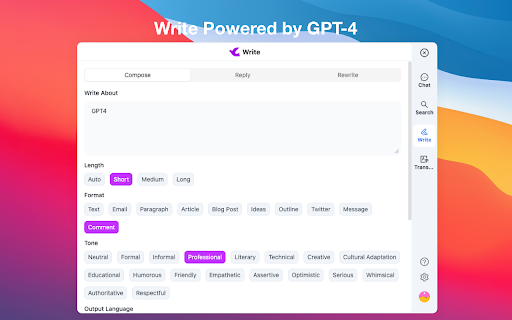
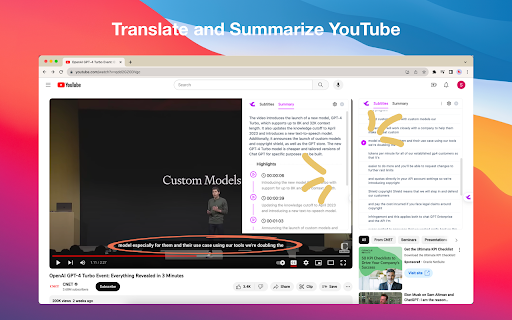

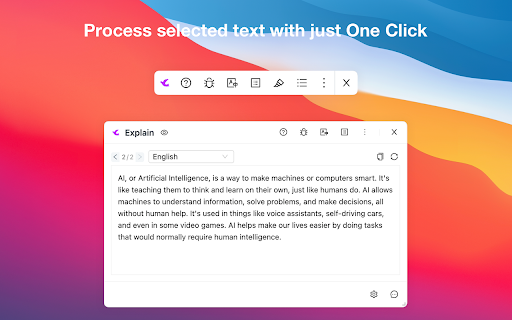
Your AI Assistant powered by AI models. Chat, YouTube summary, search, write, TTS, OCR and more. Your AI assistant, powered by GPT-4, Gemini Pro, and Sonnet, can chat, search, write, translate, perform TTS and OCR, manage personal prompt words, process selected text with one click, translate and summarize YouTube videos, and more. 🎉 Features: 💡 Search: Based on your query, we use various keywords to conduct comprehensive searches and analyses, provide precise answers, and enhance search results through responses from ChatGPT and renowned search engines like Google and New Bing. 💡 Chatbot: Open the sidebar to chat with TinaMind, gain inspiration and knowledge, just like having an intelligent assistant by your side. 💡 Writing: Efficiently write papers, reports, or emails, manage length, format, and tone. Simply provide the original text and a brief summary of your reply, and it will automatically generate the desired response. 💡 Translation: Beyond basic translation, you can manage the length, format, and tone of the translation, and it will automatically help you detect and correct subtle grammatical errors. 💡 Shortcuts: With one click, you can process selected text from web pages, PDFs, and more, including translation, rewriting, and optimization tasks. You can also customize tasks to greatly improve work efficiency. 💡 Personal Prompt Word Manager: Manage personal prompt words and access over 800 high-quality public prompt words. Quickly access the prompt word panel in chat input boxes on platforms like ChatGPT, Gemini, Claude, Bing, and more. 💡 YouTube Videos: Translate and summarize YouTube videos. 💰 Is it free? You can get 30 free queries per day and all advanced features are available. If you seek higher performance and faster response times, you can subscribe to our service.

ChatGPT Toolkit
Enhances your ChatGPT experience with useful features like a Auto-Fill prompt text from URL, common prompts after response, and… The ChatGPT Toolbox provides some useful additional features for the ChatGPT website, which can enhance the user experience. Currently, two features are available: 1. Automatic prompt filling from URL: This allows you to save commonly used prompts as bookmarks and quickly fill them in when needed. 2. Automatic prompt button in the ChatGPT response field: These commonly used prompts can be automatically entered through a button. 3. You can directly edit the prompt by double-clicking on the user icon or prompt text. 📢 This extension adds support for AutoFill and AutoSubmit functions for Gemini, Claude, phind and Groq on 2024-03-11. Please make use of the ChatGPT Prompt Link Generator: https://blog.miniasp.com/ChatGPTToolkitExtensionUrlGen.html to automatically generate links. More useful features will be launched in the future, and everyone is welcome to provide ideas and suggestions. 1. Add `#autoSubmit=1&prompt=your_prompt_text` to the URL bar, for example: Open the ChatGPT website and fill in "hello" without automatically submitting (`autoSubmit=0`): Open the ChatGPT website and fill in "hello" with automatic submission (`autoSubmit=1`): 2. Set it as the default search engine in Chrome / Edge, for example: Refer to the [Set your default search engine & site search shortcuts](https://support.google.com/chrome/answer/95426?hl=en) document for instructions! ```txt Search engine: ChatGPT Shortcut: g URL with %s in place of query: https://chat.openai.com/chat#autoSubmit=1&prompt=%s ``` Just type `g` in the URL bar and press the Tab key, and ChatGPT will automatically open and fill in the prompt text.

Kimi 阅读助手
享受 AI 辅助阅读的乐趣~ ## 功能介绍 * 使用 Kimi.ai 辅助阅读任何你能浏览的网页(windows 快捷键 Ctrl+Shift+E, Mac 快捷键 Command+Shift+E) * 支持与本地文件对话 * 适配了部分常用网站,包括小红书图文笔记、微信读书、京东商品详情、淘宝商品详情、B 站字幕总结等 * 支持常用语排序,可在多轮对话中快速使用 * 支持划词提问、支持保存对话内容到浮墨笔记 * 支持 Arc 浏览器及暗色主题 ## 说明: * 需要 Chrome 116 及以上版本才能正常使用扩展 * 欢迎提交意见及建议(会第一时间回复):https://support.qq.com/products/642015

Anything Copilot: Sidebar, Mini Window, Pip, Split-Screen
AI, right where you need it. Free in the sidebar & Mini Window. Anything Copilot: Your All-in-One AI Command Center. Stop juggling tabs. Start creating. Anything Copilot transforms your browser into a powerful, open AI workspace where all your favorite tools live in one place. 🚀 Two Core Features to Revolutionize Your Workflow The Ultimate Sidebar: Your Multitasking Powerhouse 🧩 Run AIs Side-by-Side: Why choose one? Open ChatGPT, Gemini, and Claude in parallel tabs to compare answers, brainstorm ideas, or tackle complex tasks. True Split-Screen Browsing: Drag any link or webpage into the sidebar to view it alongside your main window. Perfect for research, note-taking, or watching tutorials while you work. 10x your productivity instantly. Mini Window: Your AI Sidekick, Everywhere 💡 System-Wide Access: Your AI isn't trapped in the browser anymore. Pin a floating Mini Window on top of any application—from Excel to VS Code. Get help with formulas or code without ever switching context. Always Ready, Never in the Way: Supports multiple tabs and minimizes neatly to the edge of your screen. It's there when you need it, and gone when you don't. Tired of paying for AI tools that secretly use weaker models, steal your data, or might disappear tomorrow? With Anything Copilot, you log in directly to your own official accounts for Gemini, ChatGPT, Claude, Grok, and more. This means: - Zero Middleman: Your data is sent directly to the AI provider. We never see or store it. 🤫 - Keep Your Subscription: Get the full power of your Plus or Pro plan (like GPT-5, Gemini 2.5 Pro and Claude Opus 4.1) without compromise. ✨ - More Stable, More Affordable: Connect directly for better performance and never pay extra for a middleman service. 💰 🎵 More Than Just AI: Your Productivity Swiss Army Knife Unlock the true potential of your browser. You haven't lived until you've managed your YouTube Music playlist or scrolled X (Twitter) from the sidebar while you work. - Quick Search: Instantly search Google, Bing, and more directly within the sidebar panel. 🔍 - Omnibox Integration: Type ac + Space in your address bar to launch and search in the sidebar in a flash. ⌨️ ✅ Add to Browser and Start Exploring Now - Lightweight & Fast: Won't slow you down. ⚡ - Completely Free: Just install and go. 🎉

VisiOS - Tab / Bookmark Manager OS
The Legendary Tab/Bookmark Manager OS 🚀 VisiOS offers two main features: 🚀 A tab manager of epic proportions and an OS that legends are made of. 🟢 Main functions of the tab manager: ✅ Sort tabs and tab groups ✅ Search tab titles and copy tab links ✅ Directly restore 404 tabs with Internet Archive ✅ YouTube top mode 🟢 Main functions of the OS ✅ 20+ languages available ✅ 9 desktops (toggle between 2D and 3D modes) ✅ Save bookmarks from the tab list, toolbar, and HTML files ✅ Generate bookmark HTML files for all browsers ✅ Sync, add, and merge bookmarks to your browser ✅ Create folders that maintain the hierarchy of all currently open tabs or all bookmarks ✅ Password-lock desktops and folders ✅ Built-in video player (37 video sites supported, including YouTube, TED, and Spotify) ✅ Create video playlists (supports YouTube playlist URLs) ✅ Playlist lets YouTube work like an iPod, with shuffle support ✅ Free App Store (download various apps to your OS for free) ✅ Draw on desktops, apps, and folders with 2D painting functionality ✅ Code editor for developing your own apps on the OS ✅ Quicklook like on MacOS ✅ Hypersearch (search across all 9 desktops at once) ✅ Robo-sort (sort folder hierarchies all at once) ✅ Word processor (supports LaTeX for advanced formula editing) ✅ Fully customizable fonts and icons ✅ Wide range of backup and reset options ✅ Add texts and lists anywhere on your desktops and folders ✅ Infinite scrolling (desktops behave almost like Google Maps) ✅ ChatGPT and various AIs will be more easier to use ✅ Warp points (navigate directly to specific coordinates across all desktops) ✅ Sidebar OS You can save bookmarks anywhere on the 9 desktops. It's really easy to import, export, sync, and merge bookmarks. You can also install various VisiOS apps for free, including games, utilities, language learning apps, cryptocurrency tools, and more. When you first install the extension, click on the extension icon, and then select "Launch VisiOS" in the pop-up menu. (NOTE: Recommended to pin the VisiOS extension) 🚀 How to change your preferred language: 🚀 Right-click anywhere on any desktop and select “Settings” to change your preferred language.
