
jbfcadlbgpcakkcgpjlleamanbmbgcpm

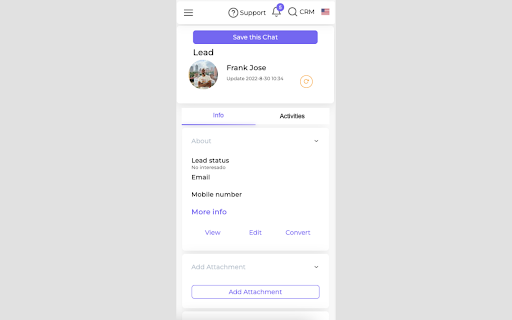


Spellty provides a quick way to manage and add leads, contacts from Whats to Zoho CRM (all plans included) Spellty's solution for WhatsApp Web and Zoho CRM integrates all the mobile phone numbers of the sales team using WhatsApp directly into Zoho CRM, improving the traceability of conversations, sales follow ups and customer service. Let your sales team send quick responses, save images, audio, conversations, create leads, contacts and more.

ZDialer - Zoho Voice Extension
Make business communication simple, cost-effective, and highly reliable. Automatically detects phone numbers on a webpage with ZDialer and make calls immediately using a click-to-call button. Select any text in a webpage and get a a click-to-dial pop-up if it is a phone number. Reach out to your customers quicker than before. Receive calls in a call pop-up from any webpage you're on. Choose if you want to receive calls in all active tabs or just in Zoho app tabs. You can also mute call notifications using silent mode and disable incoming calls using Do-Not-Disturb. Open a dial pad by clicking on the extension icon from the tool bar. Make calls to unsaved numbers from the dial pad. Choose a default number to use for making calls. Select the required caller ID from the dropdown box in the dial pad. Call transfer is supported in the extension so you can transfer calls to other Zoho Voice agents mid-conversation. Enable a ZDialer dial pad widget at the bottom right corner of all your favorite Zoho apps so you can quickly make calls using the dial pad. Check out all your call records from the Logs tab.

Zoho Integration for WhatsApp Web
The Zoho Integration for WhatsApp Web connects your Zoho CRM with WhatsApp to manage, track, and streamline customer interactions. Zoho Integration for WhatsApp Web

WhatsApp AI Agents With CRM Integration | Eazybe
WhatsApp AI agents with CRM integration (HubSpot, Zoho, Salesforce, Sheets), scheduling, privacy blur, and more. WhatsApp AI agent with CRM integration (HubSpot, Zoho, Salesforce, Sheets), scheduling, privacy blur and more. Eazybe is a powerful WhtasApp Chrome extension that enables WhatsApp AI Agent with CRM integrations, helping you automate sales, support, and operations directly from WhatsApp Web. If you want a human-like AI + deep CRM automation in one tool, Eazybe dominates. We support deep integrations including: Manage all your customer conversations and CRM workflows without switching tabs. ------------------------------- 🤖 AI AGENTS ON WHATSAPP ------------------------------- AI Customer Support Agent: Answers customer questions instantly 24/7 using your CRM data via HubSpot WhatsApp integration, Zoho WhatsApp integration, and Freshdesk WhatsApp integration to provide accurate, brand-aligned help. AI Sales Agent: Identify and close deals faster with insights synced across Salesforce WhatsApp integration, Pipedrive WhatsApp integration, and Monday WhatsApp integration. AI RevOps Agent: Maintain clean pipelines with automated syncing using: - Google Sheets integration - Webhooks WhatsApp integration - CRM integrations like Salesforce and Zoho AI Lead Qualification Agent: Automatically qualifies high-intent prospects and rejects non-leads 24/7 to ensure only ready-to-buy opportunities hit your CRM like; HubSpot, Zoho, LeadSquared, Bitrix24. Efficiency Power-Up: Our WhatsApp AI agents work 4x faster 24/7 to clear backlogs and repetitive tasks in any language, syncing your CRM data instantly with no mistakes and no extra hiring needed. ------------------------------------ ⚡ CRM & PRODUCTIVITY FEATURES ------------------------------------ WhatsApp CRM Integration: Eazybe offers the best WhatsApp CRM integration tool to automatically backup your WhatsApp chats and update deal stages directly in your CRM. AI Sync & Backup: Never lose a lead. AI auto-syncs WhatsApp chats to the correct contact in your CRM, ensuring your data is always up-to-date. Trigger workflows using Webhooks WhatsApp integration. AI Task Management: AI helps you create tasks inside HubSpot, Zoho, Salesforce directly from WhatsApp. It even suggests tasks based on your conversation so you never forget a follow-up. AI Team Accountability: Use a shared team inbox where AI tracks ownership and helps assign conversations to the right person, keeping the whole team aligned. Smart Advanced Tools: Use AI-powered templates and automated reminders to keep the conversation moving while staying 100% compliant with Meta's policies. -------------------------------- 💁 Google Workspace Integrations: -------------------------------- - Google Sheets WhatsApp integration for automatic data logging. - Google Calendar WhatsApp integration for scheduling & reminders. -------------------------- 🔒 Privacy and Compliance -------------------------- End-to-End Encryption: Your data stays secure on your device. Meta Compliant: Built to work safely with WhatsApp Business requirements. Quality Focused: Designed for professional CRM-focused teams, not spam. ----------------------- 📈 Benefits at a Glance ----------------------- Handle More Work: Manage a 200-ticket backlog easily with AI doing the heavy lifting. Scale Without Hiring: Grow your business and handle more customers without adding to your payroll. Zero Mistakes: AI ensures every lead is logged and every task is scheduled perfectly. -------------- 📞 Get Started -------------- Email Us: hey@eazybe.com Disclaimer: WhatsApp™ is a trademark of WhatsApp LLC. This extension is an independent tool developed by Eazybe and is not affiliated with, endorsed by, or sponsored by WhatsApp LLC or Meta Platforms, Inc. This extension enhances the functionality of WhatsApp Web for productivity and CRM use cases and does not modify, store, or transmit WhatsApp user data outside the user's browser.

TimelinesAI - universal integration
TimelinesAI Chrome Extension allows to start or continue a chat from any CRM or site (TimelinesAI account is required). Our Universal Chrome Extension allows you to instantly start or continue a chat in TimelinesAI from any CRM or web page by selecting a detected phone number. Enjoy embedded conversation right in the context of your work! You can dock, resize and collapse the extension display to adjust it neatly to the interface of your CRM. TimelinesAI account is required to use our Chrome Extension. Install the extension and sign-up for a FREE Trial to start sending messages from your CRM. Setup takes just 2 minutes, no credit card is required! For a limited time, Chrome Extension is available on all plans! Send messages and start new chats from: HubSpot, Pipedrive, Salesforce, Zoho, Monday or any other CRM.
