
gnpglhdhioifppkjdpmlmolgeanpaofi

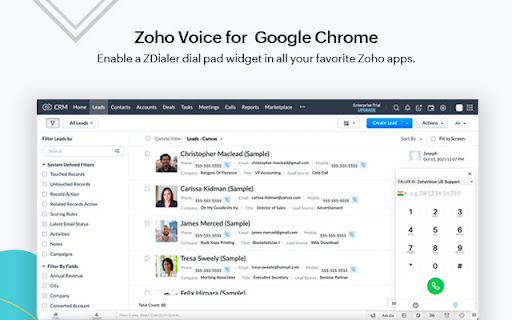
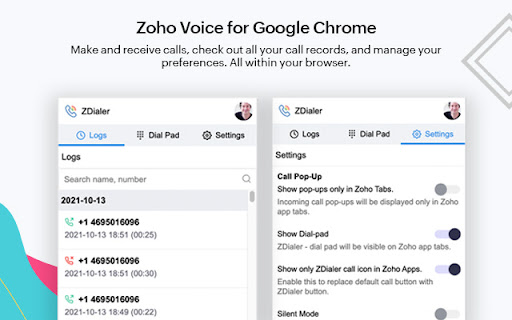
Make business communication simple, cost-effective, and highly reliable. Automatically detects phone numbers on a webpage with ZDialer and make calls immediately using a click-to-call button. Select any text in a webpage and get a a click-to-dial pop-up if it is a phone number. Reach out to your customers quicker than before. Receive calls in a call pop-up from any webpage you're on. Choose if you want to receive calls in all active tabs or just in Zoho app tabs. You can also mute call notifications using silent mode and disable incoming calls using Do-Not-Disturb. Open a dial pad by clicking on the extension icon from the tool bar. Make calls to unsaved numbers from the dial pad. Choose a default number to use for making calls. Select the required caller ID from the dropdown box in the dial pad. Call transfer is supported in the extension so you can transfer calls to other Zoho Voice agents mid-conversation. Enable a ZDialer dial pad widget at the bottom right corner of all your favorite Zoho apps so you can quickly make calls using the dial pad. Check out all your call records from the Logs tab.

Zoho Show
Zoho Show lets you create, collaborate, present, broadcast, and publish presentations, the smarter way. Zoho Show is an online presentation tool to create, edit, collaborate, and broadcast slides on the web. You can also upload PPT or PPTx files and edit them. Refine your slides with Show's editing and animation options. Review slides, add comments, and facilitate discussions with your team in real time. Visualize data using charts or use shapes to build engaging roadmaps, flowcharts, and infographics. The Zoho Show Chrome extension acts as a gateway to the web app, providing quick access to your presentations. When a new idea for a presentation comes to you, start by creating a draft using the Zoho Show Chrome extension. You can create up to 5 drafts which work even when offline. Other benefits of Zoho Show extension are: Organize your ideas and get started. -> Add text or images from your computer. -> Select text or image content from any page on the browser. Just right click and add to the draft. -> Alternatively, drag and drop content or images from your browser to drafts. Every Draft saved can be automatically converted into a completed presentation. The layout of each slide is intelligently decided based on the images and content added. With the basic slide design done, you can now continue working on your presentation. CREATE PRESENTATION Create engaging presentations from scratch with Zoho Show. Design: The contextual UI makes it easy to design visually stunning slides. Make your numbers stand out with the help of charts and tables. Enliven your content with animation. Discuss: Collaborate with your team, review, add comments, and make changes in real time. Deliver: Publish your presentation online and make it available on websites, blogs, social media, and more. IMPORT PRESENTATIONS Import PowerPoint presentations from your computer with all their slide properties intact. You can also broadcast and deliver presentations to audiences around the globe. Open PPT, PPTX files on the web just by right-clicking the URL. Open the downloaded files directly on the web with our Chrome extension.

Zoho Projects
Project Management software that lets you manage projects and tasks online. Collaboration with your team is now easier than ever. Zoho Projects, our cloud-based project management software used for project planning, tracking, and collaboration, is now available as a browser extension for Google Chrome. Zoho Projects is preferred by more than three million users worldwide for project planning, tracking, and collaboration. This new Chrome extension keeps you updated even when you are working on other tabs. Access all the important Projects modules, such as task management, time sheets, news and updates feed, bug tracker— all available right from your browser. This helps you quickly take action without having to open the web app in a new tab. Use our built-in screen grabber to easily file bugs and upload edited screenshots directly from the extension. Here’s a glimpse of what you can do with Zoho Projects: * Easily manage complex projects using milestones, task lists, tasks, and sub tasks. * Quickly view ongoing discussions, tasks, comment threads, and much more by skimming through your Feed. * Use the timesheet module to log hours for your tasks and issues. You can also see a daily, weekly, or monthly view of your logged hours, making it easy to track all the hard work you've done. * Communicate effectively with your team using our rich collaboration options such as wiki, chat rooms, and forums. * Integrate with Google Drive, Google Calendar, and Gmail. * Get in-depth insights on your projects using Gantt Charts, advanced analytics, and reports. * Take advantage of other Zoho apps such as CRM, Docs, and Desk using integrations. * Stay on top of all your projects and work on the go with our iPhone and Android mobile apps.

LinkMatch For Zoho CRM
The Best browser integration for Zoho CRM Seamless Zoho CRM Profile Import – Now with AI Insights LinkMatch helps you capture and manage profiles from professional networking platforms in Zoho CRM without manual copy-pasting. Designed for sales teams, recruiters, and business developers, it keeps your CRM updated while you focus on building relationships and closing deals. - Automatic Recognition: Instantly see which profiles are already in your Zoho CRM. - Quick Profile Management: View and edit Zoho CRM profile details directly from your browser — no need to switch tabs. - Save Time, Work Smarter: Add new leads and contacts to Zoho CRM in one click. - AI Insights: Get AI-powered recommendations to identify top leads, prioritize connections, and optimize your workflow.

Zoho CRM for Gmail
A quick way to manage and add leads, contacts to Zoho CRM from Gmail. • Create new leads and contacts right from Gmail. • See complete lead/contact detail when you open a mail. • Add tasks, events, log calls for a customer. • Create deals and notes for instant update. • FREE extension; no credit card required. • Installs in seconds, easy to use. ⦿ Manage your Zoho CRM from Gmail. Why switch windows when you can manage your CRM from Gmail? Zoho CRM for Gmail shows you a complete customer profile immediately upon opening an email from the customer. Instantly view customers’ contact information without opening Zoho CRM. You can create new Contacts and Leads, and log calls, add tasks, events, allowing you to keep better track of prospective deals and customers. ⦿ Keep track of all your information. Convert leads to contacts, add, edit and delete notes, events, tasks, log calls using this powerful extension. It's easy to use interface helps you see all the information when you need it. ⦿ Make the most out of your CRM investment. Increase your ROI by entering timely and accurate information about your leads and contacts in your CRM system. Create tasks and notes to keep your CRM always updated.
