
oljnbokalmnlbngdeejnfhbfgioobdbm
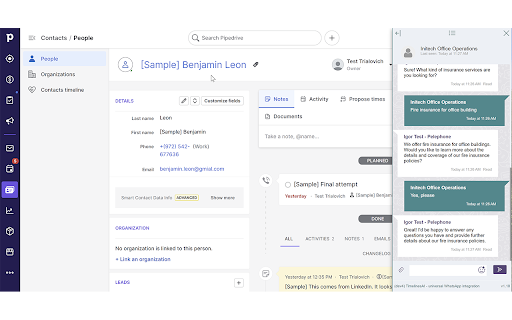

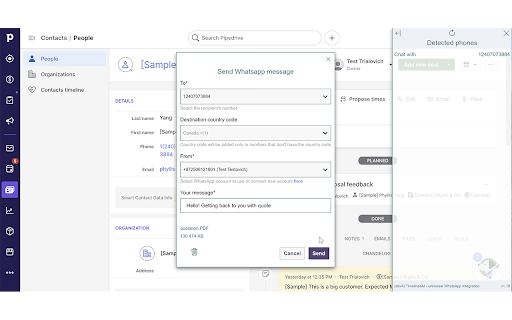
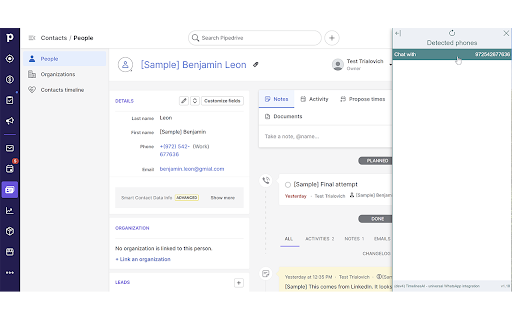
TimelinesAI Chrome Extension allows to start or continue a chat from any CRM or site (TimelinesAI account is required). Our Universal Chrome Extension allows you to instantly start or continue a chat in TimelinesAI from any CRM or web page by selecting a detected phone number. Enjoy embedded conversation right in the context of your work! You can dock, resize and collapse the extension display to adjust it neatly to the interface of your CRM. TimelinesAI account is required to use our Chrome Extension. Install the extension and sign-up for a FREE Trial to start sending messages from your CRM. Setup takes just 2 minutes, no credit card is required! For a limited time, Chrome Extension is available on all plans! Send messages and start new chats from: HubSpot, Pipedrive, Salesforce, Zoho, Monday or any other CRM.

AppCursor - All App Widgets inside CRM, Desk
Ulgebra - AppCursor - Any App Widgets for CRM, Desk. Integrates third-party apps directly inside your CRM platform Access all the authorized apps of Ulgebra in just a click. Visit the Ulgebra App Marketplace, through the link below, to install and authorize the desired applications. Post installation, use the Ulgebra icon available in all locations within your CRM/Desk to sign in and utilize the features of all the authorized extensions as given below. Initiate conversation with any contact through any of the authorized applications. Click on the Ulgebra floating icon, available on the contact page, to view the list of authorized applications and select the application to send the message from. Access the Ulgebra icon from anywhere within your platform to get in touch with all required contacts at any moment. View all authorized apps using the Ulgebra icon. Include the desired contacts using the 'Add Recipients' option. Here you can add the required contact numbers, search of a specific contact or select a CRM/Desk filter to include the contacts pertaining to the filter as recipients. Enable workflows to send automated messages based on your requirements. Select any app, enter the message and click on 'Get Workflow Code'. You can now derive the code required to send automated messages for the given details. Create a workflow using the code received as per the steps given within the Workflows section under your profile. Use existing message templates to send messages as and when required in just a few clicks. Under 'Insert Template' you can view the list of message templates. Click on 'Add New Template' to create a new template. Enter the name and content of the template. Include placeholders and emojis to customize your templates. Allow users to receive desktop notifications for your incoming messages. Under your profile within the application interface, select 'Message Notifications'. Here you can enter the email id of the required user who must have an Ulgebra account and click on 'Add user'. Share the link receive with the respective user. The user must now access the link to enable desktop notifications. Click on the notification received to view the message within the respective contact. Use the 'Manage App Users' option to view the list of CRM/Desk users within the organization. This feature allows the added users to use the account of the respective messaging platform authorized by the admin. The admin can add and remove the desired users. View the incoming messages within the respective contact. Select the incoming settings based on your requirements to sync the incoming messages and create new contacts if required. Access the calendar extension to view the past and upcoming bookings associated. Select any appointment to go through the details of the appointment and reschedule or cancel any upcoming event. View all your booking links and derive single-use links to be shared with contacts to schedule an appointment. Enable users to utilize the authorized account of the scheduling platform using the 'Manage App Users' option. The CRM/Desk admin can add and remove users based on their requirements. Map the respective CRM/Desk users with the respective agent within the calendar to sync their specific incoming appointments. Determine the fields to be mapped for required events which would provide further clarity regarding appointments booked by contacts. Disclaimer: This Chrome plugin is not endorsed by any of the services in this app. This is an unofficial enhancement tool. Our Extension Privacy policy: https://ulgebra.com/privacy-policy

Cooby: Best WhatsApp Extension for Work
Cooby is the world's most powerful WhatsApp experience. Are your business conversations happening on WhatsApp? Cooby can take your customer-facing teams to the next level, especially if you use HubSpot. It integrates WhatsApp with HubSpot seamlessly. Best suited for teams that use individual WhatsApp numbers and HubSpot. That includes, but is not limited to, sales, consulting, real estate, education, automotive, financial services, etc. Teams from SMBs to well-known companies such as Bytedance, WeWork, Aspire, and Spenmo rave about Cooby, the world’s most powerful WhatsApp experience. Hear what they say: 👉cooby.co/testimonial 👈 For managers: Record important WhatsApp conversations to gain visibility into what is being said between your representatives and customers. Use WhatsApp activities to measure members' performance. For members in Sales, Marketing and Customer Support: Save hours per day on administrative CRM work. No more going back and forth between WhatsApp and HubSpot. Make your work simpler, save time and be more productive. Here’s how you will achieve this ⭐: - View and edit your CRM contact right in your WhatsApp - Automatically log WhatsApp messages into HubSpot CRM - Generate Sales activity reports and HubSpot workflows based on WhatsApp activity - Create and update important CRM records -- like notes, tasks, tickets and deals -- right in your WhatsApp. Communicate at scale 📣 Cooby instills a high degree of organization and automation into your team’s WhatsApp. For example, ⭐Communication at Scale: Broadcast to multiple chats at once, send message templates, and import and export a large number of contacts. Start a chat with an unsaved number. You’ll communicate with more customers through automation. ⭐Inbox Productivity: Achieve Inbox Zero with Close/Snooze/Archive chats and Sort chats to Tabs. You can customize your inbox just like Legos and build workflows and message sequences. You’ll never miss a customer message, or feel lost in your messy inbox. Read more about features in the section below. Unlike WA Web Plus for WhatsApp™, WhatsWeb, WAToolkit, Promote Route, Eazybe, and other WhatsApp Chrome extensions, we focus on bringing you 3 pillars of product values: CRM Syncing, Inbox Productivity, and Communication at Scale that include, but are not limited to: ⭐ CRM Syncing 1. WhatsApp CRM syncing: sync conversational data from WhatsApp to HubSpot and more. 2. CRM contact cards: display CRM contact info and edit contact properties right within your WhatsApp. ⭐Inbox Productivity 1. System tabs: pre-built tabs that auto-update according to message’s status, such as: - Unread: messages that have not yet been opened. - Needs Reply: messages that have yet to be responded to. - Groups: chats with more than 2 contacts. - Awaiting Reply: messages that you have yet to receive a response from. 2. Custom tabs: create special tabs that suits your needs. 3. Share live chat: share live WhatsApp conversations with a link. New messages are shared in near real-time. 4. WhatsApp notes: create notes for specific chats. 5. WhatsApp reminders: set a reminder for a particular chat so you’ll never miss following up on a chat. 6. Schedule events: connect to your Google Calendar to schedule events right within WhatsApp. ⭐ Communication at Scale 1. Start a chat with unsaved numbers: send WhatsApp messages to unsaved numbers from the desktop. 2. Contact management: export and import contacts from your WhatsApp with just a few clicks. 3. Broadcasting: send messages to multiple chats at once. No pre-approved templates are needed. No additional surcharges. 4. Message templates: one-click to send pre-written templates. No pre-approval is required. WE DO NOT COLLECT YOUR CHAT DATA. YOUR CHAT DATA WILL NEVER LEAVE YOUR COMPUTER. WE DO NOT COLLECT PERSONAL IDENTIFIABLE INFORMATION EITHER. WE WILL ONLY CONTACT YOU WITH YOUR DIRECT CONSENT This extension is 100% privacy-safe 💯. We DO NOT collect your chat data or personal information. We will NEVER sell your data to any third-party companies in any shape or form. Cooby Inc. is a U.S.-based company that complies with U.S. laws. The permission requested on Google Chrome while installing Cooby might sound scary, but it's far from the real needs of the extension. The permissions are technically required for the following reasons: - Read and change your data on cooby.co and web.whatsapp.com: Required to add tabs to the top of WhatsApp Web. We don't collect any chat or contact data from your WhatsApp. - Read your browsing history: As scary as it sounds, we only need this permission strictly for the One-Click to WhatsApp Web (WAW) feature. We do not collect your browsing history at all. In fact, this is the "tab" permission from the Chrome Developer Guide, which DOES NOT allow us to read your browsing history. It only allows us to know what tabs are open right now. For any concerns or feedback, please feel free to email support@cooby.co. ———————————————————————————————————————— WhatsApp is a trademark of WhatsApp Inc., registered in the U.S. and other countries. Cooby is an independent product developed by Cooby Inc., and has no relationship to WhatsApp, WhatsApp Inc, or Facebook Inc. It is not an official WhatsApp or Facebook product.

Picky Assist
Access WhatsApp, automate, chat, call, and update CRM from any webpage with just a click no more switching tabs No More Switching between Tabs, Access your WhatsApp, Automation, Chat with Customers, Make Calls, Add Data to CRM, Access Mini App from any webpages, all with a just click away. Just select a phone number or email you see in any of the web pages then right click and take any actions you would like to perform… or simply click the Picky Assist icon to start a new conversation or reply to the existing conversations. ✅ Open Conversation from Any Webpages Open WhatsApp Conversation from any webpages or start a new conversation wherever you see a mobile number with the new integration with Picky Assist Teambox (Login Required) ✅ Open Mini App Open Mini app from any webpages for true multi tasking, integration with any 3rd party softwares and access right from any webpage with Picky Assist Mini App Builder (Login Required) YES, just one click to perform a series of actions in the background like Send Business Proposal via WhatsApp, Add Tags, Call, Add to WhatsApp Group, Enrol to WhatsApp Drip Campagin, Add Mobile Number to CRM and 20+ Actions powered by the Picky Assist Connector (Paid Feature) WhatsApp, SMS & Calling needs a country to send message or make calls, but if the number you see is not with the country code then our auto append country code helps you to automatically add the country code as configured by you and the impressive part is that you can add as many as countries codes as per your targeted countries ✅ Save your Time with Templates Save your time by creating frequently used messages as templates and use them with just a click, no more manual data entry needed Deep link to your favourite apps with just one click --------------------------------------------- 🔥 Advantages of Extension --------------------------------------------- One of its kind google chrome extension which offers the great automation capabilities along with deep lining with popular apps ✅ It’s Free to Use ✅ Save 90% of Your Time ✅ 300% Increased Productivity ✅ Works with any Webpages ✅ Multiple App Integration ✅ Easy to Use ✅ No Data Collection ✅ No Signup Needed ✅ Works with Any Web Pages ----------------------------------------------------------------------------------------------- 🚀 Discover New Automation Possibilities with Picky Assist ----------------------------------------------------------------------------------------------- Webpage : https://pickyassist.com/en/whatsapp-google-extension Documentation : https://help.pickyassist.com/setting-up-guide/google-chrome-extensions/chrome-extension-v2 The logo and brand name of other companies are used in this product is only for demonstration purpose and we don't have any association with any of these companies and this tool is independently developed to save your time. All brands logo's are trademark and copyrighted to respective brands and companies

Pipechat for Telegram Web
Connect your CRM to use template messages, manage contacts, deals, and activities. Pipechat is a Chrome extension that adds a CRM sidebar to Telegram Web to connect your Pipedrive or Zoho account. With Pipechat, you can quickly add the most important messages as notes to your deals, add your Telegram contacts to your CRM with one click and create new deals as you chat. You can also schedule your next Telegram chats and use template messages in your conversations. Simply install the extension and open Telegram Web to start using the Pipechat's sidebar.
